A Google Ads experiment splits a campaign's traffic and budget between your current setup and a change, so both run at the same time. Run it for at least four to six weeks, leave the original alone, judge it on the metric you chose up front, decide whether Google may apply the result automatically, and remove it properly when it ends.
You want to know whether switching a campaign to Target CPA, or adding broad match, would do better. The usual way is to make the change and compare the next month with the last. But the next month has different weather, different competitors and a different week for payday, and you'll never know how much of the difference was your change.
Google Ads has a built-in way to do it properly: experiments. They're underused, and when they are used, they're often stopped too early, changed halfway through, or left behind in the account for years.
Here's how to run one you can trust, and how to finish it cleanly.
The short version
- An experiment runs your change alongside the original campaign, splitting traffic and budget between them, so both face the same weeks and the same auctions.
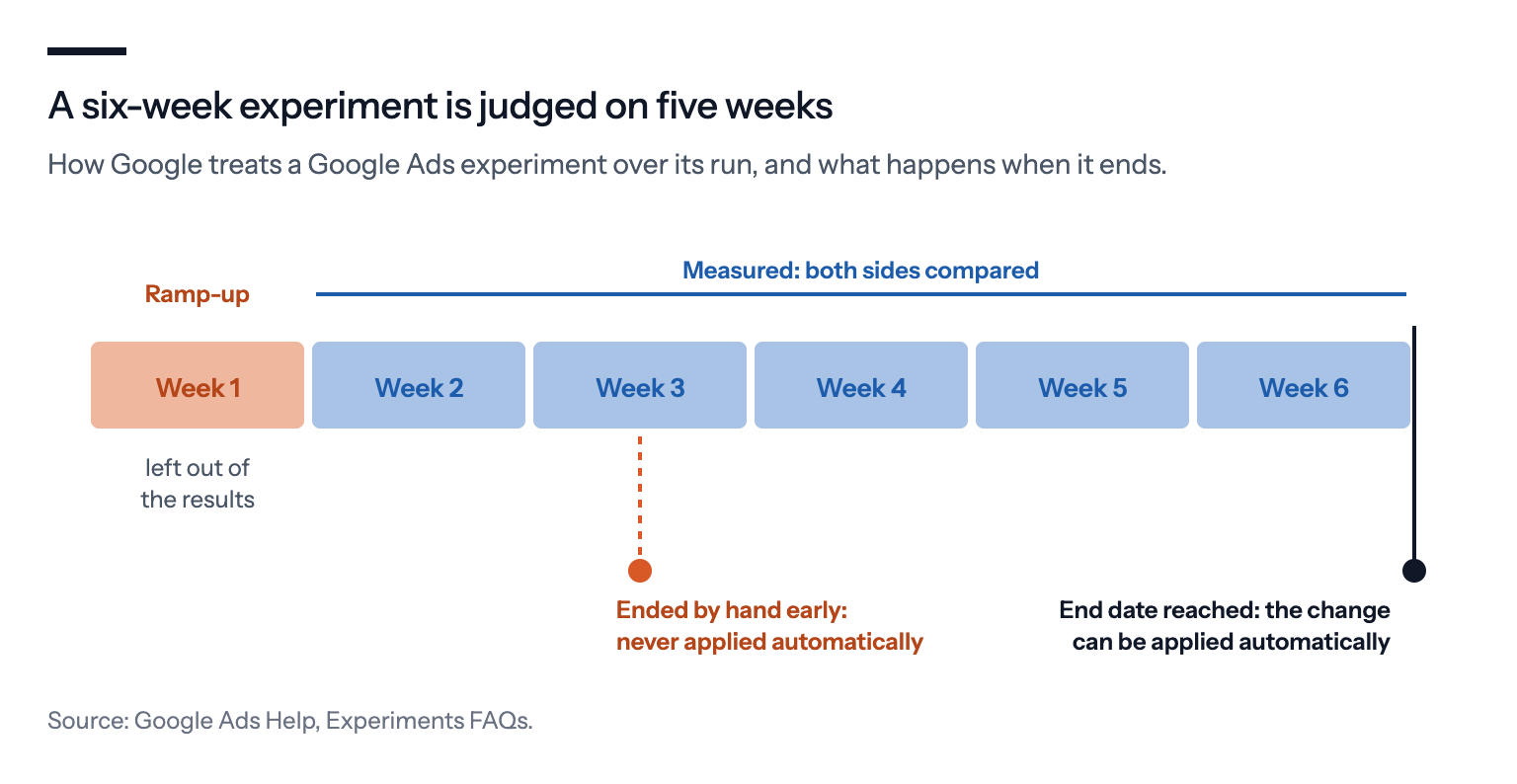
- Google recommends at least four to six weeks, and leaves the first seven days out of the results.
- Changes you make to the original campaign during the test aren't copied to the experiment, and they muddy the comparison.
- Since spring 2026, a winning experiment is applied to your campaign automatically by default, and the default bar is a "directional" result, not statistical significance. Decide before you start whether that's what you want.
- An experiment you end by hand is never applied automatically. Only one that reaches its end date can be.
- When it's over, apply it or remove it. A leftover trial campaign can't have its status, budget or dates changed through Google's API.
What an experiment does
Google's help page on custom experiments describes the mechanics: "The experiment shares your original campaign's traffic (and budget) and lets you test changes to your campaigns." You choose how much of the budget the experiment gets, and for Search campaigns, how people are split.
A search-based split sends each search randomly to one side, so the same person can see both versions. A cookie-based split keeps each person on one side, which is cleaner when the change is something people would notice across visits, such as a landing page.
Custom experiments work for Search, Display, Video and Hotel campaigns, not Shopping or App campaigns. Performance Max has experiments of its own. A few conditions catch people out: in Google's setup steps, only campaigns that use Smart Bidding and have exact or phrase match keywords are offered, a campaign can be in only one experiment at a time, and the split can't be changed once the experiment is set up. The original campaign also has to keep running; if it's paused, the experiment doesn't serve.
The point is timing. Both sides run in the same weeks, so seasonality, competitors and news hit them equally, and the difference between them is mostly your change.
How long to run it
Google is specific in its experiments FAQ, written for Shopping and Performance Max but covering the Experiments page as a whole.
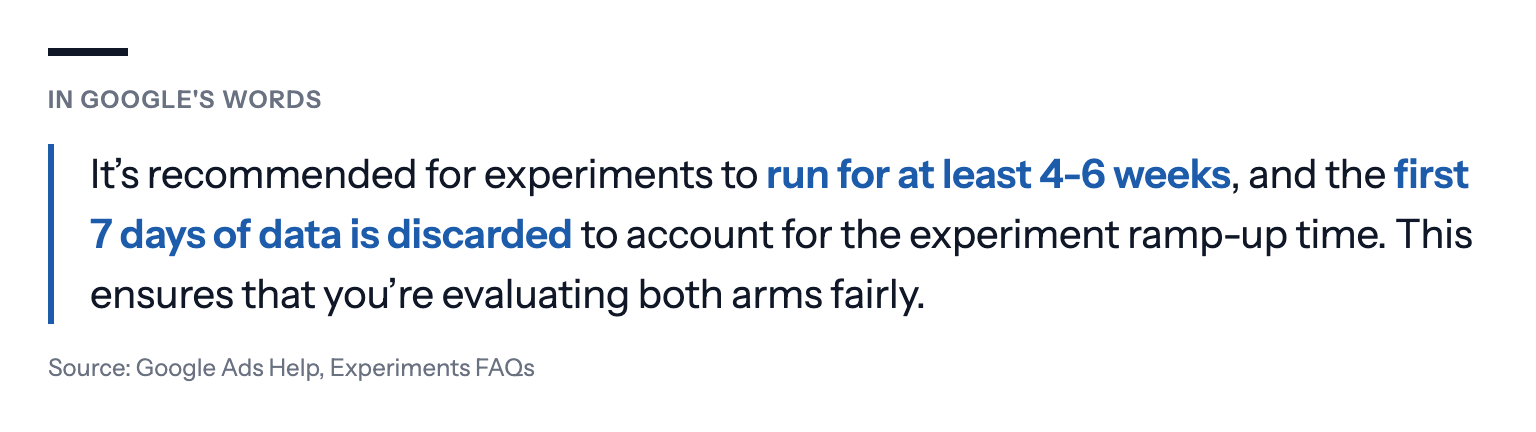
It also recommends waiting "for 1-2 conversion cycles", the time from a click to a sale, and running longer "if you have a long conversion delay". To get a clear answer at all, Google advises picking "campaigns with high volumes".
What spoils a test
Changing the original while it runs. Google's page warns that changes to your original campaign "won't be reflected on your experiment", and that changing either side while it runs "may make it harder to interpret your results". Optmyzr, which sells software for managing Google Ads tests, puts the risk bluntly in a 2021 post: "Google doesn't warn you that this might pollute your experiment." A new negative keyword in the original, and the two sides are no longer comparing one change.
Stopping early. A week in, one side is often ahead by chance. Google's FAQ also notes that an experiment "ended manually" is not applied automatically; only one that runs to the end date you set can be.
Choosing the winner after the fact. Pick the success metric when you set up the experiment, and judge it on that metric. Looking through ten metrics afterwards until one favours the change is how chance results become decisions.
Testing too little volume. With a few conversions a week per side, the difference between them is mostly noise. Google's own advice is to test campaigns with enough volume and to run longer.
What "winning" means to Google
When you set up an experiment, Google asks for a success metric and whether to apply the change automatically if the experiment wins. That auto-apply setting got a lot more important this spring. PPC News Feed reported on 1 April 2026, from a find by Bob Meijer, that experiments now apply their results by default, using "directional results" unless the advertiser asks for statistical significance at 80%, 85% or 95% confidence. A metric that does significantly worse in the test blocks the change.
Google's FAQ spells out what counts as favorable. For a campaign on Maximize conversions or Maximize conversion value without a target, an experiment "will be directly applied if either the conversions or conversion value in your treatment arm are higher than your control arm". Higher, not significantly higher.
Google's own reports are looser than many people expect, too. Its page on monitoring experiments says "80% is the default confidence interval", where most statistics courses would use 95%. At that level, a "winner" is much more likely to be luck than at 95%. A result marked with Google's blue asterisk is statistically significant; one without it isn't, however good the numbers look.
None of this makes auto-apply wrong. For a small change you'd happily make anyway, a directional result may be enough. But for a change that moves a lot of money, such as a new bid strategy, require significance or apply it yourself.
A worked example
Take a fictional online shop with a Search campaign on Maximize conversion value, getting about 120 orders a month. The owner wants to know whether a Target ROAS of 4x would bring more profit.
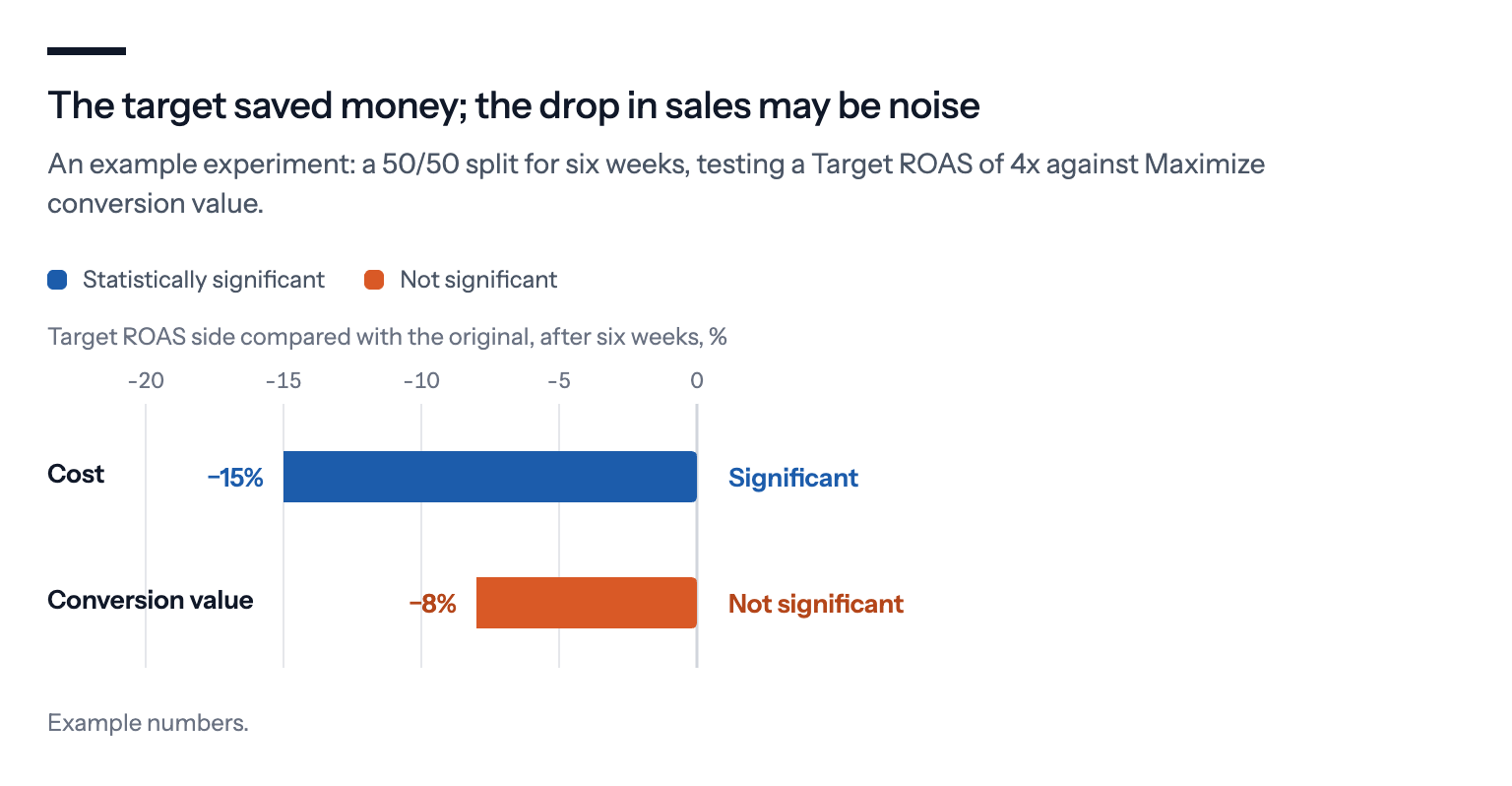
The experiment splits the campaign 50/50 for six weeks, with conversion value as the success metric and auto-apply set to require statistical significance. That gives each side roughly 60 orders a month, or about 70 each over the five weeks Google measures.
After six weeks, the Target ROAS side shows 8% less conversion value at 15% less cost. Google marks the difference in cost as significant, but not the difference in value. That's a real answer: the target saves money, and the drop in sales may be noise. Google won't apply it automatically: the value difference isn't significant, and under its rules a Target ROAS experiment is applied only if conversion value is higher and return on ad spend is higher. Whether it's better depends on margin, which is the owner's call, not Google's.
Had the owner instead compared October with September, a 10% drop in sales could have been the change, the season or both.
Cleaning up afterwards
An experiment doesn't just disappear when it ends. You can apply it, which copies its changes into the original campaign; convert it into a campaign of its own; or remove it.
If it's left alone, its trial campaign can stay in the account for years, showing up in reports and campaign lists. And it can't be handled like a normal campaign. Google's Ads API lists an error for exactly that: "Cannot modify dates, budget or status of a trial campaign." Any tool that tries to pause one through the API gets refused. The way out is the Experiments page in Google Ads, where a custom experiment can be removed.
Where experiments fall short
They split your traffic. Half the budget on a worse version costs real money while you learn. A smaller share for the experiment is safer, but takes longer to give an answer.
Significance isn't the whole answer. A significant difference in cost per conversion says the two versions differ, not that the difference matters for your business. And a test that isn't significant hasn't proved the versions are the same.
Not everything can be tested this way. Shopping campaigns can't run custom experiments, and some changes, such as a new website, affect both sides at once.
Seasonality still matters at the edges. Both sides face the same weeks, but a change tested in a quiet month may behave differently at Christmas.
What we'd do
Write down the question first. One change, one success metric, and how big a difference would make you act.
Decide on auto-apply before you start. Leave it on for small changes. For a bid strategy or anything else that moves a lot of money, require statistical significance, or switch it off and decide yourself.
Pick a campaign with volume. Ideally dozens of conversions a month on each side. Below that, run longer or test something bigger.
Run it at least four to six weeks, and leave both sides alone. No new keywords, negatives or budgets in the original while it runs.
Let it reach its end date. An experiment ended by hand isn't applied automatically, so end early only if the test is clearly harming the account.
Finish it properly. Apply, convert or remove it in the Experiments page, so no trial campaign is left behind.
If you use Bavian, it doesn't set up Google Ads experiments; it follows each keyword or ad group it adds with a measurement of how it does, and takes back broad match it added where it does clearly worse than exact and phrase. Old trial campaigns from earlier experiments are best removed on Google Ads' Experiments page, since Google's API doesn't let any tool pause them directly.