
Since January, Search, Shopping and Performance Max campaigns can run on one budget for a fixed period instead of a daily budget. It's the most useful new setting for a sale, but it only works on new campaigns, and a few rules decide whether it helps.
If you've planned a Black Friday campaign in Google Ads before, you've probably done the sum by hand. You take the money you're willing to spend on the sale, divide it by the number of days, and set that as the daily budget.
There's now a better way to do it.
A total campaign budget lets you give Google one amount for a fixed period. Google spreads the spending across the days, and the campaign stops when the period ends.
It comes with rules, though, and some of them matter a lot for a short sale. Here's how total budgets work, how they fit with Google's other settings, and how we'd use one this year.
What a total budget is
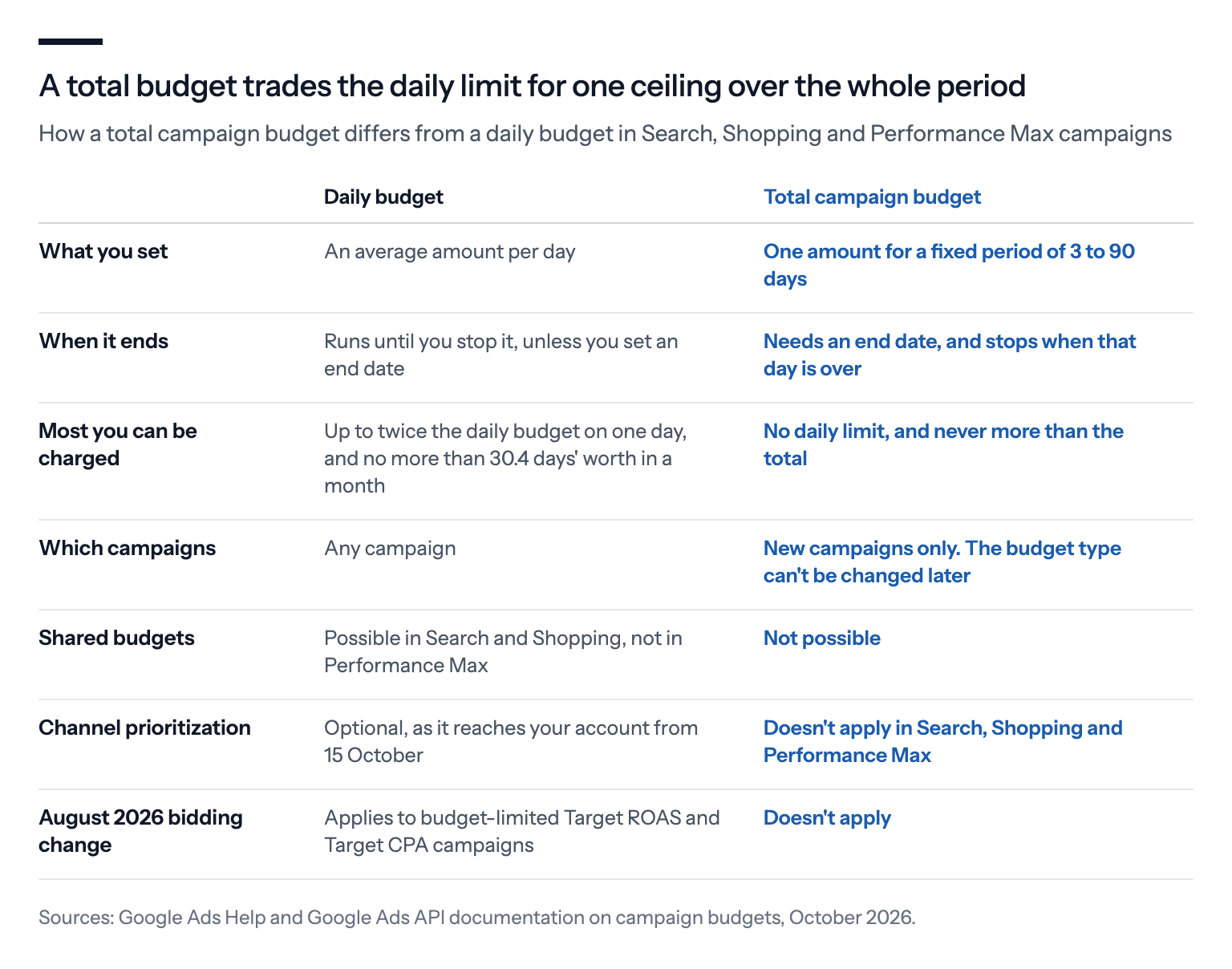
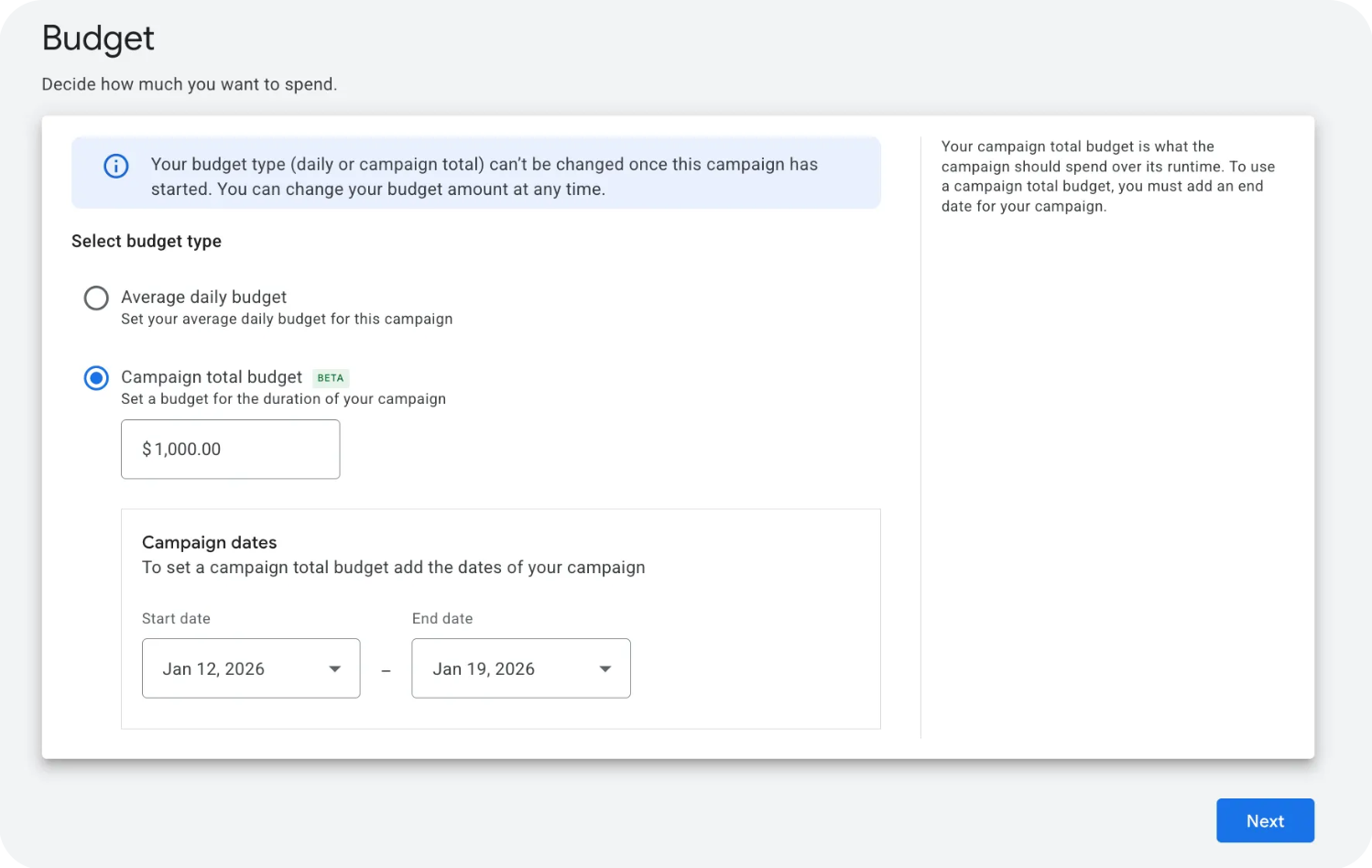
With a normal daily budget, Google aims for an average spend per day, and the campaign runs until you stop it unless you give it an end date. A total budget works the other way round. You set a start date, an end date and one amount for the whole period, and Google plans the spending inside that window.
The period can run from three to 90 days, which a Black Friday sale fits easily.
Google will never charge you more than the total. In return, there's no daily limit, so on any given day the campaign can spend whatever the plan calls for.
Until January, total budgets were mainly a Demand Gen and YouTube feature. Google tested them in Search, Shopping and Performance Max, its all-channel campaign type, in the autumn of 2025 and opened them to every account in an open beta on 15 January. By May, Google described them as launched for all Search, Shopping and Performance Max campaigns.
It saves work, too. According to Google, advertisers using total budgets made 66% fewer manual budget changes on average than with daily budgets.
How Google spends the money
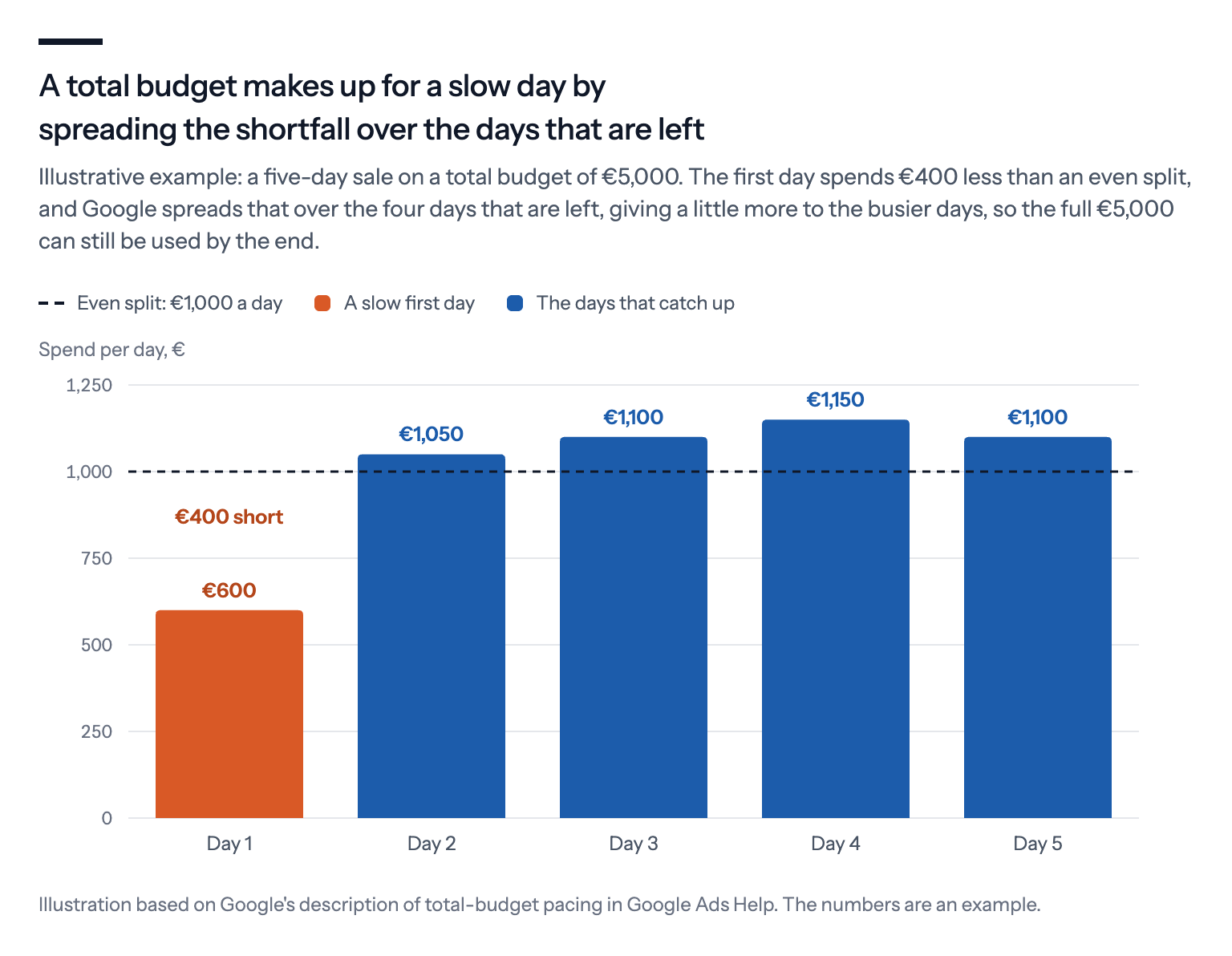
Google aims to use the full total by the end date. It spreads the spending roughly evenly across the period, while giving more to the days when more people search.
Google doesn't force a rush at the start or a dash at the end. Its Ads Liaison, Ginny Marvin, has said the pacing has "no forced 'burst' spending at the start or end of the campaign".
When a day spends less than planned, the shortfall isn't lost.
Google takes it into account and spreads it over the days that are left. Because there's no daily cap, a later day can even spend more than twice what an even split would have given it, if the first days fell well short. It works the other way too, so a busy Black Friday leaves less for the days after it.
The main exception to "the money gets spent" is your target.
If the campaign bids for a Target ROAS, the return on ad spend you ask Google's bidding to aim for, the bidding still sticks to that target. When there aren't enough sales to be had at that return, part of the total stays unspent, and Google's help page says a total budget doesn't change that.
Too little demand has the same effect. A sale campaign with only a few products can simply run out of searches, which is why Google advises putting all your sale-priced products into a Shopping sale campaign.
So a total budget is a ceiling, not a promise to spend.
The campaign runs through its end date and stops when that day is over, at 23:59 in your Google Ads account's time zone. So a Cyber Monday campaign should have 30 November as its end date. If your customers live in a different time zone from the account's, it will stop earlier or later for them.
Why it only works on new campaigns
This is the rule most likely to catch you out. You can't switch an existing campaign from a daily budget to a total budget, or back again, because Google fixes the budget type when the campaign is created.
Google hasn't said why, and its help page says only that existing campaigns can't switch for now. Our guess is that a total budget belongs to a fixed period, while most existing campaigns run with no end date at all.
So if your best campaign is an existing one, you have three options.
Keep it on its daily budget. Raise the daily budget for the sale days instead. If the campaign only runs on the sale days through an ad schedule, the setting that switches ads off on chosen days, remember that Google now aims to spend up to twice the daily budget on each day it runs.
Copy it into a sale campaign on a total budget. Google's help only says copying works for campaigns that already use a total budget, so check that the copy lets you choose a total budget before you plan around it. Give the copy the sale dates and pause the original while the sale runs, so the two don't compete for the same searches. Switch the original back on when the sale ends.
Build a dedicated sale campaign. Put every sale product in it and nothing else, then exclude those products from your always-on campaigns while the sale runs.
Starting a new campaign costs less than it sounds. Google says a campaign on a total budget won't need a new learning period if it uses your account's conversion goals.
Sarah Stemen, a Google Ads consultant, warns that a sale campaign on a total budget can end up competing with your always-on campaigns for the same people. She also expects the always-on campaigns to need time to relearn afterwards. It's her reading rather than measured data, but Google's own help also tells you to cut the overlap between a sale campaign and your existing ones, so keep the two clearly apart.
What you can change once it's running
Once the campaign has started, two things are fixed: the budget type and the start date.
The total can go up or down, and the end date can be extended, as long as the whole period stays within 90 days. Each time, Google recalculates how to spend what's left over the remaining days.
But Google warns that "changing the end date or increasing the budget can lead to uneven spend". Its advice is to keep changes to a minimum once the campaign has started.
For a sale that lasts a few days, that means deciding the amount and the dates before it begins.
How it fits with Google's other settings
A total budget doesn't mix with every setting, and a couple of Google's newer ones treat it differently.
No shared budgets. A total budget belongs to one campaign and can't be shared with others.
No channel caps. Channel prioritization is Google's new control for limiting how much goes to Search partners, the other sites that show Google's search ads, and to the Display Network of websites and apps. It doesn't apply to Search, Shopping or Performance Max campaigns on a total budget, so for a sale campaign you'll have to choose one or the other.
Exempt from the August bidding change. Since August, campaigns that are limited by their daily budget and bid for a Target ROAS or a Target CPA, a target cost per sale or lead, aim at their target instead of beating it. Campaigns on a total budget keep working as before: they aim to use the whole amount by the end date, unless the target holds them back. We covered the August change in our Black Friday guide.
Promotion mode works with it. Promotion mode, a beta for Search and Performance Max campaigns on Target ROAS, lets a campaign run with a looser target for 3 to 14 days. That looser target can be combined with a total budget, and you request the beta through your Google account team, if you have one.
How we'd use it for Black Friday
Put together, this is how we'd set up a total budget for a Black Friday sale.
Decide the amount first. The total is what you're willing to spend over the whole sale, in your account's currency. Because Google catches up after slow days, a quiet start doesn't mean the money will go unspent.
Pick the window. The four days from Black Friday to Cyber Monday are the obvious choice. Nikki Kuhlman of JumpFly suggests treating 26 November to 7 December as one 12-day deal window, and a total budget handles that just as well.
Check the account's time zone before you pick the end date, so the campaign doesn't stop early or run late for your customers.
Set your target from your margin before the sale. A strict target can leave part of the total unspent, so decide which return you can actually live with.
Choose between a total budget and channel caps, if channel prioritization has reached your account.
Leave it alone once it's running. Check how much has been spent by setting the date range to the sale period and comparing the campaign's cost with the total you set, and only step in if something is clearly wrong.
A total budget won't make a sale more profitable on its own.
What it does is take the daily arithmetic off your plate. The decisions that matter get made before the rush instead of during it: the amount, the dates and the target.