Google's AI is excellent at bidding in Google's auctions, but it works inside Google's business and knows your business only through what you tell it. An independent AI ad manager decides what Google is told, guards your budget and chooses which of Google's defaults to accept.
Google Ads is already full of AI. Smart Bidding sets a bid in every auction, Performance Max decides where your ads appear, and Google's own assistant can now change your campaigns once you approve.
So it's a fair question why anyone would put another AI on top.
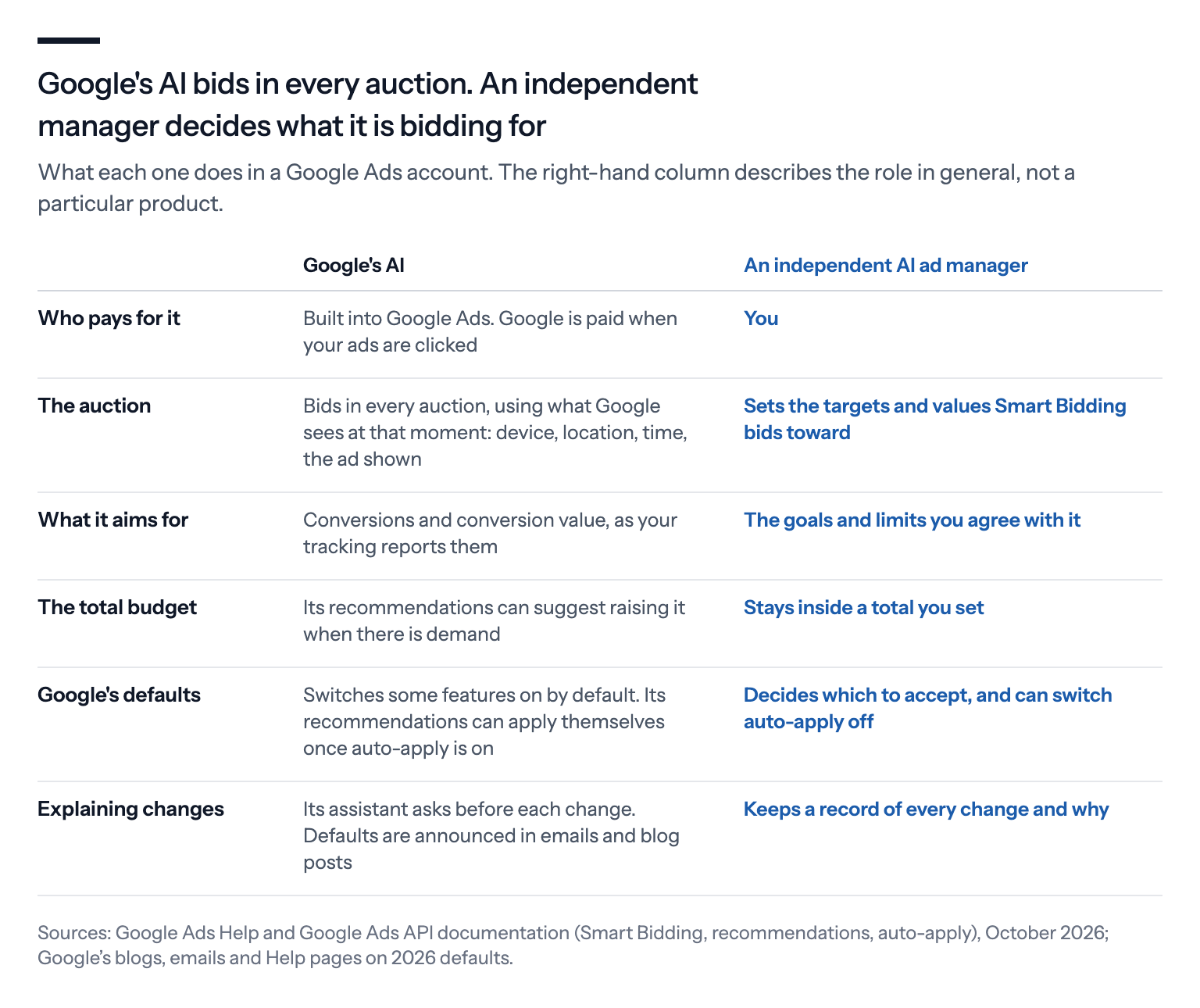
The answer is that the two do different jobs, for different people. Google's AI is built to bid well in Google's auctions, toward whatever goal it's given. An independent AI ad manager works for the advertiser, and its job starts before the auction: what the account is for, and what it's allowed to spend.
Here's how they differ, where each one is strong, and what to ask before you hand your account to either.
What Google's AI does well
Start with what Google's AI is genuinely good at, because it's a lot.
Smart Bidding is the core of it. Instead of using a fixed bid, it sets a new one for every auction, based on what Google sees at that moment: the searcher's device, location and time of day, their browser, whether they're on one of your lists of past visitors or customers, and which ad would show.
Google runs billions of these auctions every day, and no outside tool can bid in them the way Smart Bidding can.
Around it sit the campaign types that hand Google more of the decisions. Performance Max runs one campaign across Search, YouTube, Display, Discover, Gmail and Maps, and mixes your images and texts to fit each place.
AI Max for Search goes further on Search. It lets Google show your ads on searches beyond your keywords, write extra headlines and descriptions, and pick the landing page.
Then there are recommendations. Google suggests changes to your bids, keywords and ads, scores your account on how far you've worked through them, and can apply some of them by itself if you let it.
And since this year, Google's assistant, Ask Advisor, still in beta, can make changes for you, such as pausing a campaign or changing a daily budget. It asks before each one.
All of this is useful. But all of it depends on what you give it: your goals, your settings and the numbers your tracking reports.
What Google's AI can't see
Smart Bidding optimizes toward conversions and their value, the sales or leads your tracking counts and what it says they're worth.
It doesn't know your margins, which products are about to run out, which orders will come back, or what a new customer is worth over the next two years. Sales that happen over the phone or in a shop are invisible too.
Google does offer ways to feed some of this in. You can raise or lower the value of a conversion with value rules, take back the value of a returned order, add cost-of-goods data to your product feed, give new customers a higher value, import offline sales and upload your own customer lists.
Every one of those needs your numbers, and someone has to keep them current.
Measuring what ads actually return is hard, even for Google. The court in the US antitrust case found it "challenging for advertisers to calculate ROI", and quoted an internal Google document from 2017: "There is no good sense, both within Google and outside, for what the true ROI of advertising channels are."
Google told the court that measurement has improved a lot since, partly thanks to AI.
Independent research shows how far measurements can be off. In large experiments at eBay, economists Tom Blake, Chris Nosko and Steven Tadelis found that the real returns from paid search were a fraction of what the usual measurements suggested.
That was one well-known brand, more than a decade ago, so it doesn't mean your ads don't work. It does mean that returns measured without a controlled test, including the conversions an ad platform reports, deserve testing.
Google's AI works inside Google's business
Google earns money when people click on ads. That doesn't make its AI bad, but it's worth keeping in mind when you look at the defaults it sets, the suggestions it makes and the score it gives your account.
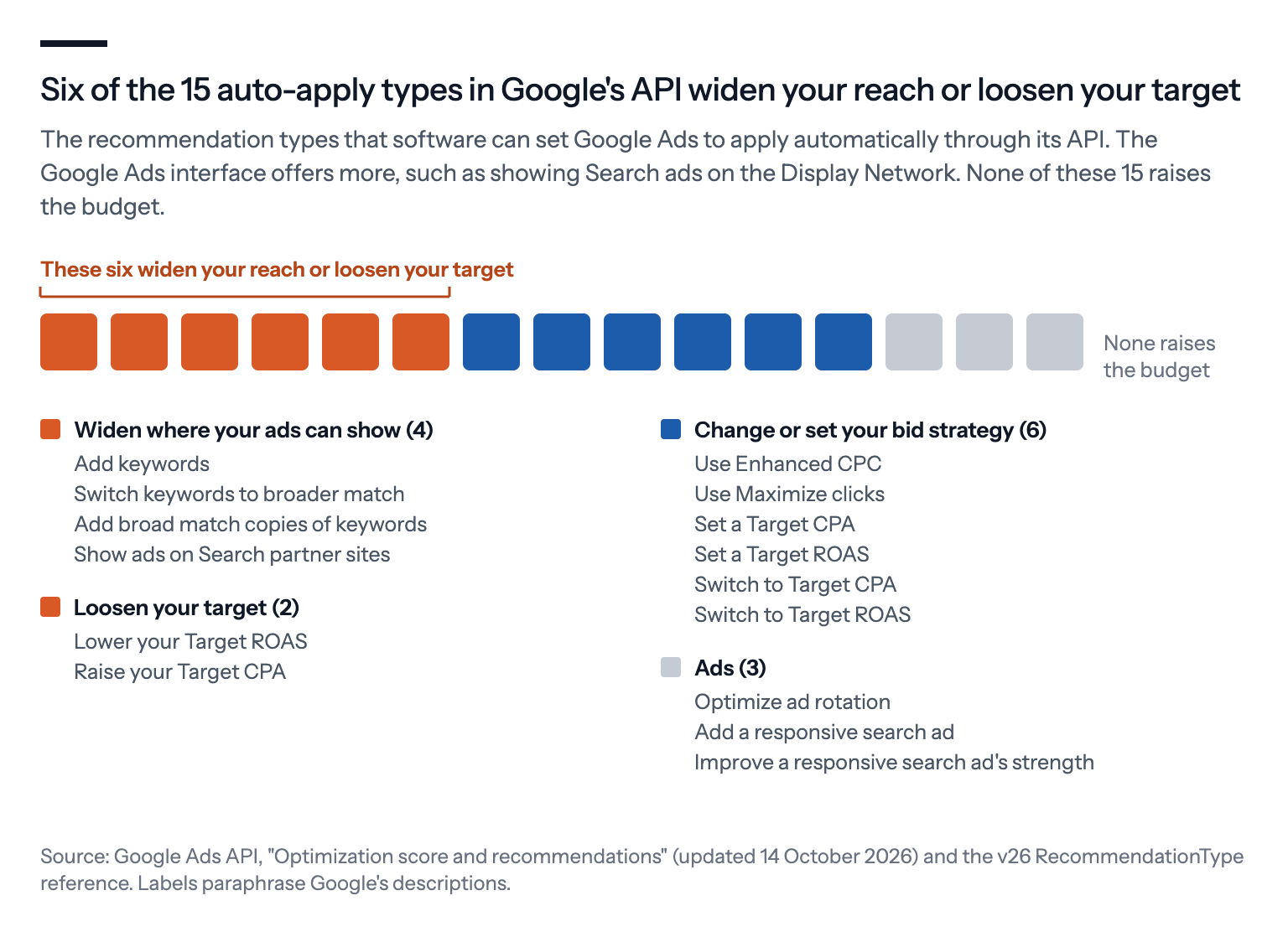
Take recommendations that apply themselves. Google's developer documentation lists 15 types that can be set to apply automatically. Six of them widen where your ads can show or loosen your target: adding keywords, switching keywords to a broader match type, which lets Google match looser searches, adding broad match copies of keywords, showing ads on other sites that carry Google's search ads, lowering the return on ad spend you ask for and raising the cost per sale you accept.
None of them raises your budget, which Google itself points out, and you can switch auto-apply off type by type. The Google Ads interface offers more types than the API lists, including one that shows your Search ads on the Display Network.
The optimization score works in the same spirit. Google describes it as "an estimate of how well your Google Ads account is set to perform", so it measures your setup against Google's suggestions, not your results.
Agencies need a score of at least 70% to keep their Google Partner badge, and Partners get Google Ads credits to boost new clients' budgets. To be fair, dismissing a recommendation raises the score too, so an agency can keep its badge without applying advice it disagrees with.
Then there are defaults. This year alone, Google switched on local inventory ads, which tell shoppers a product is in stock in a nearby shop, in every Standard Shopping campaign on 31 August. It moved many Search campaigns into AI Max in September, and from 12 October it started adding promotions from advertisers' websites to eligible ads unless they opt out.
The most serious finding is about prices, not about Google's AI.
In August 2024, a US federal court ruled that Google "has exercised its monopoly power by charging supracompetitive prices for general search text ads", meaning prices above what real competition would allow. It found that Google used "pricing knobs" to raise prices, "often between 5% and 15% at a time".
Google's own studies found that most advertisers put the higher prices down to themselves, competition or the season, "not Google".
Google argued that its ads had also got better, because more people click them. The court allowed that more clicks might mean better results, but called the evidence that quality had kept pace with prices weak.
The ruling has limits, and they're worth stating plainly. It covers US search text ads, not Shopping ads. Its evidence on pricing comes from roughly 2017 to 2020, its findings on pricing don't touch Smart Bidding, and Google is appealing the court's decision.
None of this means Google's AI is working against you.
It means someone has to judge which of its suggestions serve your business, and that judgment is hard to hand to the party that earns from the answer.
What an independent AI ad manager does
An independent AI ad manager doesn't replace Google's AI. It steers it.
Smart Bidding still sets the bid in each auction. The independent manager decides what Google is told, meaning the targets, values, budget and structure, and it checks what comes back. In practice, that covers six jobs.
It starts from your goals. Smart Bidding aims at the targets you give it, and Google's own Ads Liaison, Ginny Marvin, has said advertisers should set targets that "actually mean something to their business". An independent manager sets them from what the business needs, not from what's easiest to hit.
It owns the total budget. Google's tools lean toward spending more. Its holiday guide this year told retailers to "capture demand, don't cap it", and several of its budget recommendations exist to raise a budget. An independent manager decides how much to spend and where, inside a total you've agreed to.
It says no to defaults. The opt-outs exist, but they're scattered. Automated promotions are switched off account by account, local inventory ads only through inventory filters, AI Max campaign by campaign or feature by feature, and auto-apply one type at a time. Someone has to know where each one lives and decide.
It checks the work. In the fall of 2020, Google cut back its search terms report, the list of what people searched when your ad showed. It cited privacy, a reason the court later called suspect. JPMorgan Chase's chief media officer testified that the share of its keywords it could no longer see rose from about 5% to 20%. Checking the search terms that do show up, and the ad text Google writes, is ongoing work.
It watches for changes. In accounts run with automation tools, machines now make most of the changes. A study of 578 million changes in 72,358 accounts that use a PPC automation tool, from February to July 2026, found that only 10.8% were made by hand, and most of the rest came from feed and automation software. Google's own defaults and migrations come on top of that.
It explains every change. When prices rose, Google's own studies found that most advertisers blamed themselves, competition or the season. A record of what changed in the account, when and why, at least shows which moves were yours and which weren't.
What an independent manager can't do
Independence has limits, and it's worth being clear about them.
An independent manager can't see the signals Google uses in each auction, and it can't bid in real time the way Smart Bidding does. It also relies on the same conversion data.
If your tracking is wrong, both AIs are wrong in the same direction.
Google is also improving its own tools. Its assistant asks before each change, and a new report for AI Max campaigns, still in testing, shows which search terms led to which ad and landing page.
So the split that works is simple. Google's AI bids, and the independent manager decides what it's bidding for.
How Bavian does it
Bavian is an independent AI ad manager for Google Ads. Here's concretely what it does today.
Bavian acts rather than recommends.
It runs your campaigns in your own Google Ads account, launches what's missing and takes over what already runs. You can see every change it makes, and why, in one feed, and many changes can be undone if you ask.
When Bavian takes over an account, it switches off Google's automatically applied recommendations, and a nightly check switches them off again if they come back on. Some newer kinds can't be switched off by Bavian yet, and it tells you which, so you can do it yourself.
If Google's auto-apply still undoes a recent change of Bavian's, a daily check can put it back and switch auto-apply off again. If it keeps getting undone, Bavian stops after two tries and tells you, rather than fight it.
Auto-apply aside, the changes you make yourself, in Bavian or directly in Google Ads, count as your decision. That covers budgets, switching campaigns on or off, bidding, targeting, keywords and ads. Bavian won't reverse such a decision because it disagrees, only when something new comes up that your decision didn't account for, and then it has to say what that is.
Bavian never sets your budgets above the daily total you agreed to, never raises that total on its own, and checks every two hours that the limit holds. The total only goes up when you, or someone working in your Google Ads, raise a budget or switch on a campaign.
Google's own pacing can still spend up to twice a campaign's daily budget on a single day, as it does in every account, though over a month it charges no more than about 30.4 days' worth. The total you agreed to is the line Bavian keeps to.
And Bavian uses Google's bidding rather than fighting it. The Search campaigns Bavian builds start by bidding for clicks. Once one has shown that it converts, Bavian moves it to bidding for conversions, so Smart Bidding does what it's good at, inside limits you control.
In the EEA, Switzerland and the UK, Bavian can also be your comparison shopping service, so your whole Shopping bid goes into the auction. It's part of the regular subscription.
We built Bavian to work for the advertiser's money rather than for spend. Everything above follows from that.
Questions to ask any AI ad manager
Whether you choose Bavian or something else, these questions separate a manager that works for you from one that doesn't.
- Does it run in your own Google Ads account, so the data and history stay yours?
- What is it optimizing for: your business goals, or clicks and conversions as Google counts them?
- Can it spend more than you set, and who has to say yes before the total goes up?
- What does it do with Google's defaults and automatically applied recommendations?
- Does it tell you what it changed and why, and can you undo it?
- How is it paid? A fee that grows with your ad spend gives it a reason to raise your spend.
Google's AI will keep getting better at the auction. What it can't do is decide, on your behalf, what winning is worth.