In the EEA, the company that places your Shopping ads decides how much of each bid reaches the auction. Here's what a comparison shopping service is, how an EU antitrust case led Google to offer the choice, and how switching works.
If you sell online in Europe and run Shopping ads, look closely at one of them in Google's search results. Under the product, a small "By …" link names the company that placed the ad.
That company is your comparison shopping service, or CSS. In 21 countries, Denmark among them, every Shopping ad has one.
If you never chose a CSS, your ads run through the default, which is Google's own: Google Shopping. And in the European Economic Area, the EEA, that default keeps part of every bid before the auction even starts.
The short version
- In 21 European countries, Shopping ads can only be placed through a CSS. If you never picked one, yours is Google Shopping.
- In the EEA, Google Shopping deducts a fixed percentage margin from every bid before the auction. Google doesn't publish it, but industry estimates put it at around 16–20%.
- The setup is Google's answer to a 2017 EU decision that fined it €2.42 billion for favoring its own shopping service. The EU courts upheld the decision.
- Switching happens in Merchant Center. Your Google Ads account, campaigns and history stay as they are.
What a CSS is
In 21 countries, including Denmark, Norway, Sweden, Germany, Switzerland and the UK, Shopping ads on Google can only be placed through a Comparison Shopping Service. Shopping ads are the product ads with a picture and a price that show up in Google's search results.
A CSS is a company that places those ads on Google on behalf of shops. Google runs one itself, Google Shopping, and that's the one your Merchant Center account uses unless you choose another. According to Google, its own CSS bids like any other.
The difference lies in what happens to your bid.
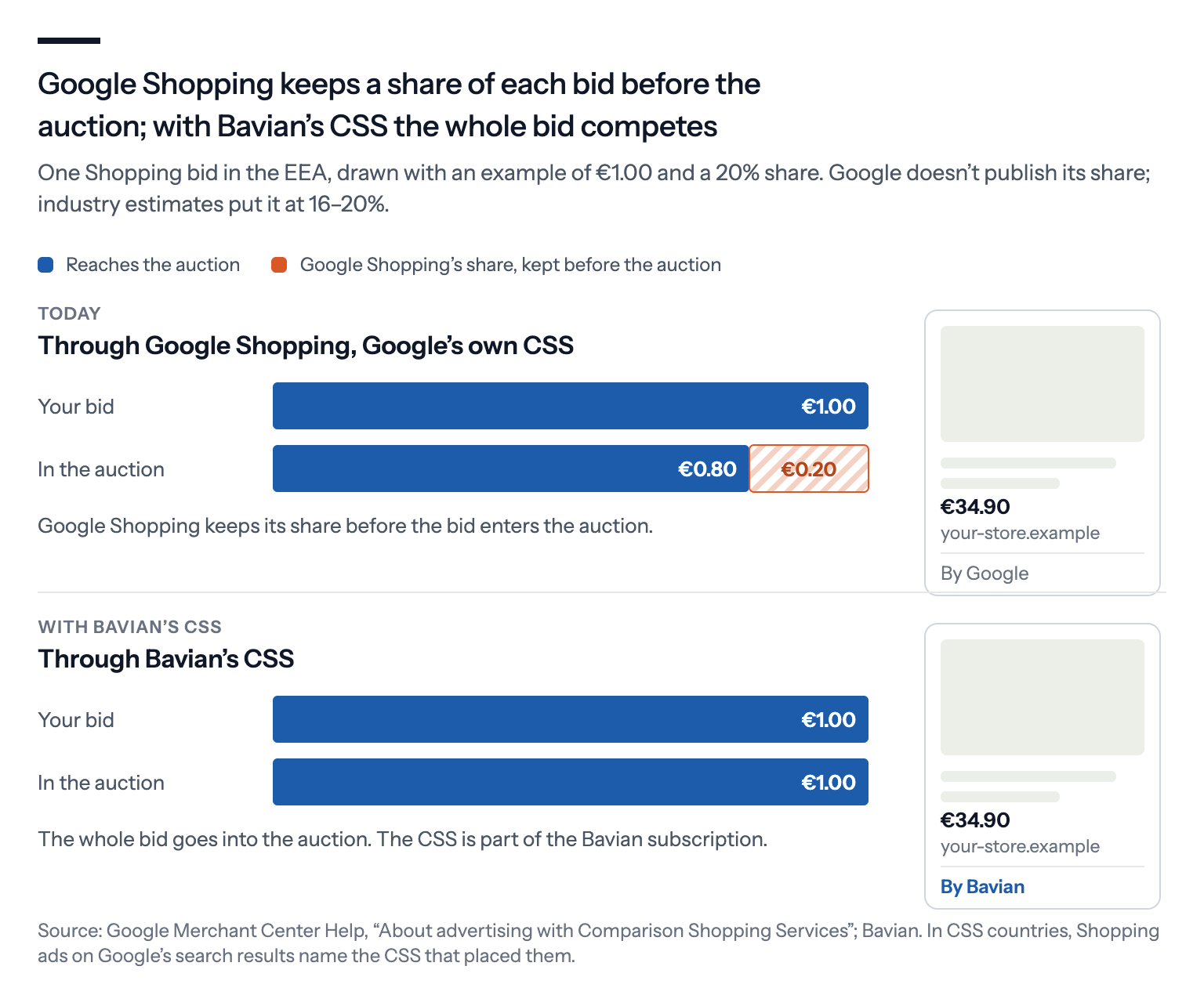
Google says Google Shopping must be independently profitable in the EEA. So before your bid enters the auction, Google Shopping deducts what Google calls "a fixed percentage margin" from it.
Google doesn't publish the percentage. But through a CSS that takes no margin, your whole bid competes in the auction.
Why it exists: Google's answer to an EU antitrust decision
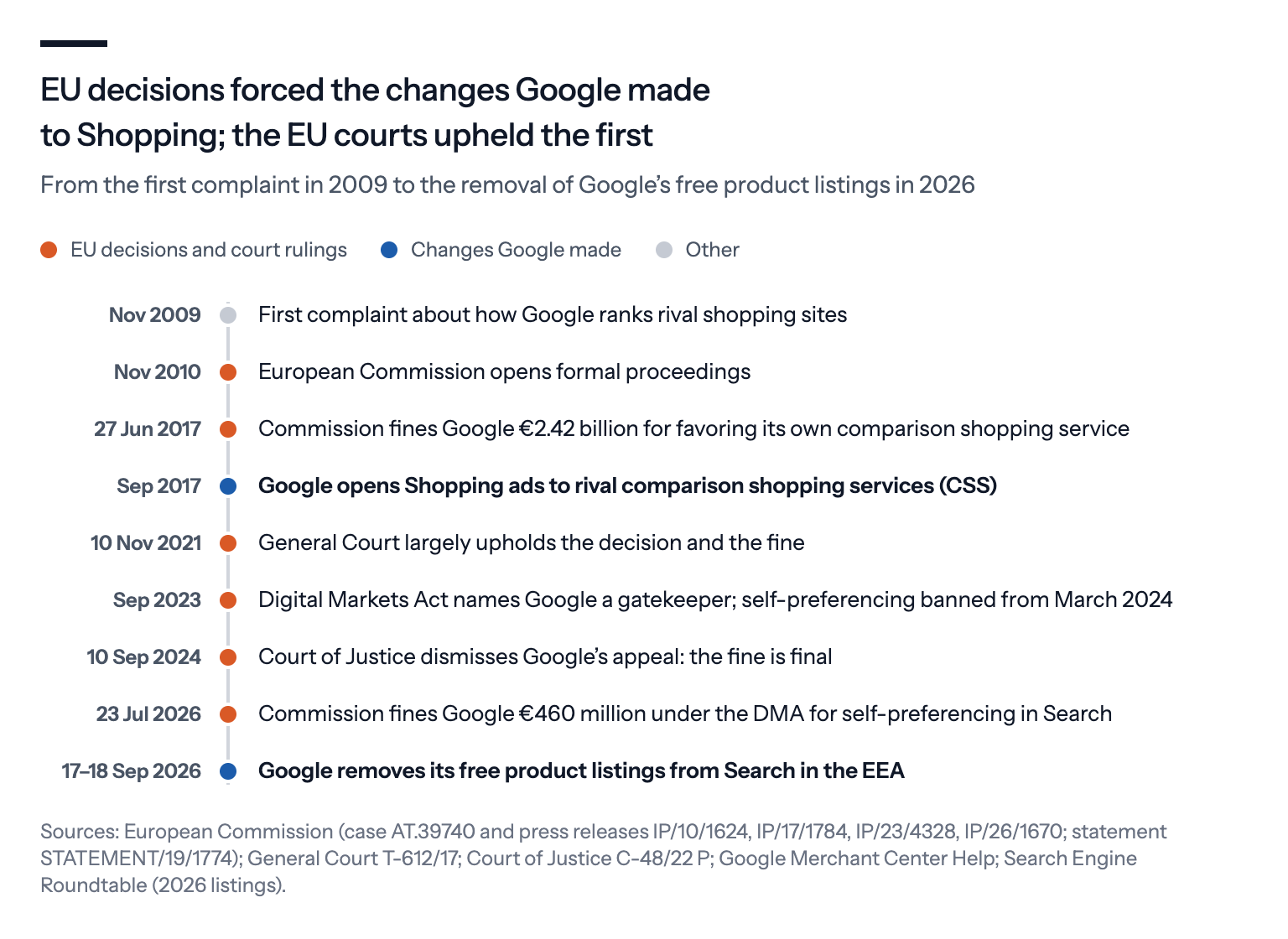
The CSS model grew out of an EU competition case that took almost 15 years, from the first complaint in 2009 to the final ruling in 2024.
The first complaint came from a British price-comparison site in November 2009, and the European Commission opened formal proceedings a year later. On 27 June 2017, the Commission fined Google €2.42 billion.
It found that Google had abused its dominance in search. Google had placed its own comparison shopping service prominently in its results while pushing rival comparison sites down, so far down that even the best-ranked rival appeared, on average, only on page four.
The decision covered 13 European countries, Denmark among them, and gave Google 90 days to treat rivals equally.
Google's answer came in September 2017. It opened the Shopping ads box, until then reserved for its own service, to rival comparison shopping services. Since then, any qualifying CSS can bid there with merchants' products, and Google says its own service bids like any other.
The EU courts upheld the 2017 decision. The General Court did so in November 2021, and the Court of Justice followed in September 2024, which made the fine final.
That wasn't the end of it.
Since March 2024, the Digital Markets Act, the EU law that sets rules for the largest platforms, has banned gatekeepers like Google from ranking their own services above similar ones from rivals.
On 23 July 2026, the Commission fined Google €460 million for self-preferencing in Search. In its decision, it found that Google's Shopping ads box and its free product box still worked as Google's own comparison shopping services, ranked above rival CSSs.
In September, Google removed its own free product listings from Search in the EEA and introduced new result boxes for comparison sites and for stores that sell directly. As of mid-October, the Commission was still assessing those changes, Reuters reported.
How it works in practice
Switching CSS is less dramatic than it sounds. It doesn't change your feed or your Google Ads account, and your ads still lead straight to your own product pages.
The link lives in Merchant Center, the Google tool that holds your product feed. The new CSS sends a request, and an admin on your Merchant Center account approves it there.
Your Google Ads account doesn't need to be switched, so your campaigns, bidding, budgets and history stay where they are.
A Merchant Center account works with one CSS at a time. After you approve the move, it takes effect after a grace period of up to 14 days, which the CSS you're leaving can shorten or waive.
If the same Merchant Center account also advertises in countries outside the CSS program, check that the new CSS covers them too. Otherwise, those ads stop serving.
The switch covers Standard Shopping and the product ads in Performance Max, Google's campaign type that runs across all its channels from one budget. Performance Max can be used with any CSS you work with, and Search text ads aren't affected at all.
One thing is worth checking. Performance Max product ads reach places beyond the search results, such as YouTube or the Shopping tab, only if your CSS has opted in to them.
So what do you actually get?
It isn't a discount on your invoice. It's more weight per euro in the auction: if Google Shopping kept 20%, the same bid would count 25% more through a CSS that keeps nothing. Seen the other way, the same clicks would cost less.
If your campaigns spend their full budget, that edge shows up in what the budget buys rather than in a smaller bill. There's no line in Google Ads that shows the difference.
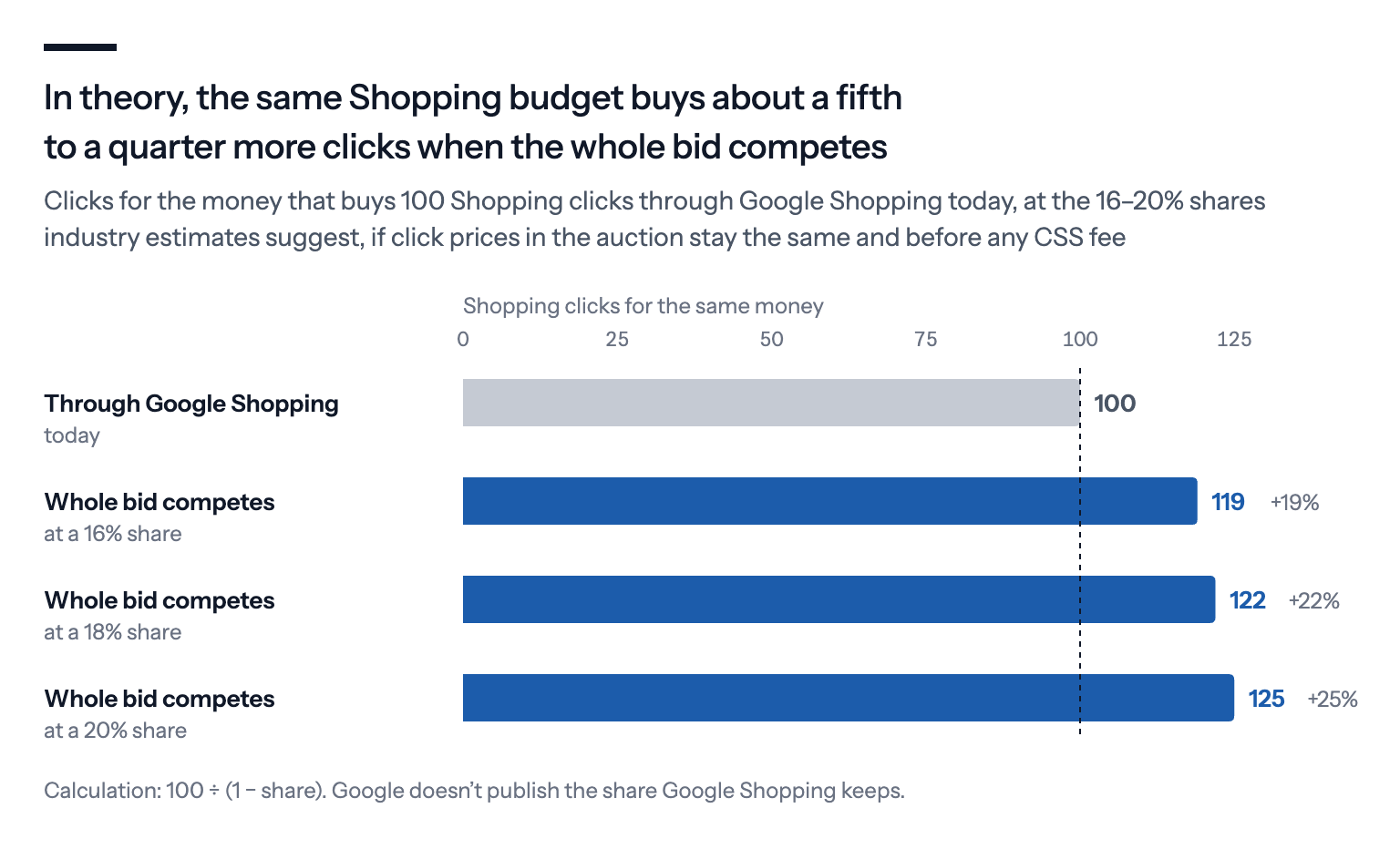
In practice, expect less than the arithmetic. It assumes auction prices stay the same, but they may rise as more of your competitors switch. And many CSSs charge for their service, as a fee, a share of spend or a mark-up per click.
Rival CSSs are a big part of Shopping ads
Google's own figures, published in October 2025, show how far the model has spread.
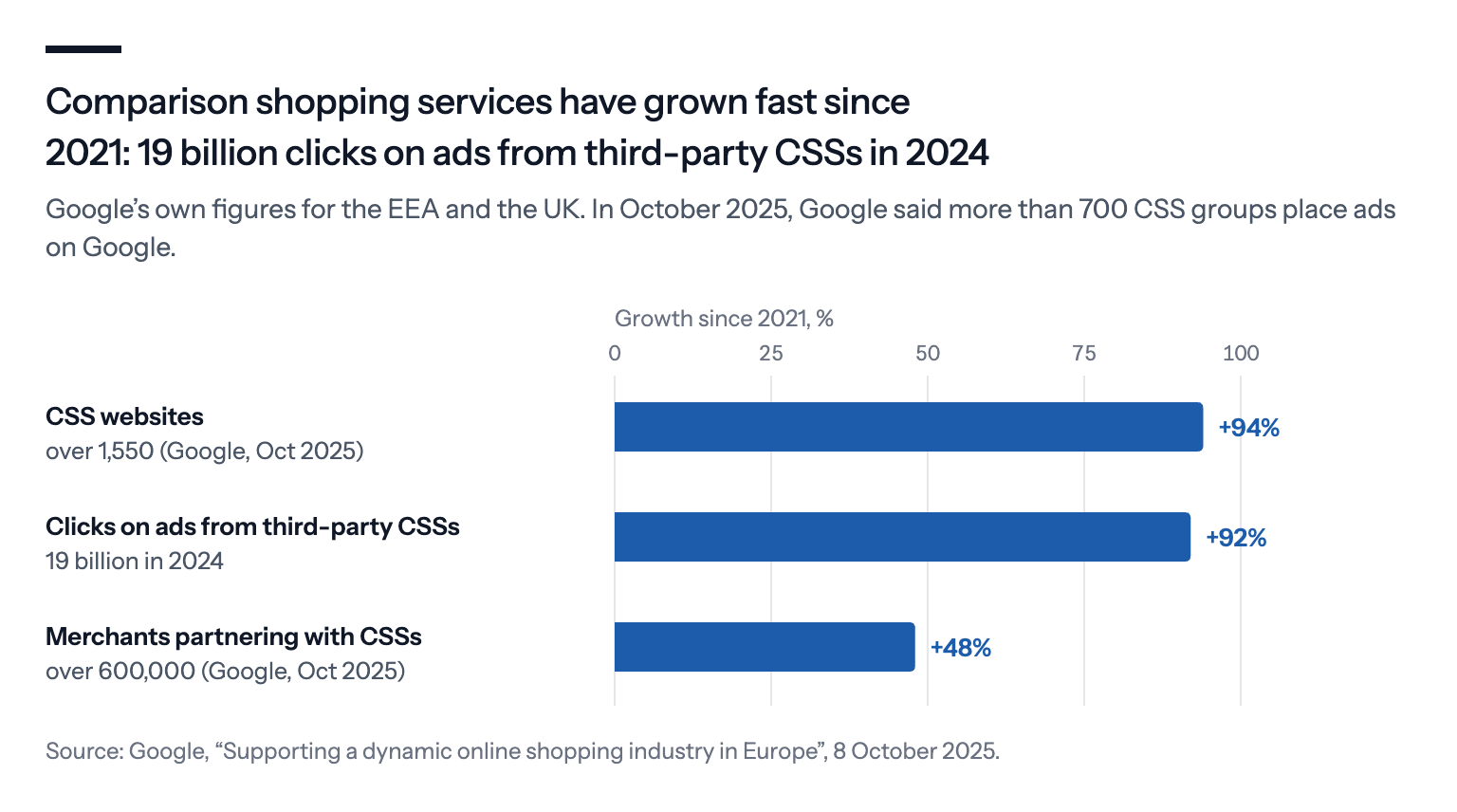
More than 700 CSS groups place ads on Google. Across the EEA and the UK, there are over 1,550 CSS websites and more than 600,000 merchants working with CSSs. Product ads from third-party CSSs got 19 billion clicks in 2024, up 92% since 2021.
Back in 2022, a Commission spokeswoman said about half of the clicks in Shopping units went to offers from Google's competitors.
So staying on the default isn't neutral.
If many of the stores you compete with already bid with their whole bid, you're bidding with less of yours.
What to check before you switch
Your account. The ads should run in your own Google Ads account, so the data and history stay yours. In a managed model, where the CSS runs the campaigns for you, you normally won't have access to the accounts it uses.
The price. A flat fee, a share of ad spend and a mark-up per click add up very differently as your spend grows.
The surfaces. Ask whether the CSS has opted in to the surfaces your Performance Max campaigns use, such as YouTube and the Shopping tab.
The exit. Check how quickly you can leave and move to another CSS.
CSS with Bavian
Bavian runs its own CSS, and it's part of the regular Bavian subscription.
Through it, your whole bid goes into the auction, and your ads say "By Bavian". Your feed, products, campaigns and budget stay as they are.
You start the move from Bavian, and Google then emails you to approve it.