Last year's Black Friday plan still works as a starting point. But since then Google has changed how budgets, bidding and product feeds behave, and a few old habits now work differently.
Black Friday is a short, expensive window, and once the sale has started there's little time to fix a campaign that behaves differently than you expected. So before you copy last year's setup, it pays to know where Google Ads now works differently.
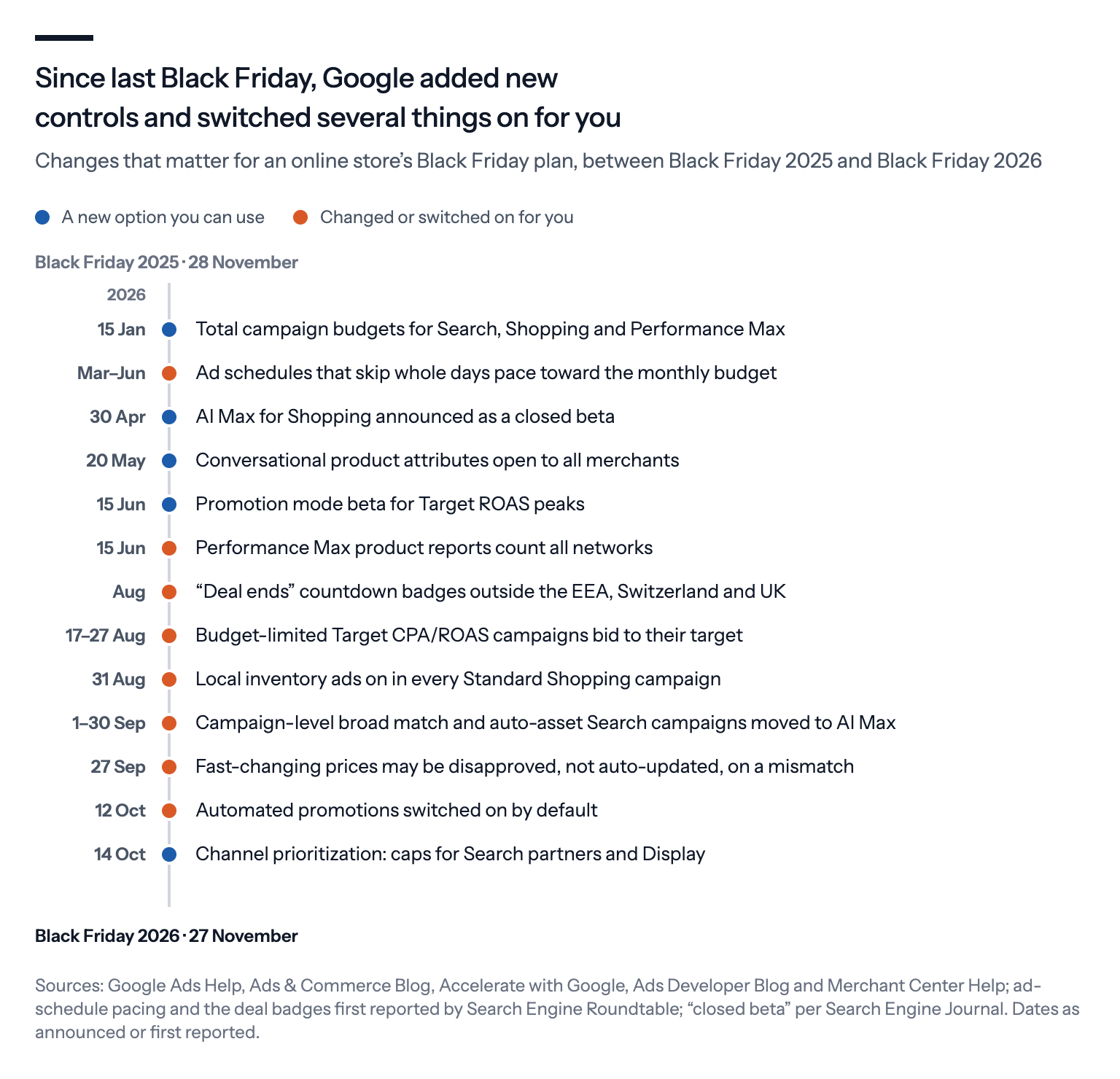
The changes fall into two groups. Some are new options you can choose to use, such as a budget that covers the whole sale period. Others are changes Google made for you, often switched on by default, which apply to you even if you do nothing.
Stores in the European Economic Area, the EEA, face one more change: Google has removed its free product listings from Search there, so paid Shopping ads carry more of the load.
Below we go through each change, last year's numbers and what we'd do. Black Friday falls on 27 November this year, and Cyber Monday on 30 November.
Build the sale campaign around a total budget
The most useful new option for a sale is the total campaign budget.
Instead of a daily budget, you give Google one amount for a fixed period of 3 to 90 days, and Google spreads the spending across that period. It never bills more than the total, although a strict target can leave part of the money unspent.
Last year, total campaign budgets were mainly a Demand Gen and YouTube feature. Since January, they also work for Search, Standard Shopping and Performance Max, Google's campaign type that runs across all its channels from one budget. Those are the campaigns most stores rely on for Black Friday.
There are two catches. A total budget only works on a new campaign, so you can't switch an existing one over. And Google warns that changing the end date or raising the budget once the campaign is running can make the spending uneven, so it's worth settling both before the sale starts. Our guide to total budgets goes through the details.
Two other budget rules have changed as well.
The first concerns ad schedules. Since this spring, a campaign that is scheduled to skip whole days aims to spend its full monthly budget, which Google counts as 30.4 times the daily budget, on the days it does run. A first group of accounts started getting the change from 1 March, and all accounts had it from 1 June.
In practice, that means a campaign that only runs on the sale days can spend up to twice its daily budget on each of those days. If you use a schedule like that for Black Friday, we'd halve the daily budget to keep spending where you planned it.
The second is Promotion mode, which has been in beta since June. It's meant for campaigns that bid for a Target ROAS, the return on ad spend you ask Google's bidding to aim for, where 300% means €3 in sales for every €1 spent on ads. For a window of 3 to 14 days, a Search or Performance Max campaign can run with a looser target and, if you want, extra budget, and afterwards it returns to normal by itself.
Promotion mode doesn't cover Standard Shopping, and you request it through your Google account team.
Manuel Baudisch at smec points out that the campaign's normal target can't be changed while a promotion window is running. So decide that target before Black Friday week, not during it.
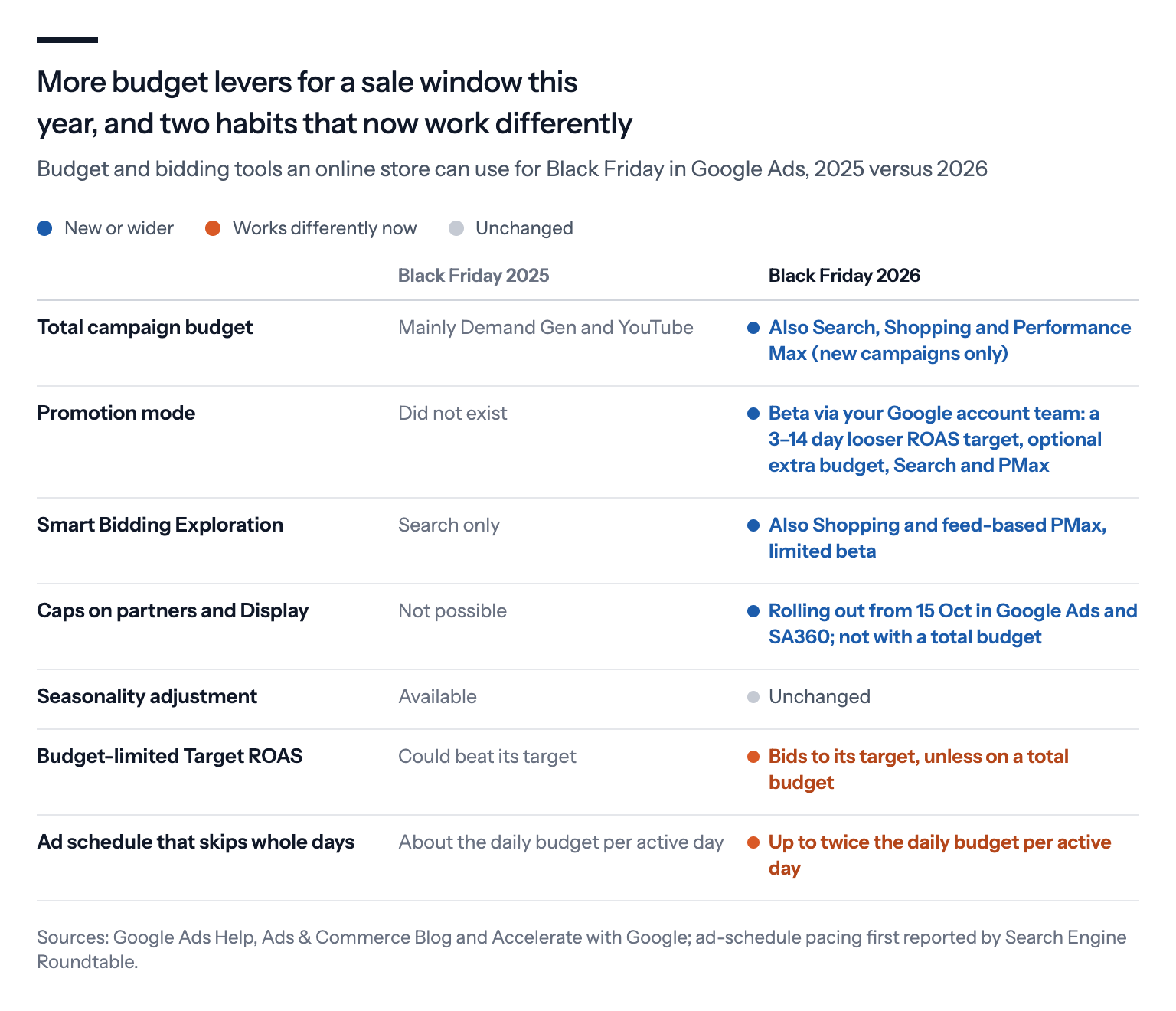
One familiar tool hasn't changed: seasonality adjustments, which tell Google's automated bidding to expect a short jump in conversion rates, so it bids higher for a few days.
Practitioners still disagree about them. Frederick Vallaeys of Optmyzr advises leaving them off for Black Friday, based on a three-year study in which accounts that used them lost ROAS. Consultant Lionel Fenestraz still uses them for short events.
We lean toward Vallaeys.
Rather than nudging the bidding for a few days, we'd set the sale's target from your margin in advance and let the campaign work toward that.
A tight budget no longer buys you a high ROAS
Until August, a quirk in Google's bidding worked in favor of campaigns that were short of budget. A campaign is "limited by budget" when its daily budget is too small for all the clicks it could get, so Google shows its ads less often to make the money last.
When such a campaign also had a Target ROAS, Google's bidding often picked off the cheapest clicks and ended up beating the target. smec found that more than half of these campaigns beat their target in the three months before the change.
That's no longer how it works.
In a rollout between 17 and 27 August, Google changed how these campaigns bid. A budget-limited campaign with a Target ROAS, or with a Target CPA, which is a target cost per sale or lead, now aims at its target instead of beating it. The change covers Search, Shopping, Performance Max and Demand Gen, but campaigns on a total budget are exempt.
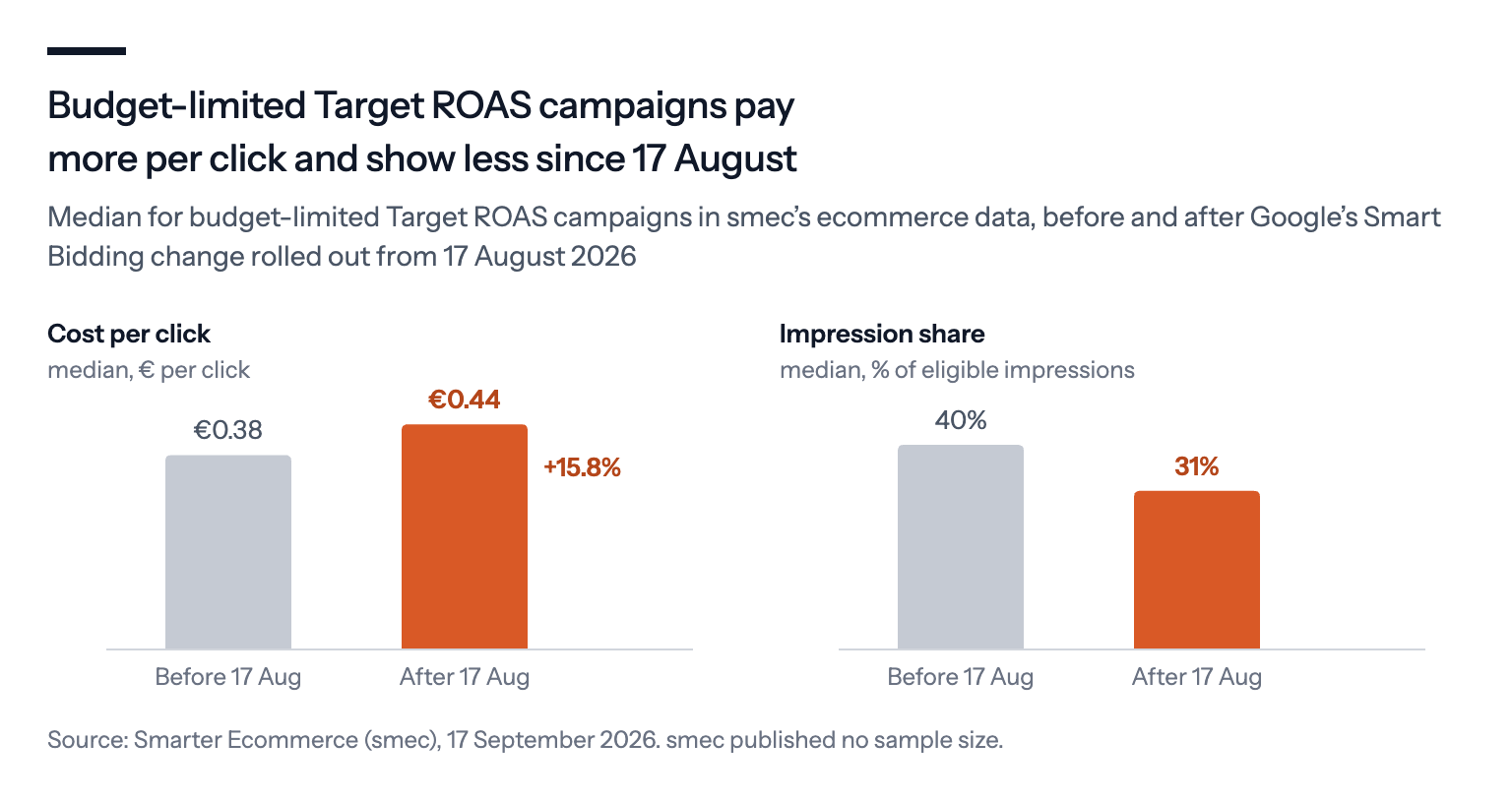
In other words, a 300% target now means 300%, not "300% or better".
So set the lowest ROAS you would actually accept during the sale, or give the campaign enough budget that it's no longer limited.
What last year's peak cost
Last year's numbers point the same way: shoppers turned up, but costs rose faster than sales.
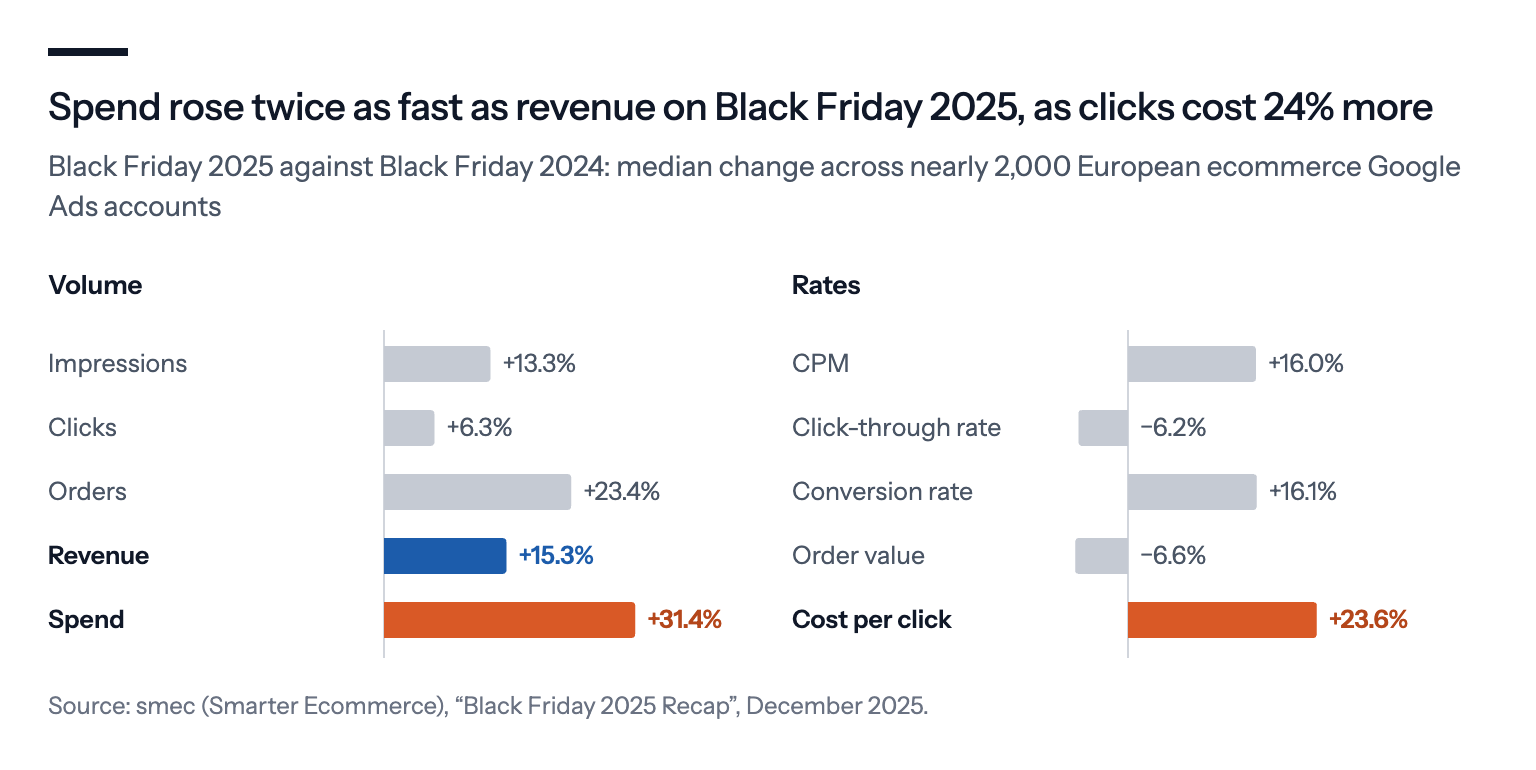
Across nearly 2,000 European ecommerce accounts, smec measured Black Friday ad spend up 31.4% on the year before, while revenue rose only 15.3%. The cost per click went up 23.6%, and the average order value fell 6.6%.
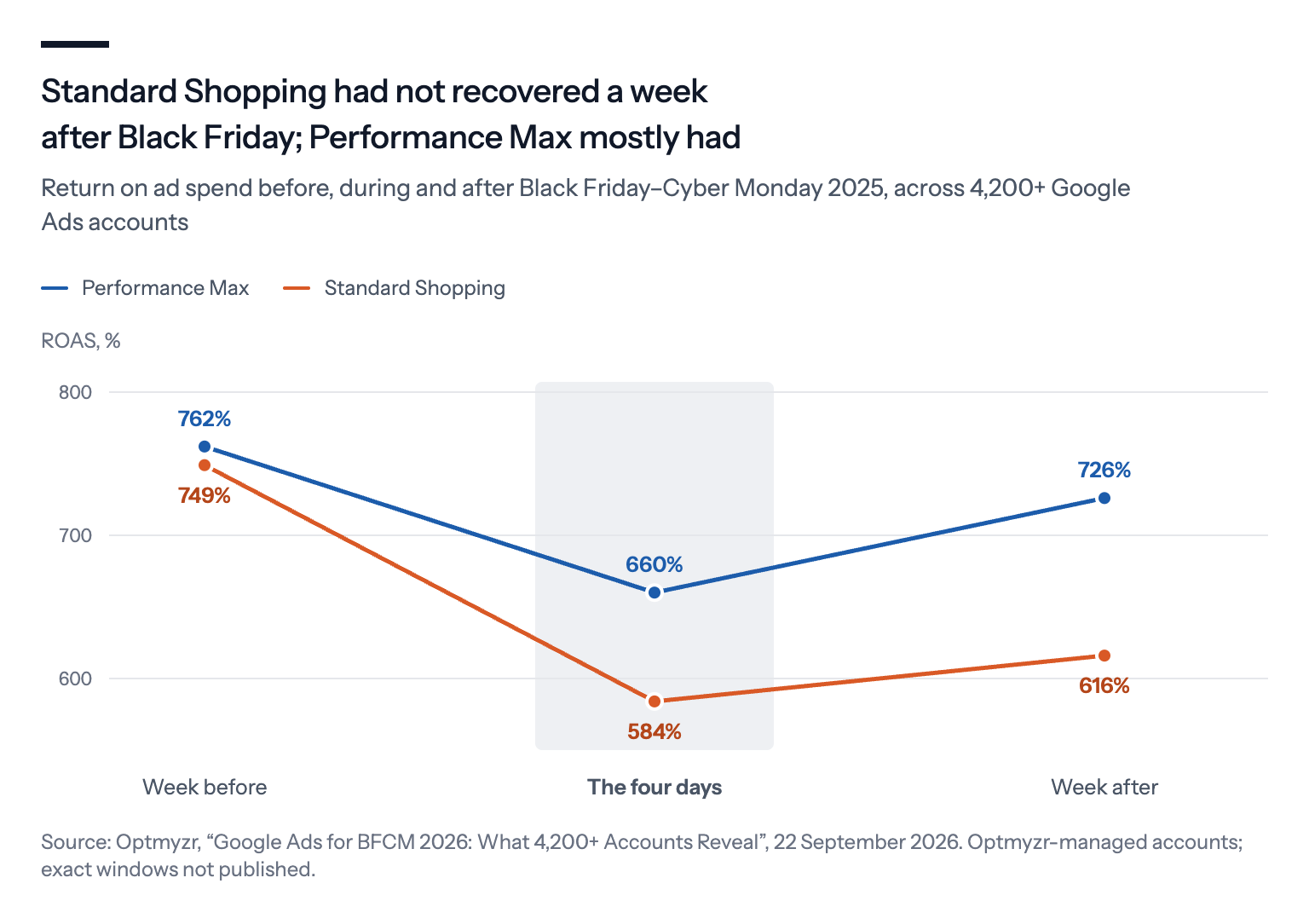
Optmyzr's study of more than 4,200 accounts shows how that squeeze played out inside the peak. Over the four days from Black Friday to Cyber Monday, ROAS fell 22% in Standard Shopping and 13% in Performance Max, compared with the week before.
In the week after the sale, clicks in Standard Shopping still cost 10.2% more than in the week before it.
Two lessons follow.
First, plan the week before, the four days themselves and the week after as three separate phases, each with its own budget and target, because costs and returns shift from one phase to the next.
Second, don't choose between Performance Max and Standard Shopping based on a benchmark. In accounts that ran both, Optmyzr found almost the same ROAS in December. It's better to divide your catalog by margin and stock, and let that decide which products get which campaign.
Nikki Kuhlman of JumpFly suggests a 12-day deal window, from Thanksgiving to 7 December. She also advises watching how campaigns perform after Cyber Monday rather than cutting budgets automatically.
What Google switched on in Shopping and Performance Max
Some changes take effect without you doing anything, which is exactly why they're worth checking before the peak. Three stand out.
Local inventory ads. These ads tell shoppers that a product is in stock in a nearby physical store. On 31 August, Google turned them on in every Standard Shopping campaign, and the old switch for turning them off is gone. If your Merchant Center account also holds inventory for physical stores and you want to stay online-only, use an inventory filter.
Automated promotions. Since 12 October, Google has been finding promotions on your website and adding them to your ads. It does this in Search and Performance Max campaigns that show your address through location assets and carry no promotions you added yourself. It's on by default, and the opt-out covers the whole account.
A discount code that expired last week is annoying in October and expensive during Black Friday. So unless your site's offers are always current, we'd switch it off.
Performance Max product reports. Since 15 June, the product-level reports in Performance Max have counted results from all networks. That's useful, but it means this year's product numbers won't compare cleanly with last year's.
There's also a new control worth knowing about, though it may not reach you in time.
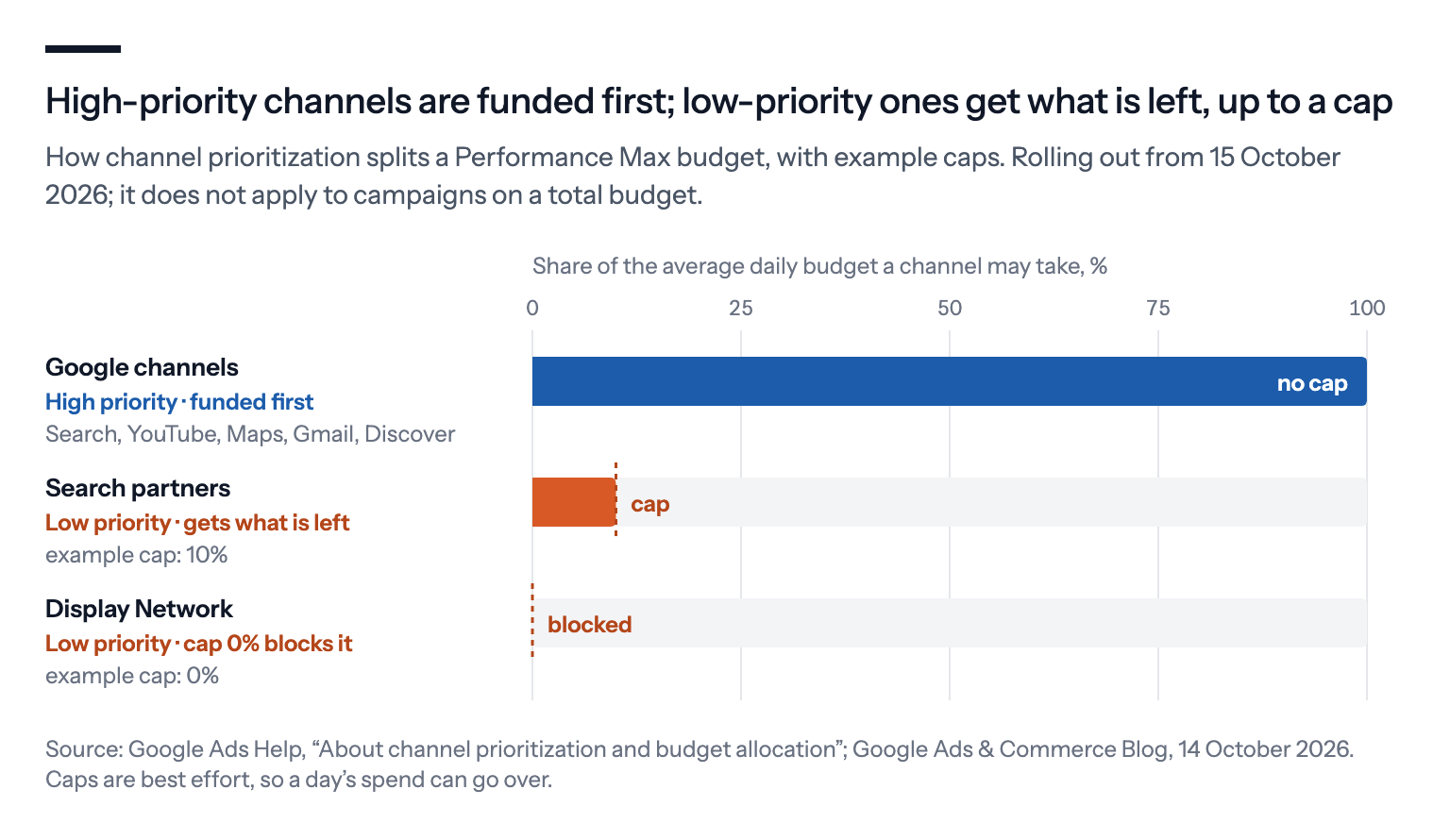
Channel prioritization, announced on 14 October, lets you mark each place a campaign's budget can go as high or low priority, and cap what the low-priority ones get. In Shopping campaigns you can cap Search partners, the other sites that show Google's search ads. In Performance Max you can cap Search partners and the Display Network of websites and apps.
But channel prioritization doesn't work for campaigns on a total budget, so for a sale campaign you'll have to choose one or the other. It's also rolling out over the coming months, in Google Ads and Search Ads 360 only, and may not reach your account by late November.
Your feed carries more of the work
For stores in the EEA, the biggest change this year isn't in Google Ads at all.
On 17 and 18 September, Google removed its own free product listings from Search there. Google's Ads Liaison confirmed it was a Digital Markets Act step. That's the EU law that sets rules for the largest platforms, including a ban on favoring their own services.
That leaves Shopping ads as the main way to show products in search results there, whether they run through Google Shopping, which is Google's own comparison shopping service, or through another one. On some product searches, Google also shows new result boxes for comparison sites and for stores that sell directly.
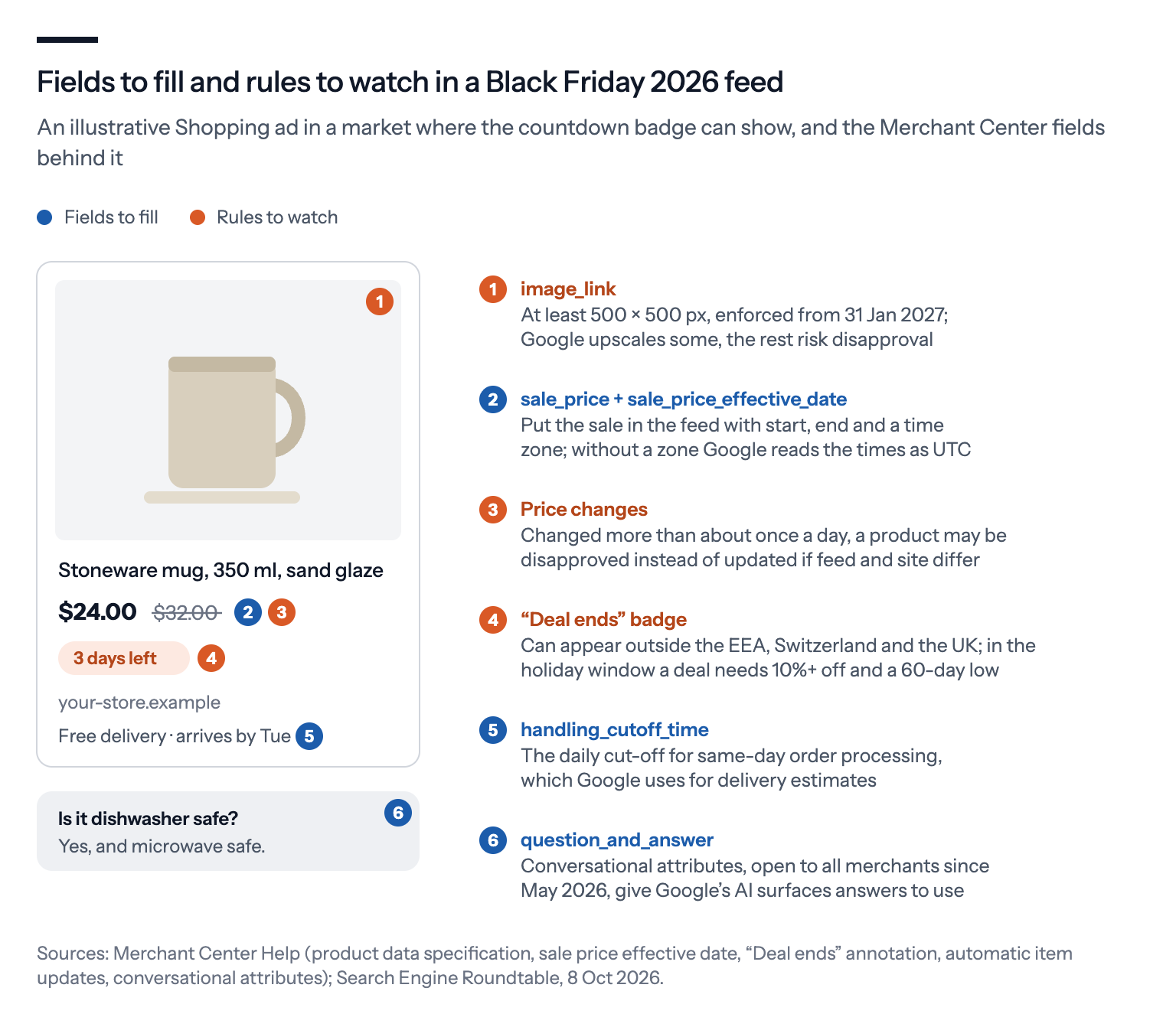
Shopping ads are built from your product feed, the file that tells Google what you sell and at what price. So the feed rules matter more this season.
These are the ones we'd check.
Put the sale price in the feed. Use sale_price for the price and sale_price_effective_date for when the sale starts and ends, and include a time zone. Without one, Google reads the times as UTC, which can move the start and end of your sale by an hour or more. Optmyzr lists a sale price that only lives in a coupon code among the basic mistakes, because the ad then shows the full price all through the sale.
Don't rely on automatic updates for fast price changes. Merchant Center can update a product's price by itself when it finds a different price on your website. But Google's help page now warns that a product repriced more than about once a day may be disapproved instead, if the feed and the site don't match. That warning arrived in a revision on 27 September, Search Engine Roundtable reported. During the sale, send each price change to Merchant Center as it happens.
Start on conversational attributes. These are feed fields such as question_and_answer, where you add common questions and answers about a product, and they've been open to all merchants since May. Google says they help in AI Mode, its AI search experience, which is live in Denmark and most of Europe, and in regular search. Google's shopping-specific AI features, such as checkout inside AI Mode, are still mostly US-only.
Fix small images now. From 31 January 2027, product images smaller than 500×500 pixels risk disapproval. The rule only starts after the peak, but the quiet weeks before it are the easiest time to get this done.
Watch for the countdown outside the EEA. In countries outside the EEA, Switzerland and the UK, Google may add an experimental "Deal ends" countdown, such as "3 days left", to a sale that ends within seven days. In the holiday window, the deal also has to be at least 10% off and the lowest price in 60 days.
Our checklist for Black Friday 2026
- Build the sale campaign on a total budget, or halve the daily budget on campaigns that run only on the sale days.
- Set your Target ROAS from your margin before the sale starts.
- If you have Promotion mode, set it up before Black Friday week.
- Switch off automated promotions unless your site's offers are clean and current.
- Check the local inventory settings in Standard Shopping.
- Load sale prices with dates and a time zone, and send price changes as they happen.
- Plan the peak in three phases, and don't cut budgets automatically after Cyber Monday.
- Compare this year's product-level numbers with last year's carefully.
None of this replaces the basics: a clean feed, margins you know, and budgets decided before the rush.
What has changed is how much of the plan now has to be in place before the sale starts.