
Keyword Planner's search volumes are estimates: rounded, grouped with similar searches, often too high, and missing for the low-volume searches that many small businesses live on. Your own search terms report shows what actually happened when your ads showed. Use volume to find ideas, and your own data to decide.
You're about to add a keyword, and someone asks the obvious question: how many people search for it? You open Keyword Planner, and it either says 1K–10K, which tells you little, or shows no number at all, which seems to say nobody does.
Neither answer is quite true. Search volume estimates are useful for some decisions and misleading for others, and the keywords many smaller businesses depend on are exactly the ones the estimates handle worst.
Here's what search volume can and can't tell you, and what to look at instead.
The short version
- Keyword Planner's numbers are estimates. Google rounds them, groups similar searches together, and doesn't show keywords with very low search volume at all.
- An Ahrefs study of 72,635 keywords found Keyword Planner's volume more than 50% above the impressions Google Search Console recorded for 54% of them.
- Google said in 2019 that about 15% of the searches it sees each day are new. No volume tool can estimate those.
- Your search terms report shows the searches that actually showed your ads, with their clicks, cost and conversions, though Google hides the rarest ones too.
- Use volume to find and size ideas. Use your own search terms to decide which keywords to keep, add and block.
What Keyword Planner is good for
Keyword Planner, built into Google Ads, is made for planning: finding keyword ideas and estimating how much a set of keywords might bring. Its help page says it can show "estimates on the number of searches a keyword gets each month".
For popular searches, those estimates are a reasonable guide to size. If you're deciding whether a new product line or a new country is worth a campaign, a rough sense of how many people search for it is better than none.
Where the numbers fall short
They're grouped and rounded. Keyword Planner rounds volumes into buckets and often shows one number for searches it treats as the same: plurals, misspellings and close variants. Tim Soulo, chief marketing officer of Ahrefs, which sells its own keyword tool, gave an example in a 2021 study: Keyword Planner treated "chusky", a dog breed, as a misspelling of "husky" and gave it the same 550,000 searches a month in the US.
They're often too high. The same study compared Keyword Planner's volume for 72,635 keywords in the 1K–10K range with the impressions Google Search Console recorded for them. "Most search volumes in GKP (54.28%) are overestimations, while just under half (45.22%) are roughly accurate", meaning within 50% of the impressions.
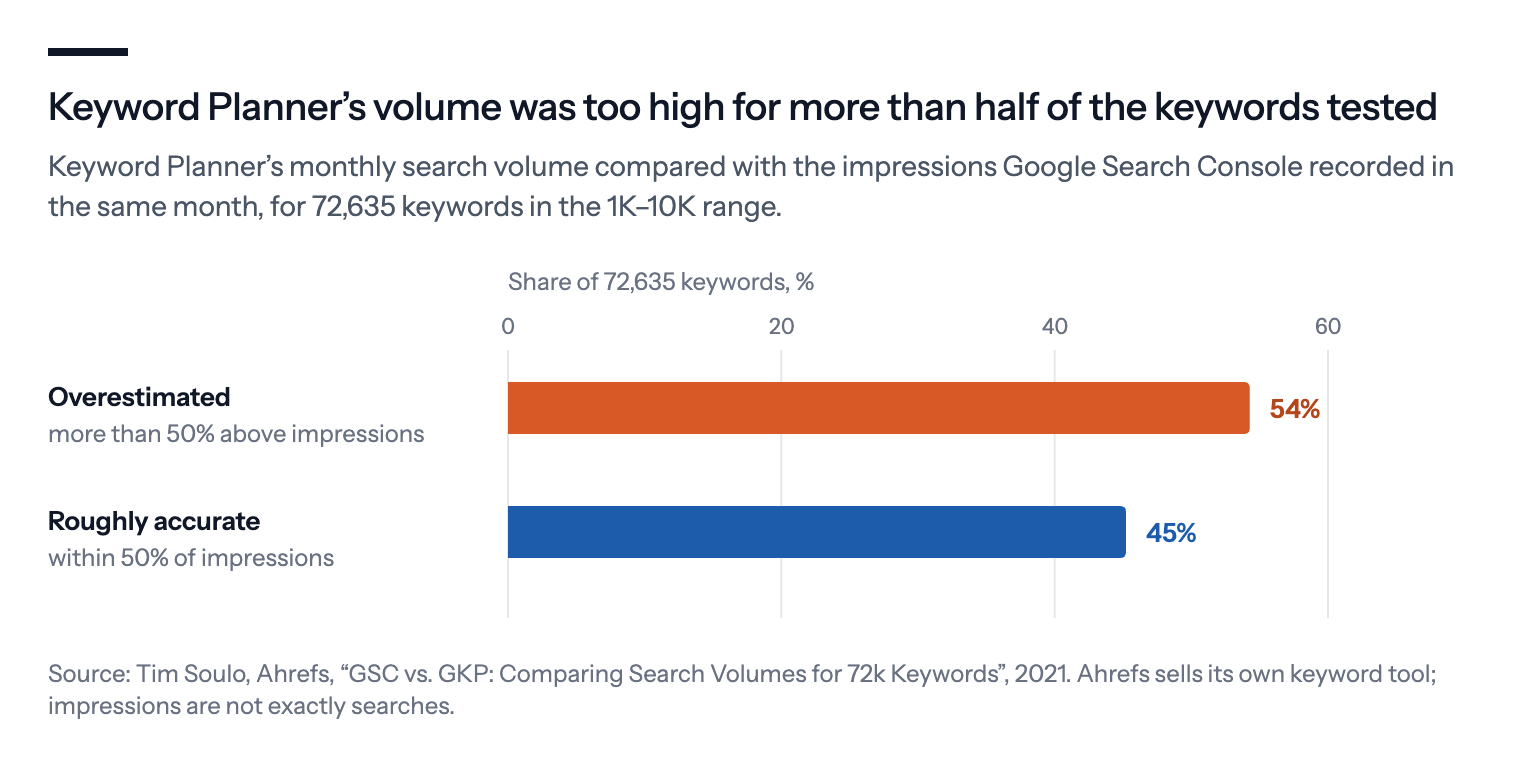
That's a vendor comparing Google's tool with a benchmark of its choosing, and impressions aren't exactly searches. But the direction matches what many advertisers see: the estimate promises more than arrives.
Small searches aren't there. Google's own page is clear about the bottom end.
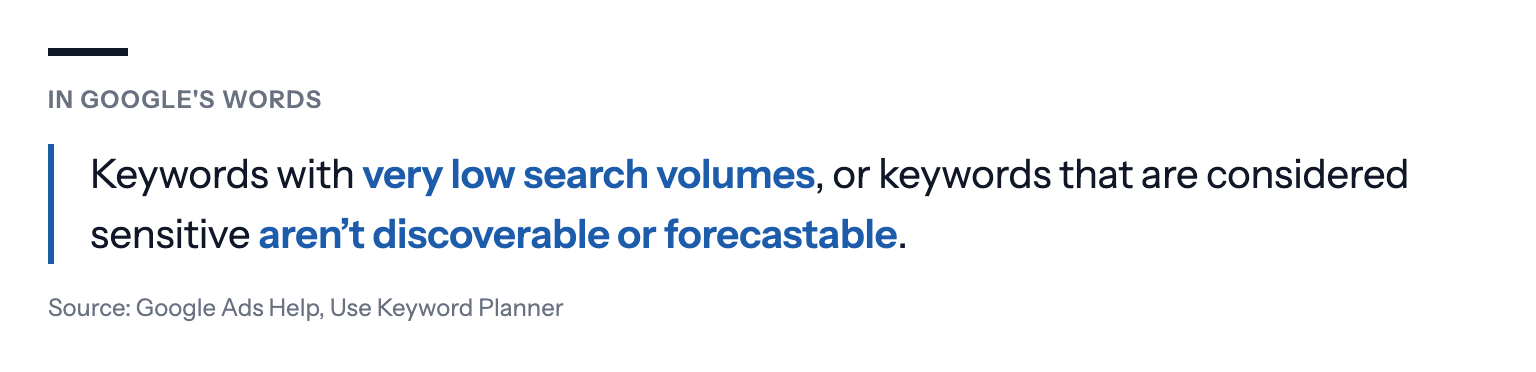
That bottom end is where many local and niche businesses live. A search for one specific repair, in one town, may happen a handful of times a month. Keyword Planner can't show it, but those few searches can be the best customers you get.
New searches can't be estimated. "We see billions of searches every day, and 15 percent of those queries are ones we haven't seen before", Pandu Nayak, a Google Fellow and vice president of Search, wrote on Google's blog in 2019. A tool built on last year's searches has no number for tomorrow's.
What your own search terms show instead
Your search terms report lists the searches that actually showed your ads, with impressions, clicks, cost and conversions. That's not an estimate of demand; it's what happened when you were in the auction.
It has gaps of its own. Google's help page says the report shows search terms "used by a significant number of people", and that "some search terms that don't have enough query activity are omitted from the search terms report in order to keep with our standards on data privacy". You still pay for their clicks; Google's search terms insights group them as "other queries" without showing the words.
Even so, your own data has two things volume never does: what a search cost you, and whether it led to a sale or a lead.
Google also flags keywords that reach very few people. A keyword marked "Low search volume" has "very little to no search history on Google", according to its help page, and stays inactive until searches pick up.
A worked example
Take a fictional bicycle workshop in a mid-size city, deciding which keywords to add.
Keyword Planner says "bike repair" in the city gets 1K–10K searches a month, and shows no number for "e-bike motor repair" in the same city: too few to show.
The workshop's search terms report, from its broad "bike repair" keyword, tells a different story for the last 90 days. The other searches brought 900 clicks and 18 bookings. Searches containing "e-bike motor" brought 40 clicks and 6 bookings.
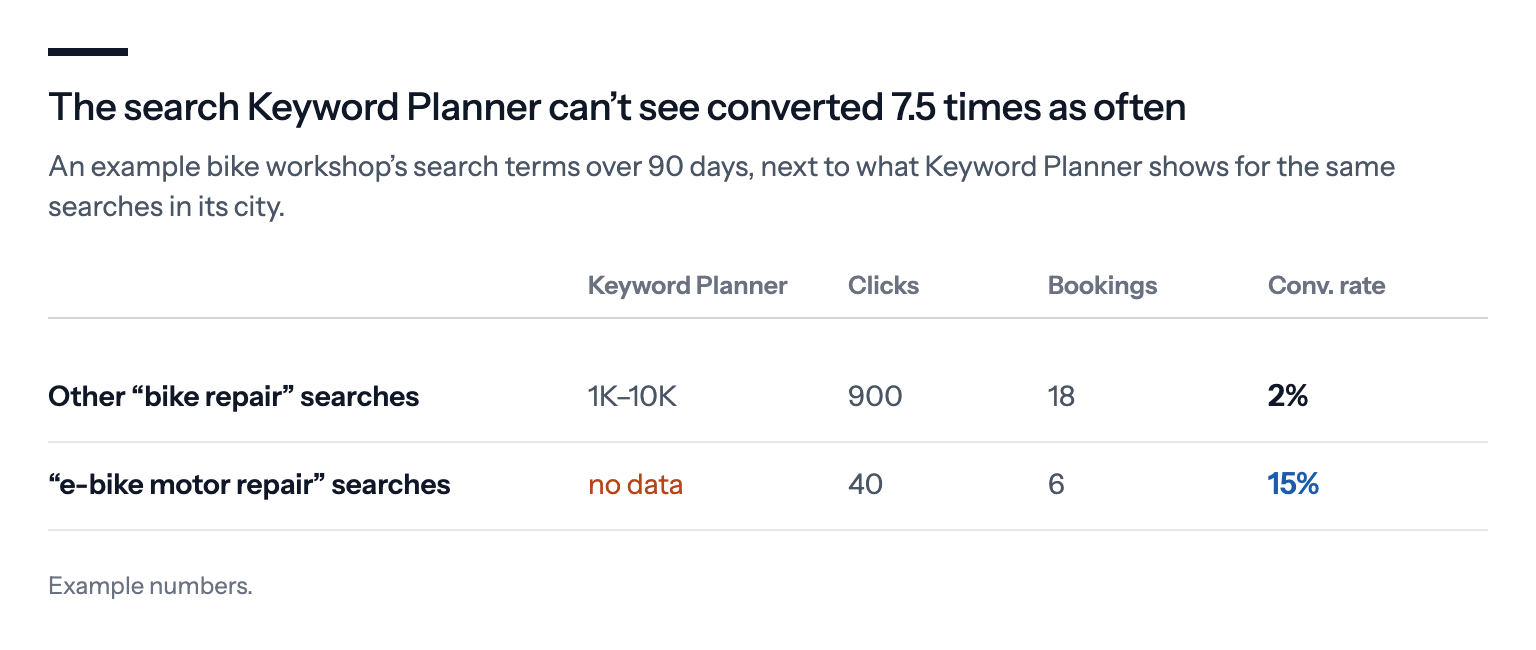
So the search with "no volume" converts at 15%, against 2% for the big one. Adding "e-bike motor repair" as its own keyword, with its own ad and landing page, is the obvious next step, whatever Keyword Planner says. The big keyword stays, but with a closer look at which of its searches never book.
How to read search terms for keyword decisions
A search terms report can run to thousands of rows, and most of them have one or two clicks each. Reading it row by row leads nowhere. A few habits make it useful.
Use a long enough window. Ninety days usually gives enough clicks to see a pattern; a week rarely does, especially in a small account.
Look at words, not just whole searches. Rare searches each happen a few times, but the words in them recur. Group the searches that contain one word, such as "motor", "warranty" or a town name, and add up their clicks, cost and conversions. A theme that converts as a group is worth a keyword, even if no single search in it is.
Compare with the account's own average. A theme that converts at twice the account's rate deserves its own ad group. One that converts at half the rate, with real money behind it, is a candidate for a negative keyword.
Separate the clear cases from the unclear ones. A search that has nothing to do with what you sell can go straight away. One that fits but hasn't converted yet needs more clicks before you judge it.
Where this approach falls short
You can only learn from searches you've shown up for. Your search terms report says nothing about searches your keywords never matched. To find those, Keyword Planner, competitors' sites and what customers tell you are still useful.
Small numbers mislead too. Six bookings from 40 clicks is promising, not proof. Give a new keyword a few weeks before judging it.
Hidden searches leave holes. Because Google omits low-activity search terms, part of what you spend can't be traced to a visible search. Broad match, which reaches more one-off searches, can make that share bigger.
Volume still matters for planning. If you're sizing a market you've never advertised in, estimates are the only numbers you have. Just treat them as a rough upper bound, not a forecast.
What we'd do
Use Keyword Planner for ideas, not decisions. It's good at suggesting searches you hadn't thought of and at sizing big topics. Treat a missing number as "unknown", not "zero".
Read your search terms every month. Sort by conversions, then by cost. Add the searches that convert as their own keywords; block the ones that cost money without results.
Give specific searches their own ad and page. A low-volume search that converts well deserves an ad that answers it.
Judge keywords on cost per result, not volume. A keyword with ten searches and two customers can be worth more than one with a thousand searches and none.
Watch for "Low search volume" keywords. They don't cost anything while inactive, but if a whole ad group is made of them, it may never show.
If you use Bavian, it works from your own search terms rather than volume estimates: it mainly adds keywords for searches that have brought results, follows how they do, and blocks searches that cost money without results. Our Help article explains why Bavian doesn't show search volume.