
Google's bidding aims at whatever value your tracking sends it, and for most online stores that is the order value. Send each sale's profit instead, lower your target to match, and Google Ads starts chasing profit even though the setting still says ROAS.
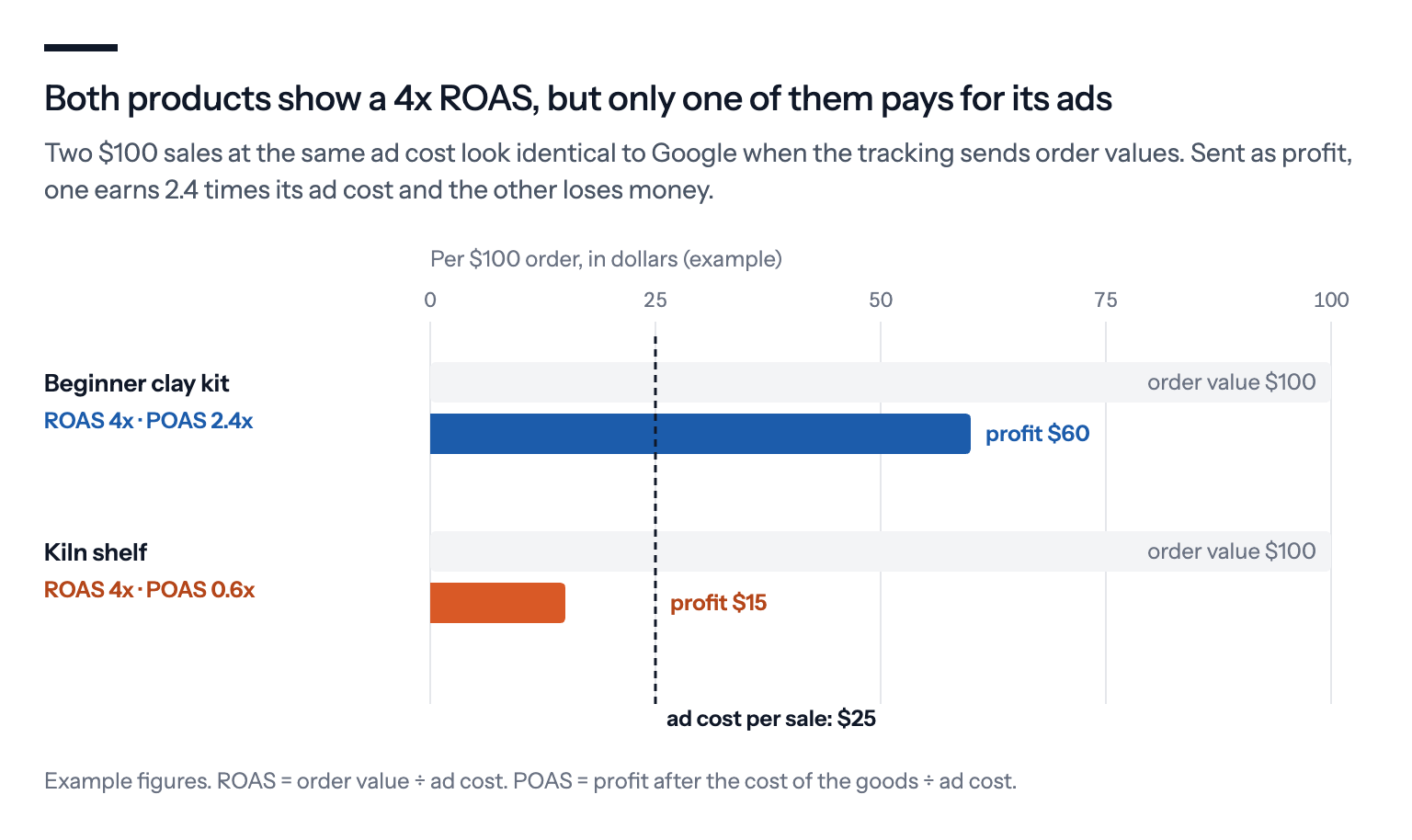
Google Ads' value-based bidding aims at whatever your tracking tells it a sale is worth. For most online stores that's the order value, so Smart Bidding, Google's automated bidding, gets very good at buying revenue. It doesn't know that one $100 order leaves you $60 and another leaves you $15.
There's no switch in Google Ads that turns ROAS into profit for every account. But there's a way round it that works in any account: send each sale's profit as the conversion value instead of its order value. The bid strategy still says target ROAS, but the number it steers by is now profit.
People call that number POAS, profit on ad spend.
The short answer
- Google's bidding optimises for the value you send it. Send profit, and it bids for profit.
- There are three ways to make Google Ads bid for profit: a profit figure per order from your own site, Google's profit bidding from cart data (a beta), or margin bands in Merchant Center.
- Lower your target the day you switch. A revenue target multiplied by your average margin gives roughly the same target on profit.
- POAS still has blind spots. It can starve new-customer acquisition and treats a sale that would have happened anyway as a win, so read it next to your shop's own numbers.
Why revenue sends the bidding the wrong way
Take an online pottery store with two products at $100: a beginner's clay kit that leaves $60 after the cost of the goods, and a kiln shelf that leaves $15. With order values in the tracking, Google sees two identical $100 sales and bids for both alike. If the kiln shelf converts a little better, it gets more of the budget.
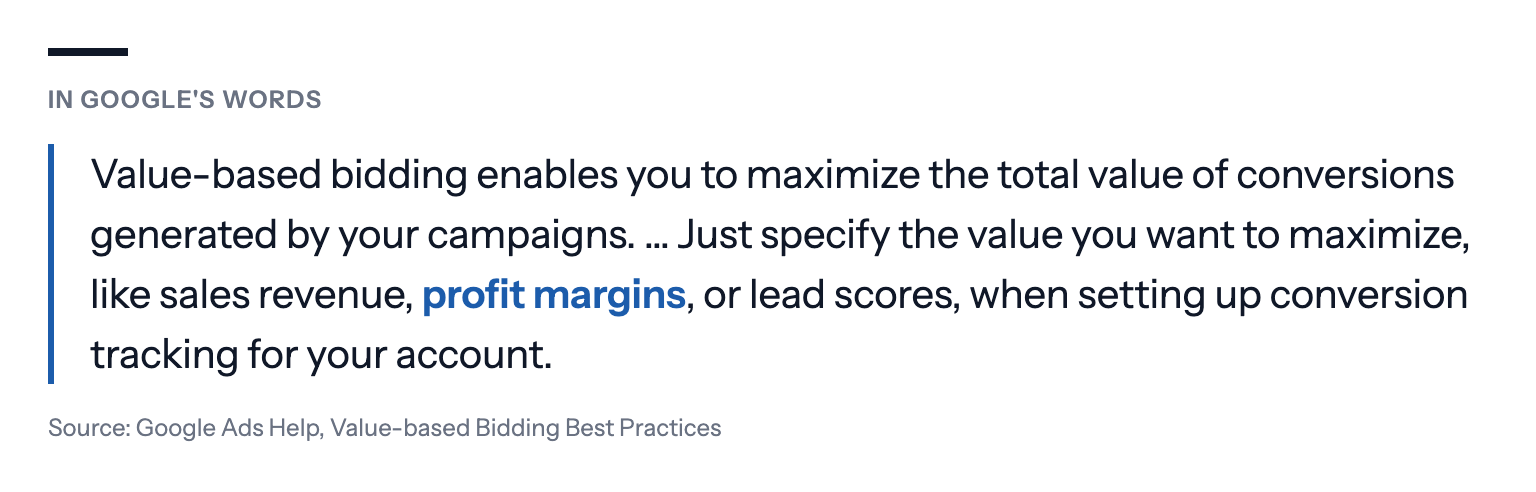
The bidding has no view on which number it gets. Google's guide to value-based bidding names profit as one of the values you can ask it to maximise, and its page about conversion values says Target ROAS maximises "sales revenue or profit margins", whichever you report.
So the default isn't a choice Google made for you. It's simply what most tracking sends.
Google is moving the same way
Google has been building profit into its own tools too.
In early October, Search Engine Land reported that paid search specialist Arpan Banerjee had spotted a test of a Target ROAS calculator that asks for a campaign's average profit margin and suggests a target from it. The calculator doesn't make Google bid for profit. It still assumes your conversion values are revenue and helps you set a target from the break-even point on them, which is the sum we explain in What is a good Google Ads ROAS for my business?
Google also has a bidding option that does aim at profit: gross profit optimisation, a beta for Performance Max and Standard Shopping that works out each order's profit from cart data and your product costs. Few advertisers have been set up for it. Smarter Ecommerce, a Google Ads software firm, found in its own data from early 2024 that only about 5% of advertisers were ready, "mostly because people are hesitant to share their cost data with Google".
Sending profit yourself needs neither the beta nor your costs in Google's hands, which is why it's the route open to any store.
Three ways to put profit into Google Ads
Send the profit per order from your site. When an order is placed, your tracking reports the order's gross profit, the order value minus what the products cost you, instead of the order value. This is the most precise way, because it works per product and per basket, and it works for Search, Shopping and Performance Max alike.
Do it server-side if you can. A margin written into the page's data layer, the data your site hands to the tracking tags, can be read in the browser by anyone who places an order, competitors included.
Let Google calculate it from cart data. Google can work out the gross profit of an order if your tag sends the products in the basket and Merchant Center holds each product's cost. Bidding on that profit needs the gross profit beta, and your conversion value stays revenue. Our guide to Google's profit bidding with cart data covers what it takes.
Use margin bands. If you can't send a profit per order, you can group products by margin with custom labels in Merchant Center and give each group its own target. It's rougher, but it needs no tracking change. See Margin in Google Shopping without sharing your costs.
Conversion value rules aren't a shortcut here. Google's rules adjust values by location, device or audience, not by product.
Which profit to send
Practitioners disagree on how much to subtract, and it matters less than you'd think.
Gross profit, the order value minus the cost of the goods, is the easiest to get right and the usual place to start. Some stores go further, towards contribution margin, by also taking off shipping, payment fees and an allowance for returns. That's closer to what an order really leaves you, but every extra cost is another number to keep current.
Two things matter more than the exact definition. Leave VAT out, because it isn't yours. And keep the definition the same over time, or the bidding will chase changes in your bookkeeping rather than in your results.
Lower your target the day you switch
Profit is smaller than revenue, so a target ROAS that made sense on revenue asks for far too much on profit. Convert it by multiplying your old target by your average margin.
| Your margin | Target on revenue | Same target on profit |
|---|---|---|
| 20% | 6x | 1.2x |
| 30% | 4x | 1.2x |
| 40% | 4x | 1.6x |
| 50% | 3x | 1.5x |
The break-even point becomes easy to read. On gross profit values, 1x means the ads cost exactly what the sales left you after the cost of the goods, so anything you want to keep for shipping, fees and actual profit sits above 1x.
Change the target on the same day as the values. If you leave the old target in place, Google suddenly sees every sale as worth less than its goal and bids down hard.
Where POAS falls short
Profit is a better number to bid on than revenue, but it has blind spots of its own, and they're worth knowing before you hand it the budget.
It can starve new customers. Frederik Boysen, founder of ProfitMetrics, a Danish company that sells profit tracking and has trademarked the term POAS, makes the point himself. For shops with many repeat buyers, he writes, "It is significantly more expensive to acquire new customers," and a blended figure lets cheap repeat buyers hide that.
In his example, an account with €15 of gross profit per order and an average ad cost of €10 shows a healthy POAS of 1.5. But a new customer costs €20 to win, a POAS of 0.75 on the first order.
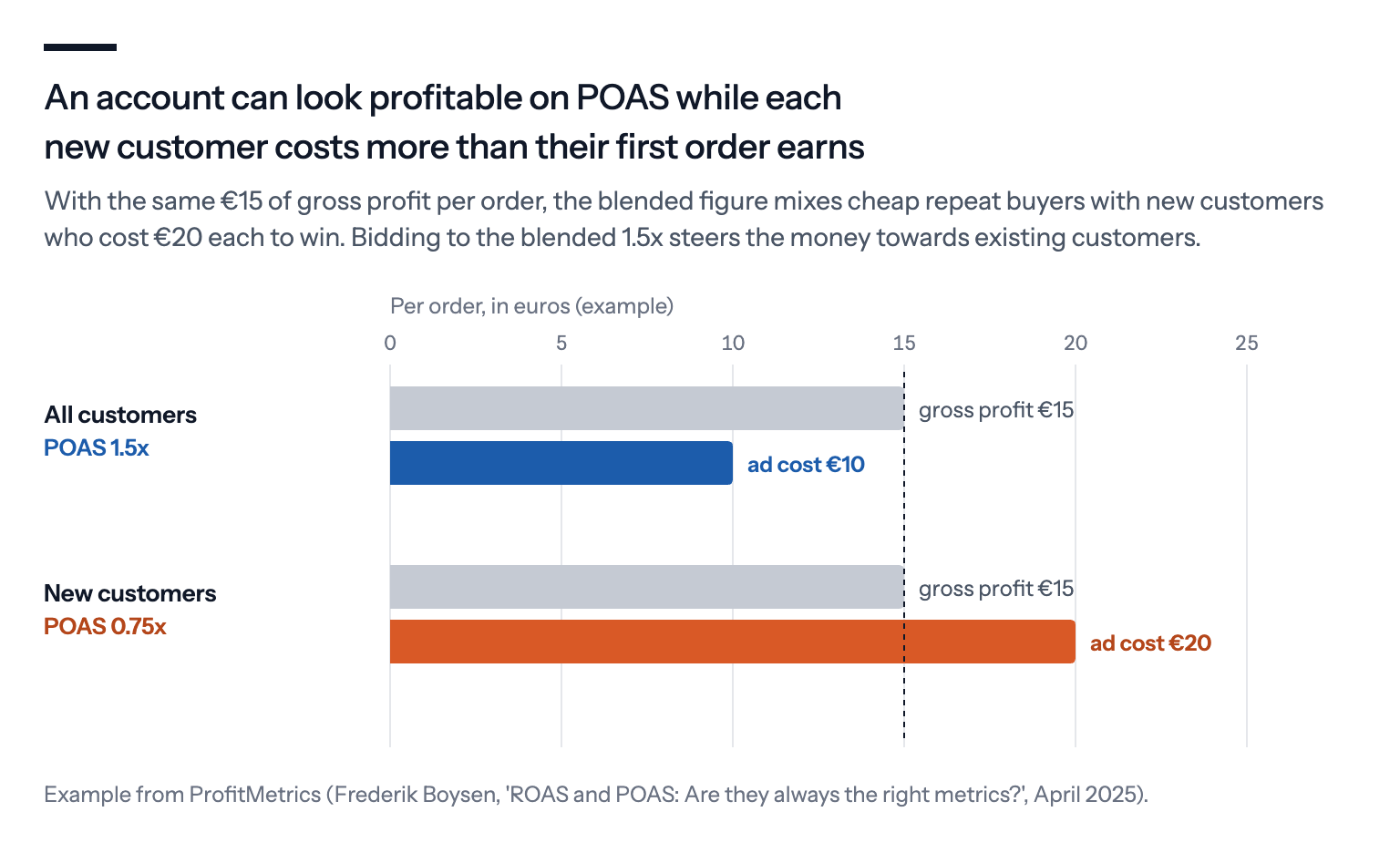
Bid everything to 1.5, he argues, and Google will favour the existing customers who are cheapest to win back. If your customers buy again, a loss on the first order can be a good deal. Google's customer acquisition goal, in its New Customer Value setting, adds a value you choose to a new customer's first purchase, so the bidding can weigh them in.
It counts sales that would have happened anyway. POAS uses the same attributed conversions as ROAS. Searches for your own brand and ads to past visitors bring orders from people who already know you, so they flatter POAS exactly as they flatter ROAS. Judge brand and non-brand separately, as we explain in Brand vs. non-brand campaigns.
It's only as good as your cost data. If product costs in your system are months old, or discounts aren't taken off before the profit is calculated, the bidding optimises for a profit that doesn't exist.
What to expect after the switch
A learning period. If you move bidding to a new profit conversion action, Google lists a significant change to "the conversion goals or actions you are optimizing to" as one of the triggers for Smart Bidding's learning status, and says it can take one to two conversion cycles, the usual time from a click to a sale, for performance to settle. Avoid other big changes in the same weeks.
History that doesn't compare. Last month's ROAS was on revenue, and this month's is on profit. Note the date you switched, and compare like with like.
Reports that say profit where they said revenue. Conversion value in Google Ads is now profit. If you still want revenue in your reports, keep a second purchase action with the order value and set it as secondary, so Google records it but doesn't bid on it. Our guide to primary and secondary conversions explains the difference.
Some campaigns will look worse. That's the point. The kiln shelf campaign that looked fine on revenue now shows what it actually earns.
What we'd do
Work out a gross profit per order you trust. Product cost is enough to start, excluding VAT. Shipping, payment fees and returns can come later, as long as the definition then stays the same.
Send it server-side, and keep revenue as a secondary action. Then you bid on profit and can still report on sales.
Run it as a secondary action for a few weeks first. Compare the profit values with your shop's own figures before you let the bidding use them.
Switch values and targets on the same day. Multiply the old target by your average margin, and then move in small steps.
Treat new customers separately if they buy again. Either give them extra value with Google's new customer goal, or accept a lower POAS on campaigns built to find them.
Judge the result on your shop's own profit, not on the ROAS column, for at least a month.
If you use Bavian, it works from the conversion values in your Google Ads account, so once those are profit, its budget split and any return on spend goal on the Bidding page are read as profit too. Lower a goal you've set yourself when you switch, and tell Bavian in the chat that your values are now profit.