
The typical webshop gets about 3x from Google Ads, and 4x is a common target. Whether either is good for you depends on your margin, so work out the ROAS at which your ads break even and set your target above it.
ROAS, short for return on ad spend, is the number most shop owners use to judge Google Ads. It tells you how much you sell for every krone, euro or dollar you put into ads, so the question it raises sounds simple: is mine good?
There is a short answer, and then there is the number that decides whether it holds for you.
The short answer
If you want a number to hold yourself against, published studies put the typical webshop at around 3x on Google Ads, meaning 3 in sales for every 1 spent on ads. In a recent study of 38 webshops, the middle half landed between about 1.7x and 5.4x.
A British agency's audit of accounts running Performance Max, the campaign type that places ads across all of Google's channels, found a median of 3.4x among its online shops.
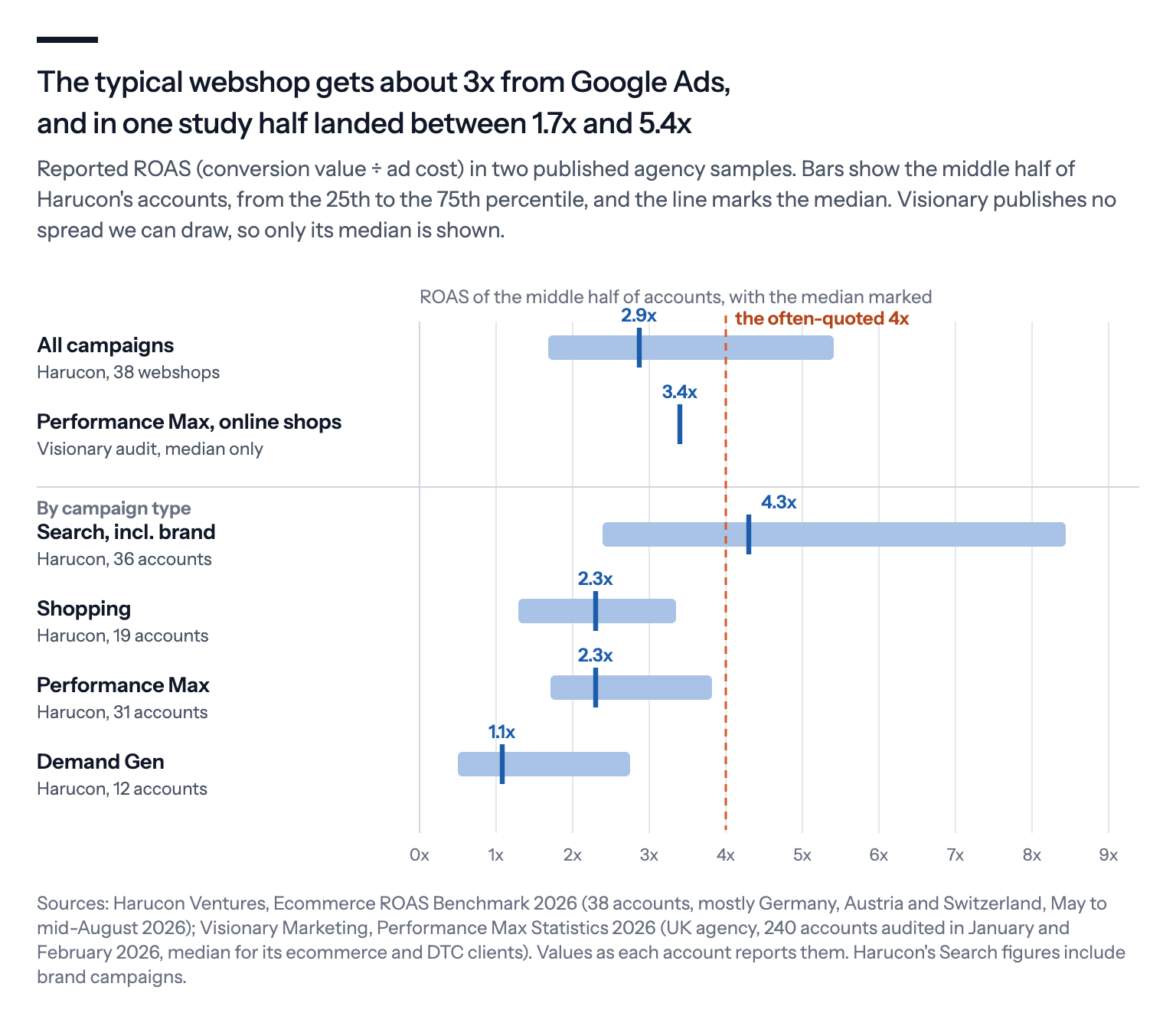
The rule of thumb you'll often hear is 4x, but treat all of these as signposts rather than targets.
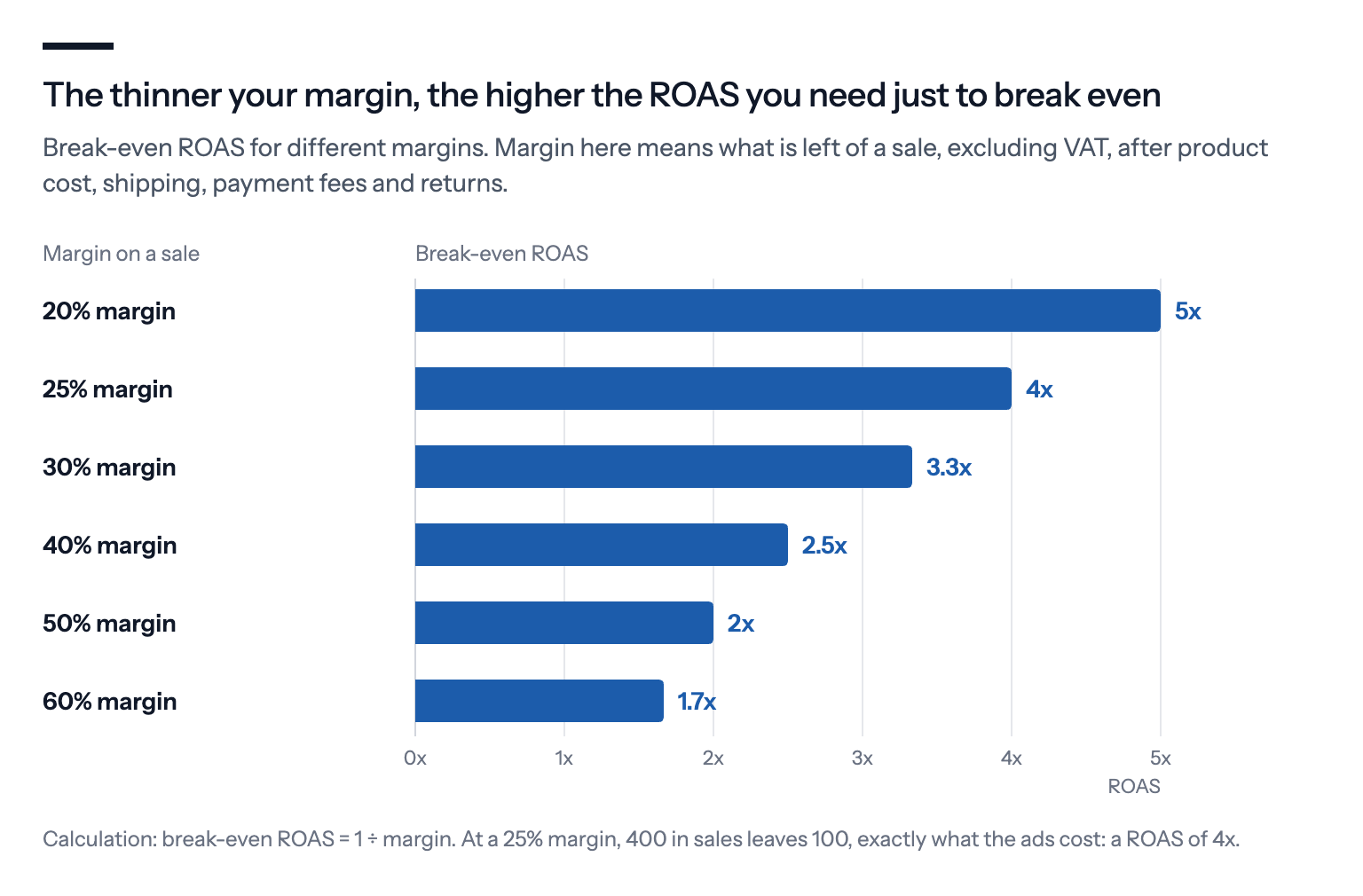
A 4x ROAS is exactly break-even for a shop that keeps 25% of each sale, so the same number can be a healthy profit for one shop and a loss for another. Your margin is what makes a ROAS good or bad, and this table turns your margin into a number:
| Your margin | Break-even ROAS | A first target we'd use |
|---|---|---|
| 20% | 5x | 6.3x |
| 25% | 4x | 5x |
| 30% | 3.3x | 4.2x |
| 40% | 2.5x | 3.1x |
| 50% | 2x | 2.5x |
| 60% | 1.7x | 2.1x |
The last column is our own rule of thumb. It sets the target a quarter above break-even, which leaves a fifth of your margin as profit once the ads are paid.
What ROAS measures, and what it leaves out
ROAS is the value of the sales your ads brought in, divided by what the ads cost. Google calls that sales value the conversion value, and it is whatever your tracking reports for each order, so a campaign that brought in 10,000 in sales on 2,500 of ad spend has a ROAS of 4x.
Google Ads asks for a target as a percentage, so a 4x target is typed in as 400%, while the column that shows your actual result, Conv. value / cost, gives the same 4x as a plain 4.00. Google's own help page uses a shoe shop with a target of 500%, which is 5x in the terms we use here.
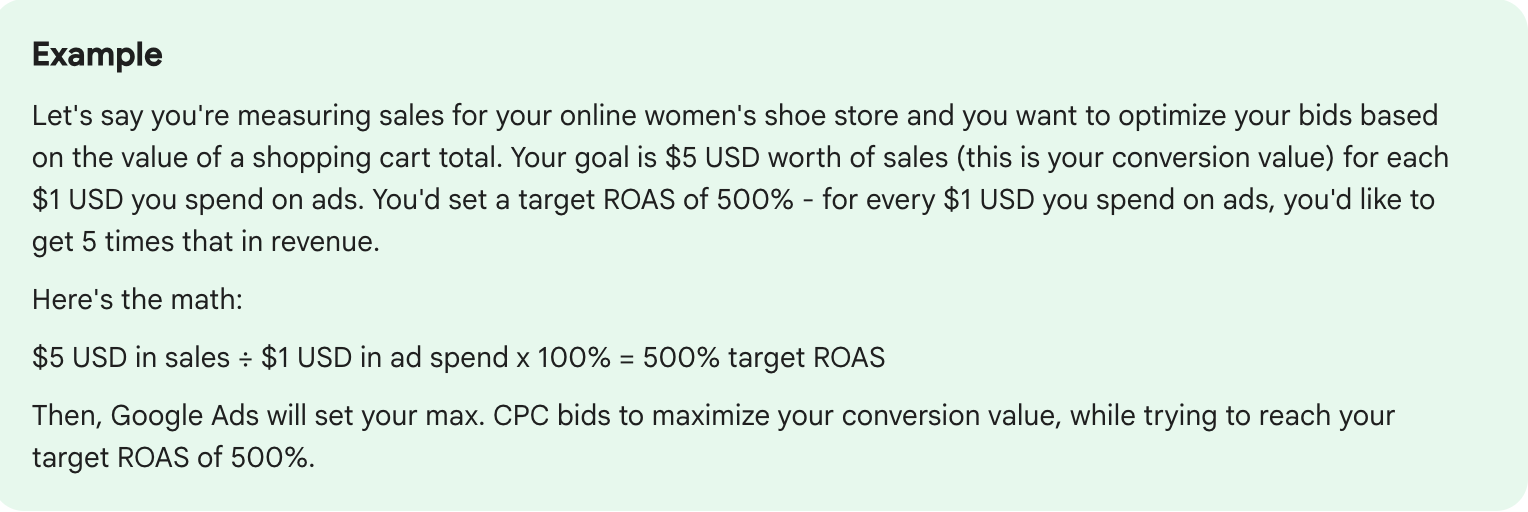
What ROAS leaves out is everything that decides whether you made money.
The product cost, shipping, payment fees and returns all still have to be paid out of that order value, and VAT may sit inside it too. If your shop reports prices including Denmark's 25% VAT, a 4x in Google Ads is really 3.2x before VAT, which is worth checking before you compare yourself with anyone.
Start with your break-even ROAS
The number that decides whether a ROAS is good is your break-even ROAS: the ROAS at which the ads cost exactly what the sales leave you. You find it by dividing 1 by your margin.
By margin we mean what is left of a sale, excluding VAT, after the product cost, shipping, payment fees and returns. If that is 30%, your break-even ROAS is 1 ÷ 0.30, or about 3.3x.
Below that the ads lose you money, and above it they make you money.
Google appears to be testing the same sum inside Google Ads. In a test spotted in early October, advertisers enter their average margin and get a suggested target back. A screen from the test showed 667%, or 6.7x, for a 15% margin, which is exactly break-even.
A break-even target earns you nothing, though, so treat it as the floor rather than the goal.
For many shops, break-even sits uncomfortably close to the typical result. smec, a Google Ads software and agency firm, measured an average gross margin, the share left after the cost of the goods, of about 35% across more than 150 European retail accounts last autumn. That puts break-even near 2.9x before shipping, fees and returns come off.
So a shop with that margin that gets the typical 3x may be making nothing from its ads, or losing money once shipping, fees and returns are paid, without anything in Google Ads looking wrong.
The same ROAS can make one shop money and cost another
Two shops can report the same ROAS and get opposite results, because ROAS only measures sales. The margin behind those sales is what pays for the ads.
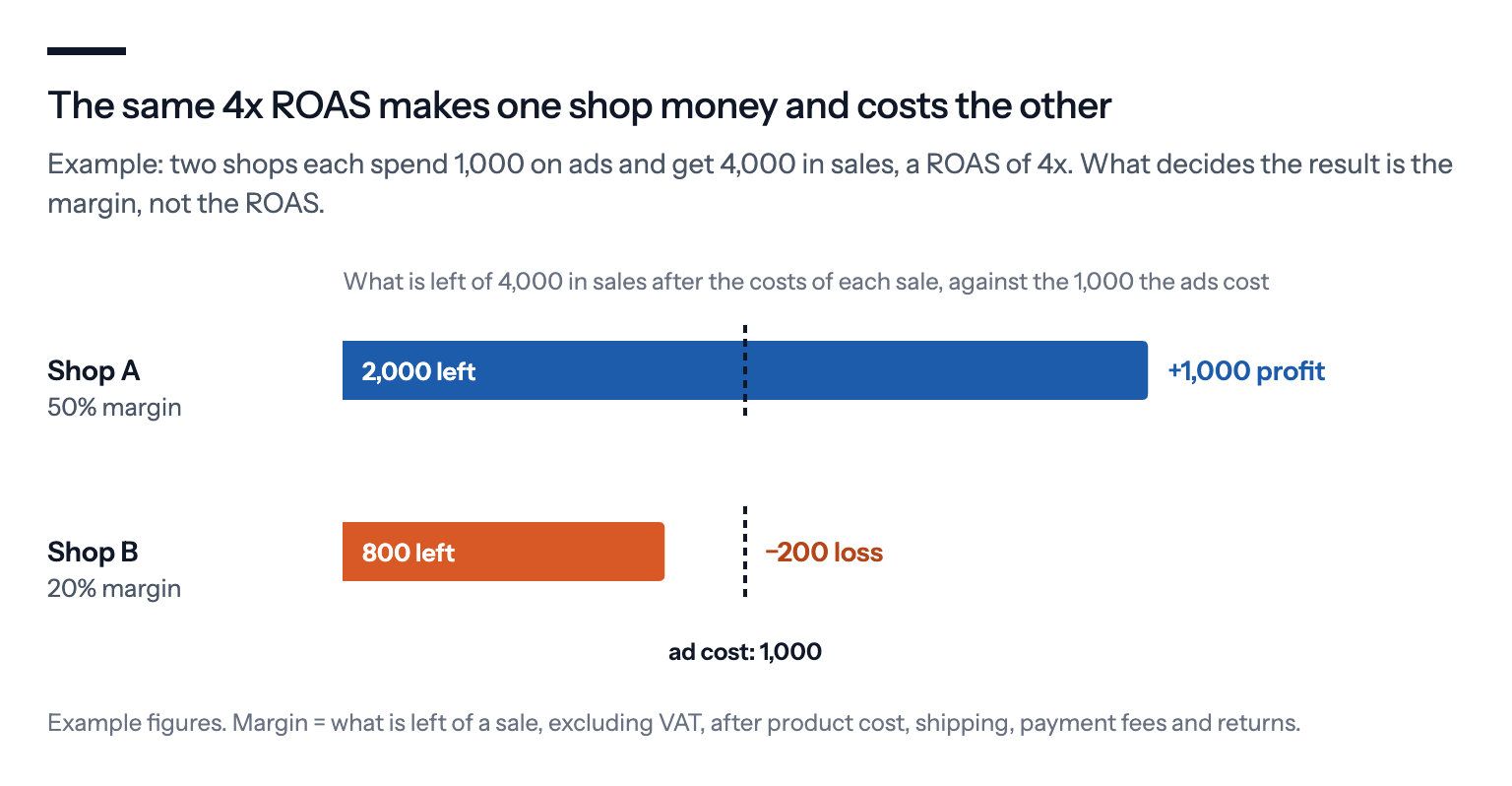
That is why a benchmark makes a poor target. A brand selling its own designs at a 50% margin and a reseller working on 20% can both sit at the typical 3x, but only the brand is making money at it.
From break-even to a target
Once you know your break-even, you can set a Target ROAS: the return on ad spend you ask Google to aim for when it bids. Google then bids high on searches it expects to bring valuable orders and low on the rest. For that it needs your tracking to report order values, plus at least 15 conversions in the past 30 days on Search campaigns and on Shopping campaigns, the product ads with a picture and a price.
The target Google Ads normally recommends is based on your actual ROAS over the last few weeks, so it tells you what you have been getting, not what you need.
Set the target above break-even by the profit you want to keep, but not so high that Google bids in fewer auctions and you lose traffic and sales. Google's guide for retailers points the same way: set the target on what will yield the highest profit, counting the cost of goods and what a customer is worth over time.

Since August, the target also means what it says when a campaign is short of budget.
Until then, a campaign held back by its budget, marked "Limited by budget" in Google Ads, often beat its target, because Google lowered its bids to make the budget last. smec found that more than half of those campaigns did so in the three months before the change.
Since a rollout between 17 and 27 August, Google bids them to the target instead, so a 3x target now means 3x, not "3x or better". Our Black Friday guide explains what that means for a sale.
When you change a target, move in steps and give it time. Google says its bidding reacts at once but needs one to two conversion cycles, the usual time from a click to a purchase, to reach a new target. Mike Ryan of smec advises steps of under 30%, with at least 30 days before the next change.
When a lower ROAS is fine, and a high one is a warning
A high ROAS isn't automatically good news, and a lower one isn't automatically bad.
"If your ROAS is too high, that can actually be a problem," says Jyll Saskin Gales, a Google Ads coach who spent six years at Google. A high target mostly reaches people who already know the shop, she explains, and she recalls from her Google years a very large retailer whose brand search campaign, the ads on searches for its own name, ran at 34x while adding nothing it wouldn't have sold anyway.
Brand searches and remarketing, the ads shown to people who have visited your shop before, lift ROAS because those people already know you.
Kirk Williams of the agency ZATO once wrote to a shop that wanted 8x before hiring his agency. Once the account also ran ads for people who didn't know the shop yet, he expected 3x to 4x overall: around 6x to 7x on brand and remarketing, and 1x to 2x on the ads for newcomers, partly because the sales they start often land later, under brand and remarketing.
First-time buyers can also be worth a lower ROAS on their first order if they come back and buy again, so it helps to know roughly what a customer is worth over time.
In our view, the safest yardstick is your shop's own numbers rather than Google's.
Andrew Lolk, founder of the Copenhagen agency SavvyRevenue, checks Google Ads targets against the company's own figures, above all total revenue divided by all ad spend, known as blended ROAS. In 8 out of 10 cases, he writes, cutting the target by about 20% has let his clients spend meaningfully more with little or no drop in that blended return or in their margin, though that is his agency's experience, not a controlled test.
What we'd do
A good ROAS is one you chose from your own numbers, so most of the work happens before you type a target into Google Ads.
Work out your margin, per product group if they differ. Take what is left after product cost, shipping, payment fees and returns, excluding VAT, and turn it into a break-even ROAS with the table above.
Check whether your conversion values include VAT. If they do, either remove it in your tracking or raise your break-even by the VAT rate: 25% in Denmark, so a break-even of 4x becomes 5x.
Set the target above break-even, not from a benchmark. Start around a quarter above break-even, then adjust based on what happens to your sales and your profit.
Read brand and new customers separately. An account-wide ROAS that includes searches for your own name will flatter the rest of your campaigns.
Work it out again for sales. Discounts lower your margin and so raise break-even. By the week of Black Friday last year, smec's average gross margin had fallen from about 35% to 27%, which moved break-even from about 2.9x to 3.7x, even before shipping, fees and returns.
Move the target in steps, and judge it on profit. Outside sales, change it by less than 30% at a time, wait at least a month, and check what happened to your shop's total sales and margin, not just the ROAS column.
If you use Bavian, it decides what each campaign bids for, with or without a ROAS target, unless you take over. On the Bidding page you can choose a return on spend and type your own number as a multiple: 4 for 4x, not the 400% Google Ads uses.
Bavian keeps that number until you change it, and only overrides it if something new comes up that would otherwise cost you money or break a rule. So it pays to work out your break-even before you type it in.