Google can bid Standard Shopping and Performance Max campaigns for gross profit in a beta, but only if your tag sends the products in each order and Merchant Center knows what each product costs you. Here's what that takes, what you get even without the bidding, and when sending profit yourself is simpler.
Google can bid for profit. It just doesn't ask you for your margin to do it. It wants to know which products were in each order and what each of them cost you, and then works out the profit itself.
Google calls it gross profit optimisation. It announced it in May 2024 for Performance Max and Standard Shopping campaigns, and it was showing up in select accounts by October 2024. Google called it a beta, and it has never been announced for every account. But the data it runs on is open to every online store, and that data is useful long before any bidding changes.
The short version
- Google's profit bidding needs two things: a purchase tag that sends the products in each order, called conversions with cart data, and the cost of each product in Merchant Center.
- With both in place, Google Ads reports gross profit per campaign and product, even if you never switch the bidding.
- The bidding itself is limited to Performance Max and Standard Shopping, and only in accounts where Google has switched it on.
- Few advertisers were ready for it in 2024, mostly because they didn't want to hand Google their costs. Sending profit as your own conversion value is the alternative, and it works in every campaign type that bids on conversion value, Search included.
Why margins break revenue bidding
A store with one margin across its catalogue can live with revenue bidding. Set the target right once, and every sale is worth roughly the same share of its price.
Most stores aren't like that. Otavio Dias of the Irish agency Wolfgang Digital describes a client whose electronics sell at margins of about 5% and whose furniture sells at about 25%. On revenue, the electronics need a ROAS of 20x just to break even, and the furniture needs 4x. One target can't be right for both.
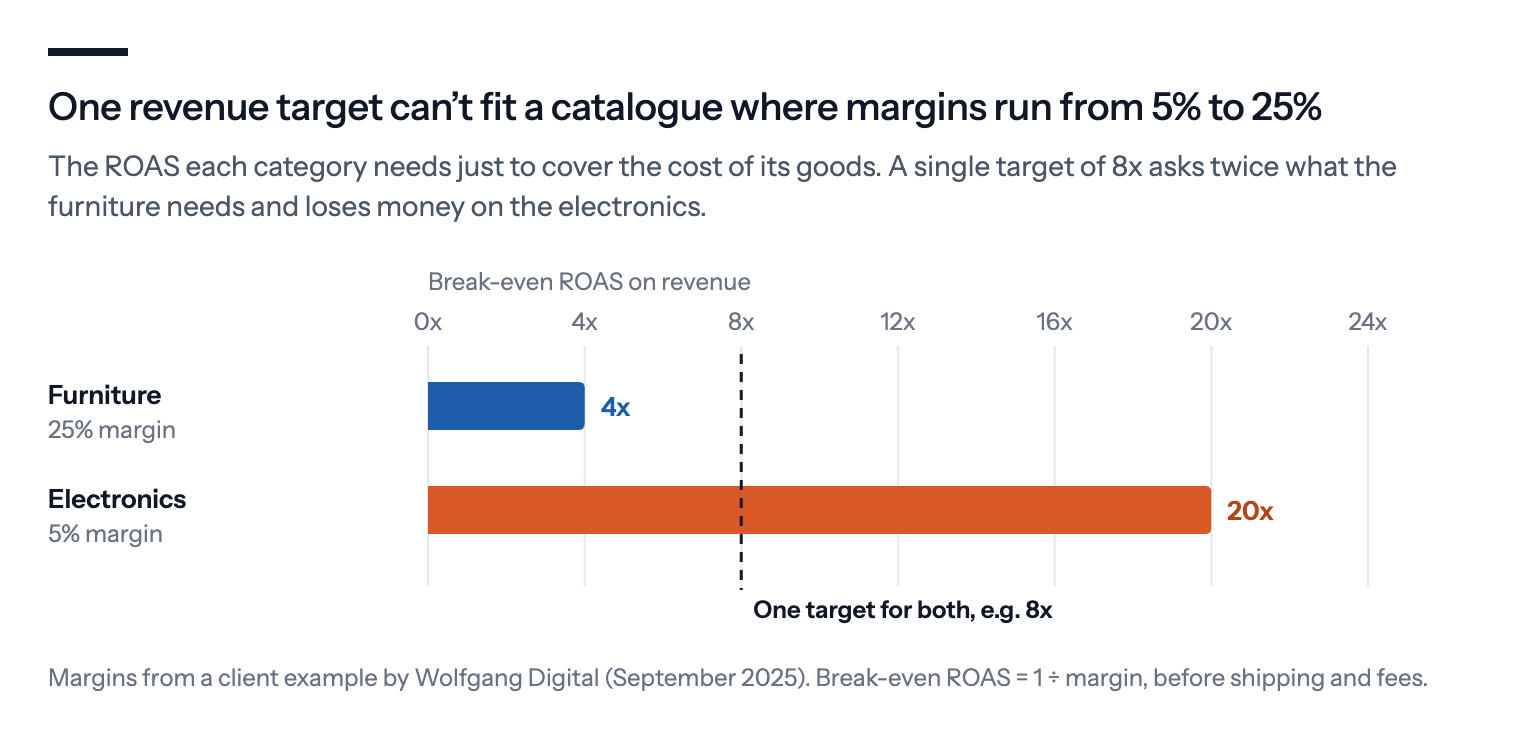
Without the product costs, Dias writes, "the algorithm and consequently the campaigns will prioritise revenue-driving products". The product that sells for most wins the budget, whatever it leaves behind.
The usual workaround is to split the catalogue into campaigns by margin, which we explain in Margin in Google Shopping without sharing your costs. Cart data with product costs lets Google's profit bidding do the same job per product and per order, without the split.
What it needs
Conversions with cart data. Your purchase tag sends the products in the basket, with their IDs, prices and quantities, not just the order total. Google's rule is strict: the item IDs in the tag "must exactly match the id attribute in your Merchant Center feed". When they don't, Google Ads lists the flagged IDs in the diagnostics for that conversion action.
The cost of each product in the Merchant Center account linked to your Google Ads account. That's the cost_of_goods_sold attribute in your product data. You can send it in the feed, through the API or in a supplemental feed, and Google says an estimate will do for the reporting. Its setup guide gives 80% of the price as an example.
![In Google's words: This data is used to calculate an estimated gross profit of your products. … The information that you share with Google regarding COGS is for reporting purposes and does not need to be exact. Source: Google Merchant Center Help, Cost of goods (cogs) [cost_of_goods_sold]](https://bavian.com/api/public/insight-image?path=2026-10-22%2Fb5d35bcf-cart-cogs-quote.png)
A purchase conversion Google bids on. The conversions have to be biddable purchases tracked with the Google tag or Google Tag Manager, or imported from Google Analytics, Search Ads 360 or Firebase.
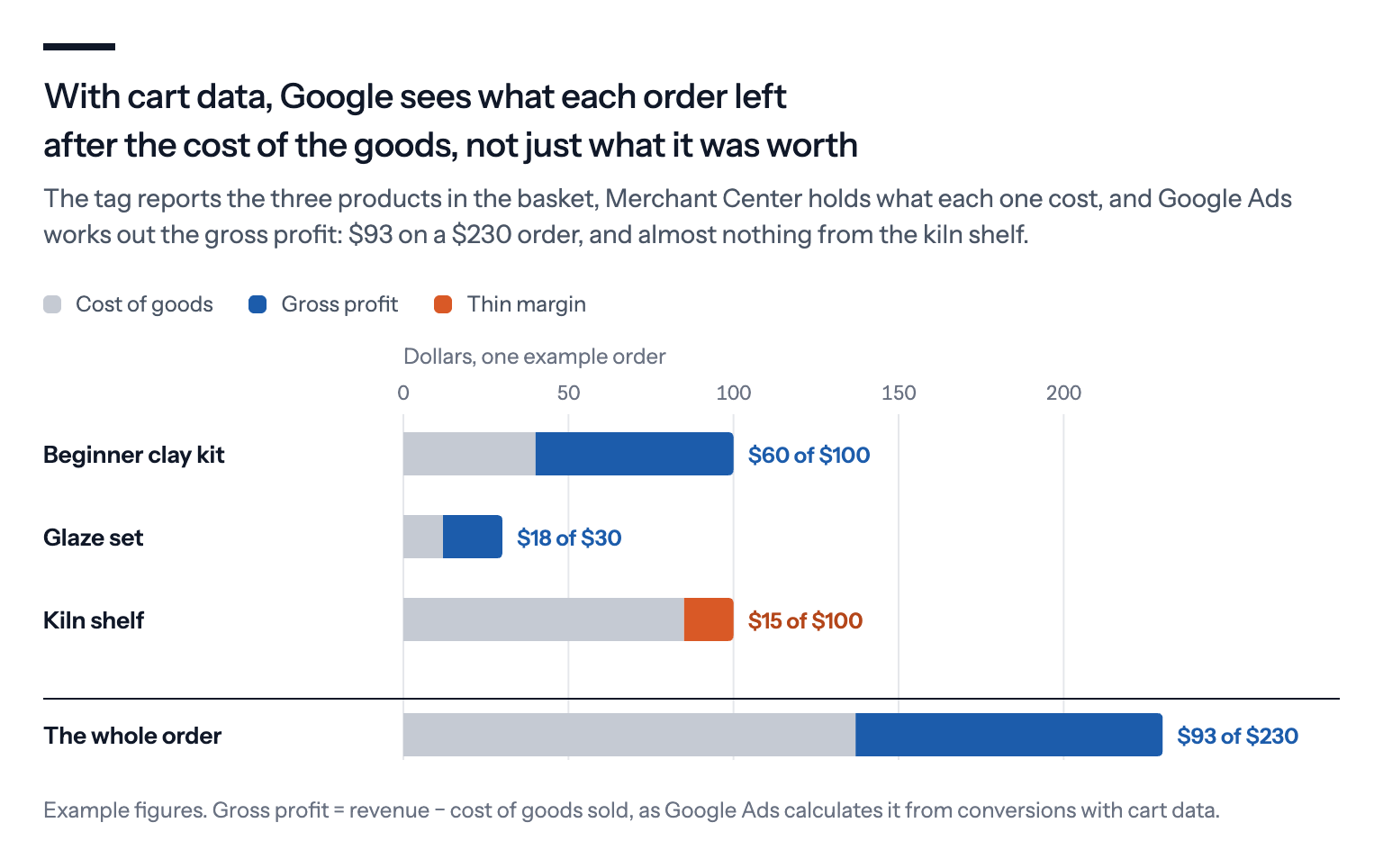
With all three in place, Google Ads can take each order apart: the products in it, the price of each, and what each cost you.
What you get even without the bidding
Cart data plus product costs unlock reports that most accounts never see: orders, average basket size, revenue, items sold and gross profit per campaign and product. For Shopping ads, Google also shows which other products people bought after clicking an ad, so you can see which products pull bigger baskets.
That alone is worth doing. You'll see which campaigns make money, not just which ones sell, and you'll see it in Google Ads instead of in a spreadsheet you build once a quarter.
The reports only count what they can match. Google's gross profit and margin metrics include only the products for which you've sent costs, and products whose IDs don't match your feed are left out of the product reports. Check the diagnostics before you trust the numbers.
How to check that it works
Most cart data problems are invisible until someone looks for them, because the purchase still counts as a conversion. Only the products and the profit go missing.
Google's test guide walks through a test order with the browser's developer tools open. On the order confirmation page, you find the conversion request and check that it carries your Merchant Center ID, the feed's country and language, and the items with their IDs, prices and quantities. The Google Ads tag can also send the order's discount (conversions imported from Google Analytics can't), which matters for profit: a 20% discount code takes a fifth of the price and leaves the cost of the goods where it was.
After the test order, Google suggests watching the cart data diagnostics under Goals, then Diagnostics, for the next 7 days. They flag IDs that don't match the feed and products without a cost.
Three things go wrong most often:
- The IDs don't match. The shop sends its own SKU, while the feed uses a variant ID, or the other way round.
- The wrong Merchant Center account is linked, or the feed country and language in the tag don't match a data source.
- Only some products have a cost. The order still reports, but its profit only covers the products with a cost in the feed.
Who it suits, and who it doesn't
It suits stores with many products and very different margins, where a single ROAS target is wrong for most of the catalogue and sending profit from the site is hard.
It doesn't help service businesses or lead accounts, because there's no basket and no product cost.
It's a bigger ask than it sounds. The tag has to send clean product data with every order, and you have to hand Google your product costs. Smarter Ecommerce, which sells Google Shopping software and its own profit bidding, found in its own data from early 2024 that only about 5% of advertisers were ready, "mostly because people are hesitant to share their cost data with Google".
Google's uplift figure is Google's. Google said on a help page in 2025 that advertisers using gross profit optimisation in Smart Bidding see an average 15% uplift in campaign profit compared with revenue-only bidding, a figure agencies such as Wolfgang Digital pass on. Its footnote says only that the figure comes from Google's own data on Shopping campaigns in September and October 2023, and the claim has since gone from the page. Treat it as a vendor claim, not an independent test.
Google's profit bidding or your own profit values?
There are two ways to make Google Ads bid for profit, and they suit different stores.
| Google's profit bidding | Profit as your conversion value | |
|---|---|---|
| Campaign types | Performance Max and Standard Shopping | Every campaign that bids on conversion value, including Search |
| What you send | Products per order, and product costs in Merchant Center | One profit figure per order |
| Your costs | Stored in Merchant Center | Stay on your own server |
| Availability | Select accounts | Any account |
| Reports | Revenue and profit side by side | Conversion value becomes profit |
Google's route keeps revenue and profit side by side in your reports and needs no change to how your site calculates orders. Your own route works in any value-bidding campaign, keeps your costs to yourself, and lets you decide what counts as profit, such as taking off shipping and payment fees too.
If your store can calculate a profit per order, sending it as the conversion value is usually the quicker route. Our guide to making Google Ads bid for profit shows how, and what to do with your target when you switch.
What we'd do
Set up cart data for the reporting, whatever you decide about bidding. You'll see profit per campaign even if you never switch the bidding.
Add product costs, even estimated. A rough cost per product category beats none, and Google says it doesn't need to be exact for the reporting.
Fix the IDs before you read the reports. Download the flagged item IDs from the conversion action's diagnostics, and make the tag send the same IDs as your feed.
Test the profit bidding on one campaign if it shows up in your account, and judge it on your shop's own profit over a month or more, not on Google's 15%.
If you use Bavian, it divides your total daily budget according to the conversion values in your Google Ads account. With Google's profit bidding, those values are still revenue, so to have Bavian's budget split work towards profit as well, send profit as the conversion value instead.