
A supplemental data source adds or changes product details in Merchant Center, matched to your main feed by product ID, without touching your shop or its feed app. It's the right tool for custom labels and for details Google asks for that your shop doesn't send. It's the wrong one for prices and stock, which must match your website.
Your Shopping products are missing a colour, so Google limits them in some countries. You want to group products by margin with a custom label. Or you'd like product types your shop doesn't have. And the feed comes from a shop app you can't change, or from a developer who's busy until spring.
Merchant Center has a tool for exactly this: a supplemental data source. It lets you add or change product details on top of your main feed, without touching the shop. Used well, it's one of the most useful settings in Merchant Center. Used for the wrong things, it can get products disapproved.
Here's what it does, what it's for, and where it goes wrong.
The short answer
- A supplemental data source adds details to products that already exist in your main (primary) data source, matched by product ID. It can't add or remove products.
- In today's Merchant Center, you first switch on an add-on called "Advanced data source management". A Google Sheet is the simplest way to start.
- It's the right tool for custom labels, and for details Google asks for that your shop doesn't send, such as colour, size, gender and age group for clothing.
- It's the wrong tool for price and availability unless it's kept as current as your website. Google checks prices against your pages and can disapprove products that don't match.
- Every value you add is a value you now maintain. Fix what you can in the shop, and keep the supplemental source small.
What a supplemental data source is
Every Merchant Center account has at least one primary data source: the feed from your shop, a file or an app such as Shopify's Google & YouTube channel. It decides which products exist. A supplemental source sits on top of it.
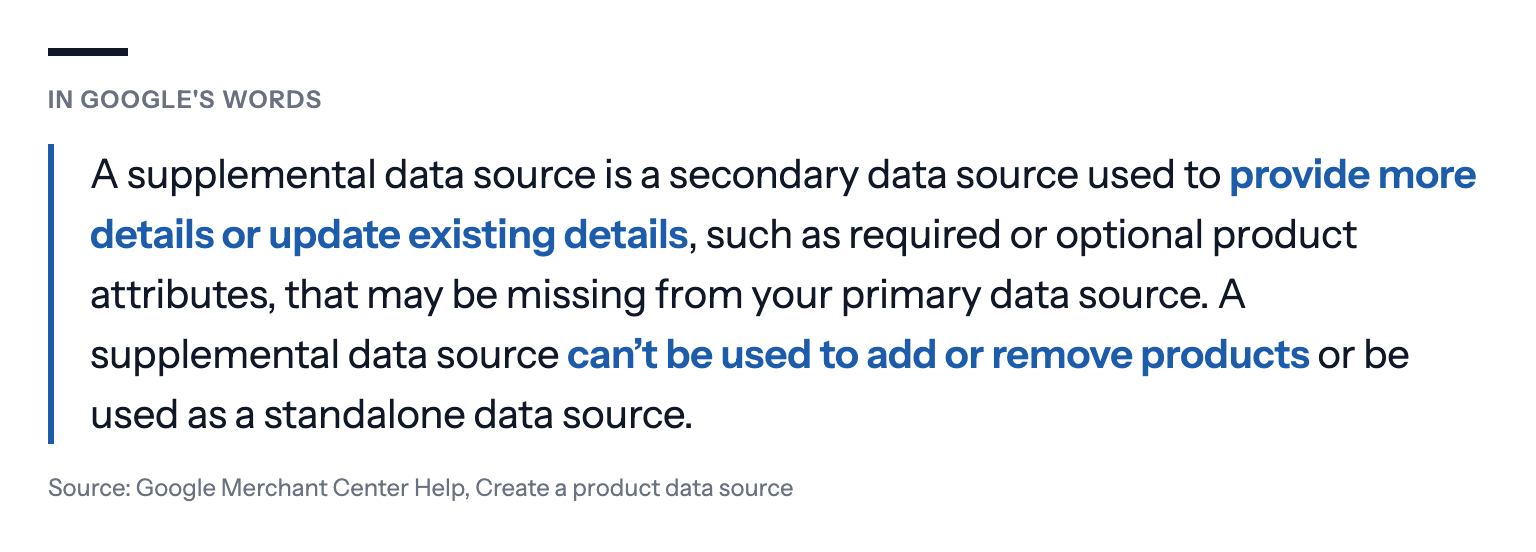
The link between the two is the product ID. John Stanko, an account manager at the US PPC agency JumpFly, which runs Shopping campaigns for clients, puts it plainly in the agency's guide: a supplemental feed "cannot stand alone; it only applies changes when a product's ID matches an item in your primary feed." Get the IDs wrong, with a missing prefix or a parent ID instead of the variant's, and nothing happens at all.
In Merchant Center as it looks since Google replaced the old interface, the "supplemental sources" tab only appears once you switch on the "Advanced data source management" add-on, under Settings and Add-ons, according to Google's help page. From there you can add a file, a Google Sheets template or a connection through Google's Merchant API.
What it's good for
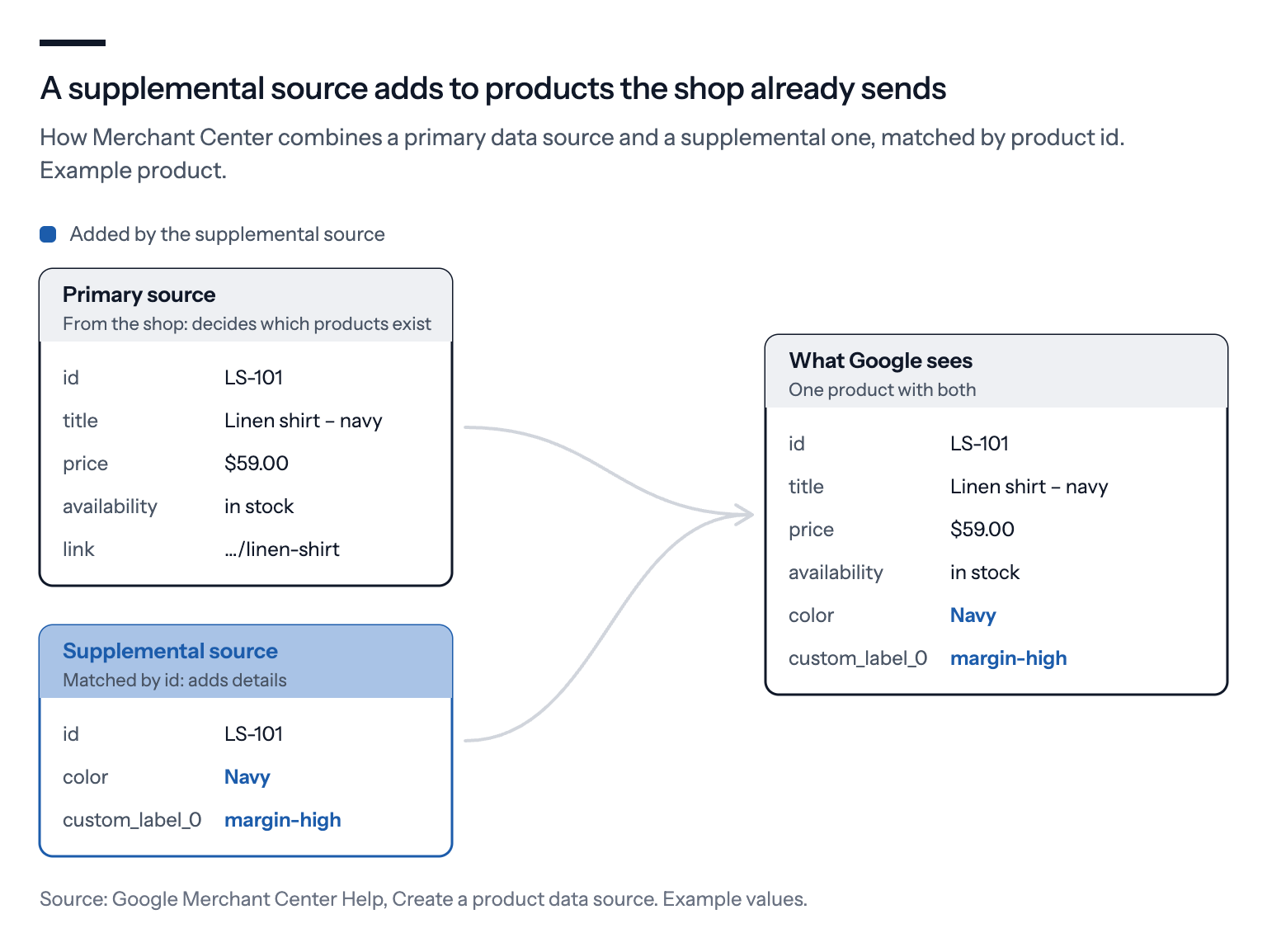
Custom labels. Merchant Center gives each product up to five custom labels, custom_label_0 to custom_label_4, which you can use to split products into campaigns or listing groups, such as by margin band, season or best sellers. Google's custom label page allows up to 1,000 unique values per label across the account. Shops rarely have a field for them, so a supplemental source is where they usually live. Our guide to margin in Google Shopping with custom labels shows how to use them.
Details Google requires that your shop doesn't send. For clothing and accessories, Google needs more than a title and a price. Colour, for example, is required for free listings of all apparel, and for Shopping ads when you target Brazil, France, Germany, Japan, the UK or the US, according to Google's colour attribute page. Size, gender and age group have similar rules. Many shop platforms keep colour and size only as variant names, never as separate fields, and the feed app sends nothing. A supplemental source can add the missing values without a new feed.
Product categories and types. A product_type that describes how you group your range, such as "Kitchen > Knives > Chef's knives", makes it far easier to split campaigns and read reports than a flat list of products.
Keeping products out of one channel. The excluded_destination attribute keeps a product out of Shopping ads, say, while it still appears in free listings. Google's own help page on data sources points to it when you need to exclude products, rather than a separate primary feed.
What it's risky for
Price and availability. Google lets a supplemental source update price and availability; its help page even describes a "Take latest" rule for the purpose. But Google also checks prices against your website. Its page on mismatched prices says that "when a mismatch is found between your price on the landing page when it loaded and price [price] in the data source, the product with the mismatch may be disapproved". Price mismatches, Google adds, "may lead to an account suspension".
![In Google's words: When a mismatch is found between your price on the landing page when it loaded and price [price] in the data source, the product with the mismatch may be disapproved. Source: Google Merchant Center Help, How to fix: Mismatched product price](https://bavian.com/api/public/insight-image?path=2026-10-23%2F854e47d4-supp-q-price.png)
A Google Sheet with prices from last month's sale is exactly that kind of mismatch. Unless the supplemental source is generated automatically from the same system as your website, leave price and stock to the primary feed.
Titles and descriptions. A supplemental source can replace a title, and a better title can help a product match more searches. But a title written in a spreadsheet doesn't update when the product does. When the shop renames a product, changes its size range or drops a colour, the old title stays in Shopping until someone notices.
A worked example
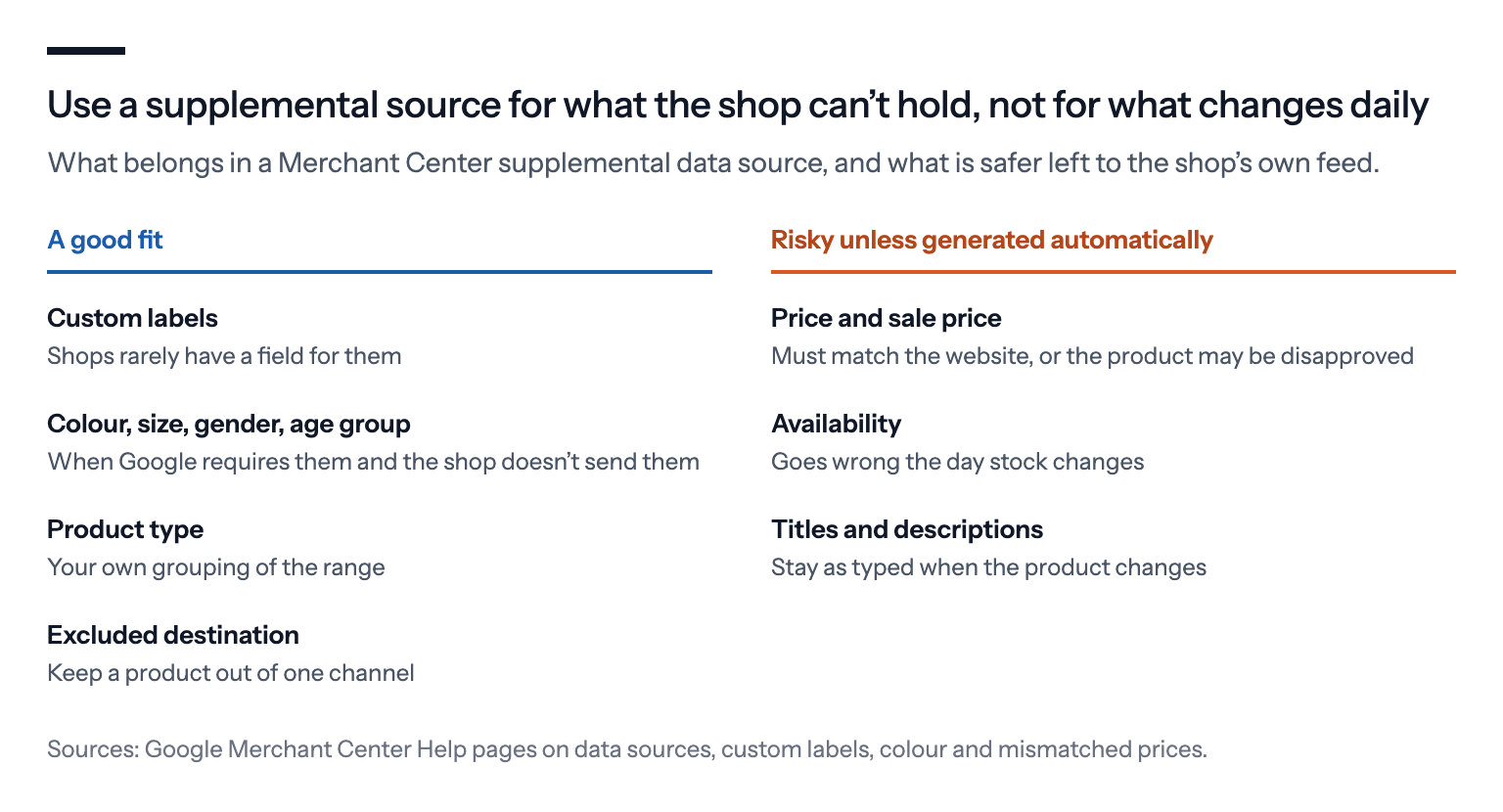
Take a fictional clothing shop with 800 products, selling in Germany and Denmark from one Merchant Center account. Its feed comes from a shop app that sends title, price, stock, images, size, gender and age group. But for about 300 products it sends no colour, because the shop stores colour only as part of the variant name ("Linen shirt – navy").
In Merchant Center, those 300 products carry a warning about missing colour. In Germany, where colour is required for clothing in Shopping ads, they can't serve.
The shop builds a Google Sheet with two columns, id and color, for the 300 products. The colour comes from the variant name. It links the Sheet as a supplemental source to its primary feed, and the warnings clear as Merchant Center processes the data.
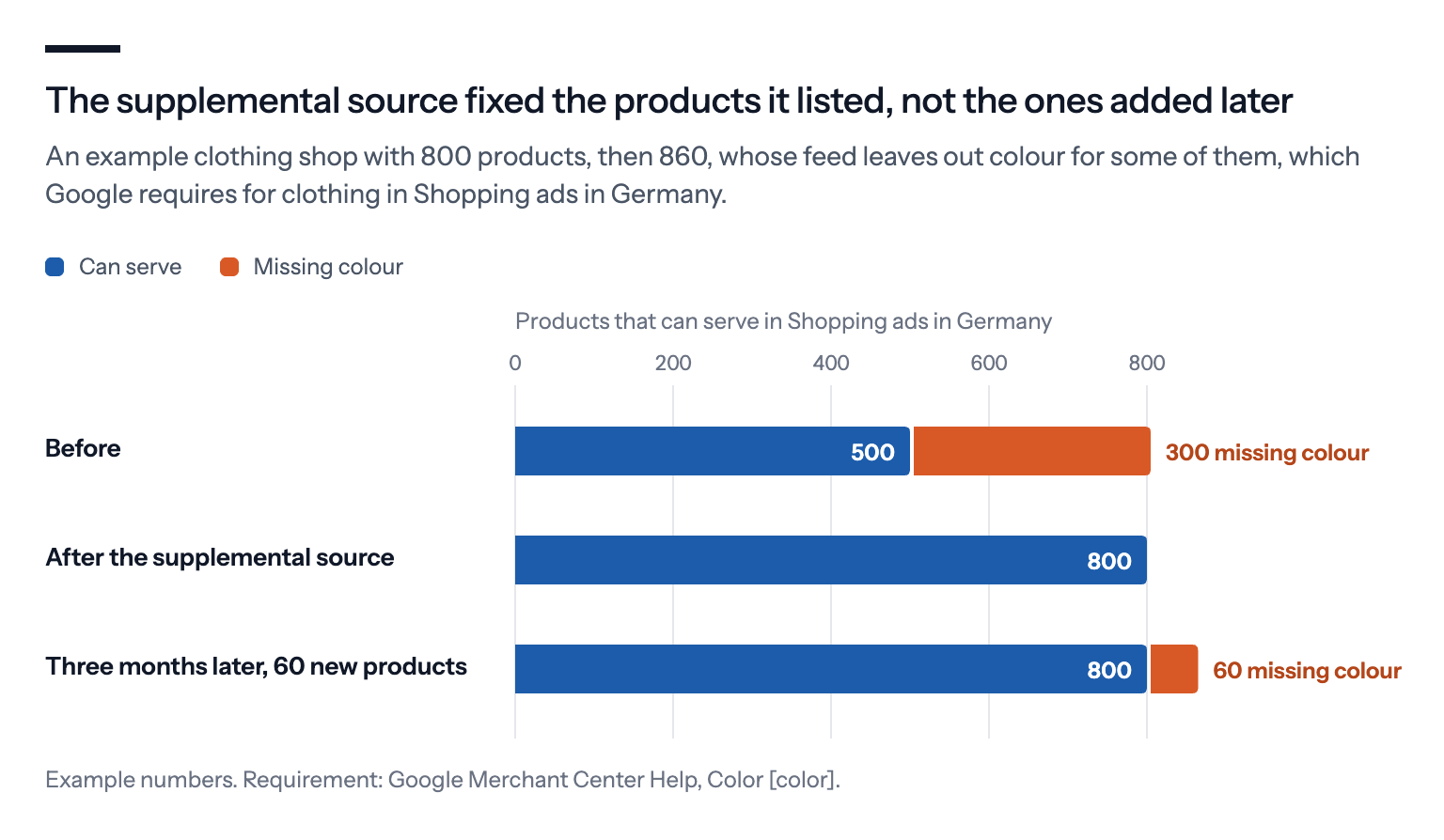
Three months later, the shop adds 60 new products. None of them are in the Sheet, so they're missing colour again. The supplemental source fixed the past, not the future. The lasting fix is to send colour from the shop, or to generate the Sheet from the shop's own data on a schedule.
Where this falls short
It's a second source of truth. Every value in a supplemental source is a value someone has to keep up to date. A small, generated source is easy to live with. A large hand-edited one becomes a second product catalogue that nobody owns.
It hides problems from the shop. If a supplemental source quietly fixes missing data, nobody fixes the shop. The same gap then shows up in every other channel that reads the shop's data, from Meta's catalogues to price comparison sites.
ID mismatches fail silently. If an ID in the supplemental source doesn't match the primary feed exactly, that row does nothing. Check a few products in Merchant Center after linking, rather than trusting that it worked.
It doesn't fix the website. Google checks some details against your landing pages. A colour, price or availability in the feed that the page contradicts is still a mismatch, wherever in Merchant Center the value came from.
What we'd do
Look at Merchant Center's product issues first. Sort them by how many products each issue affects. That tells you whether missing data is costing you anything worth fixing.
Fix at the source where you can. If the shop or its feed app can send colour, size or product type, set it there. It stays right as products change.
Use a supplemental source for what the shop can't hold. Custom labels and missing required details are the classic cases. Keep it to the columns you need.
Keep prices and stock out of it, unless it's updated automatically from the same system as your website.
Generate it rather than type it. A Sheet built from the shop's export, refreshed on a schedule, ages far better than one edited by hand.
If you use Bavian, it keeps its own supplemental sources in your Merchant Center for the campaigns it manages: one with the custom labels that decide which of its Shopping campaigns each product runs in, and one that fills in colour, gender, age group, size, shipping weight and missing images where Google asks for them and your feed leaves them empty, read from the product's own text and page. Where Google refuses an image, Bavian can also use the one the product page shows, for a while. You don't need to build either, but price, stock and titles still come from your shop.