
One website with several markets is the simplest to run in Google Ads and Merchant Center. A site per country gives each market its own budget, language and product data, but also its own Merchant Center and, usually, its own Google Ads account. Here's how to choose.
When an online store starts selling abroad, the Google Ads question comes down to how the website is built. One site with several markets and one site per country need different setups in Google Ads and Merchant Center, and the setup decides how much work every new market adds and how clearly you can see what each one earns.
Most stores never choose on purpose. The site grows a German version one year and a Swedish domain the next, and the ad accounts follow. It's worth deciding before the second market, because moving later means starting a market's ad history again.
The short answer
- One site with several countries is the simplest to run. Merchant Center can show the same products in every country that shares a language, and one Google Ads account can split budgets by campaign.
- A site per country gives each market its own Merchant Center account and usually its own Google Ads account, with clean numbers and its own currency, but every new market starts from scratch.
- Since September, Google no longer lets you choose a language for Search campaigns. The language of your ads and landing pages now does that job.
- Our rule of thumb: start with one site and a campaign per big market, and split when a market needs its own prices, range or brand, not just a translation.
One site, several countries
Merchant Center can use the same products for several countries that share a language. You add the countries to your product data source, and Google's help page uses Spanish as its example: one Spanish data source can also reach Colombia and Ecuador. Translations get their own data sources, one per language.
Your shipping settings must cover each country, in the currency of your products, and your campaigns' location targeting in Google Ads has to include those countries. Policies apply country by country, so a product allowed in one country can be disapproved in another. To keep a product out of one country's Shopping ads, use the shopping_ads_excluded_country attribute.
Google Ads targets the countries per campaign. One campaign can cover several countries. A campaign per country costs more work, but gives each market its own budget and results, which matters when one country converts at half the cost of another.
Check the location option. By default, Google Ads shows ads to people in, regularly in, or interested in your countries. If you only ship to those countries, switch to Presence, so someone in a country you don't ship to who reads about Germany doesn't see your German ads.
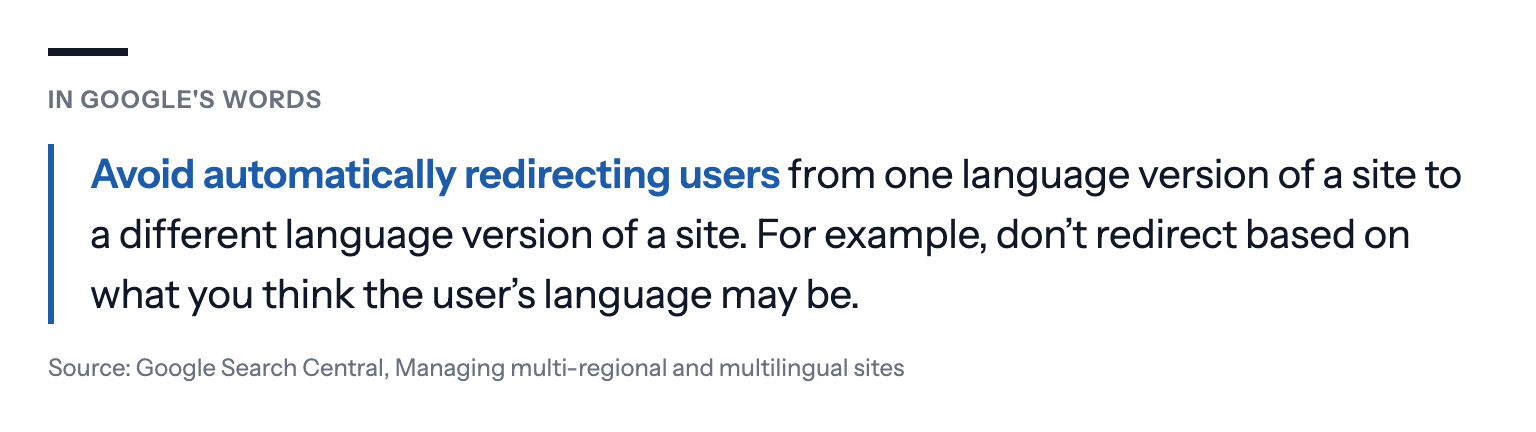
Let people choose their country. Google's own advice for sites with several versions is to link between them rather than redirect visitors automatically.
For ads, there's a second reason. Merchant Center checks that your landing pages match your product data, and its landing page requirements ask for the same price and currency whatever the visitor's location. A page that switches price or currency by where the visitor seems to be can show Google a different price from the one in your feed.
Language is now the ad's job
Since September 2026, Search campaigns no longer have a language setting, and Performance Max ignores its language setting when its ads run on Google Search. Google matches ads mainly on the language of the ad, the landing page and the search itself, plus what it knows about the languages a person understands. Google's Ads Product Liaison, Ginny Marvin, announced the change on 14 August, and Google's guidance is to make ads and landing pages clearly in the intended language. Performance Max keeps the setting for YouTube, Display, Discover and Gmail.
So an ad in English can show to an English search in Germany, and a German search favours your German ad. If you sell in two languages, write ads and landing pages in both, and keep one language per ad group.
Regional variants of one language are the hard case, such as Flemish and Dutch, or Swiss and German German. If your offer or prices differ between them, separate them by country targeting and landing page, because the language alone doesn't tell Google which you mean. In our September–October roundup, a Dutch agency's search lead suggested splitting ad groups that mix Dutch and Flemish, and recording a baseline for each region.
Prices, currencies and conversion values
A Google Ads account has one currency, but a store that sells abroad often takes orders in several. That's fine for reporting, as long as each conversion says which currency it's in.
Google converts conversion values into the account's currency at the average daily exchange rate when the tag sends a currency code with the value, as long as the conversion action has a currency set. If the tag sends no currency code, or one that isn't a valid 3-letter ISO 4217 code, Google uses the currency set on the conversion action's default value instead.
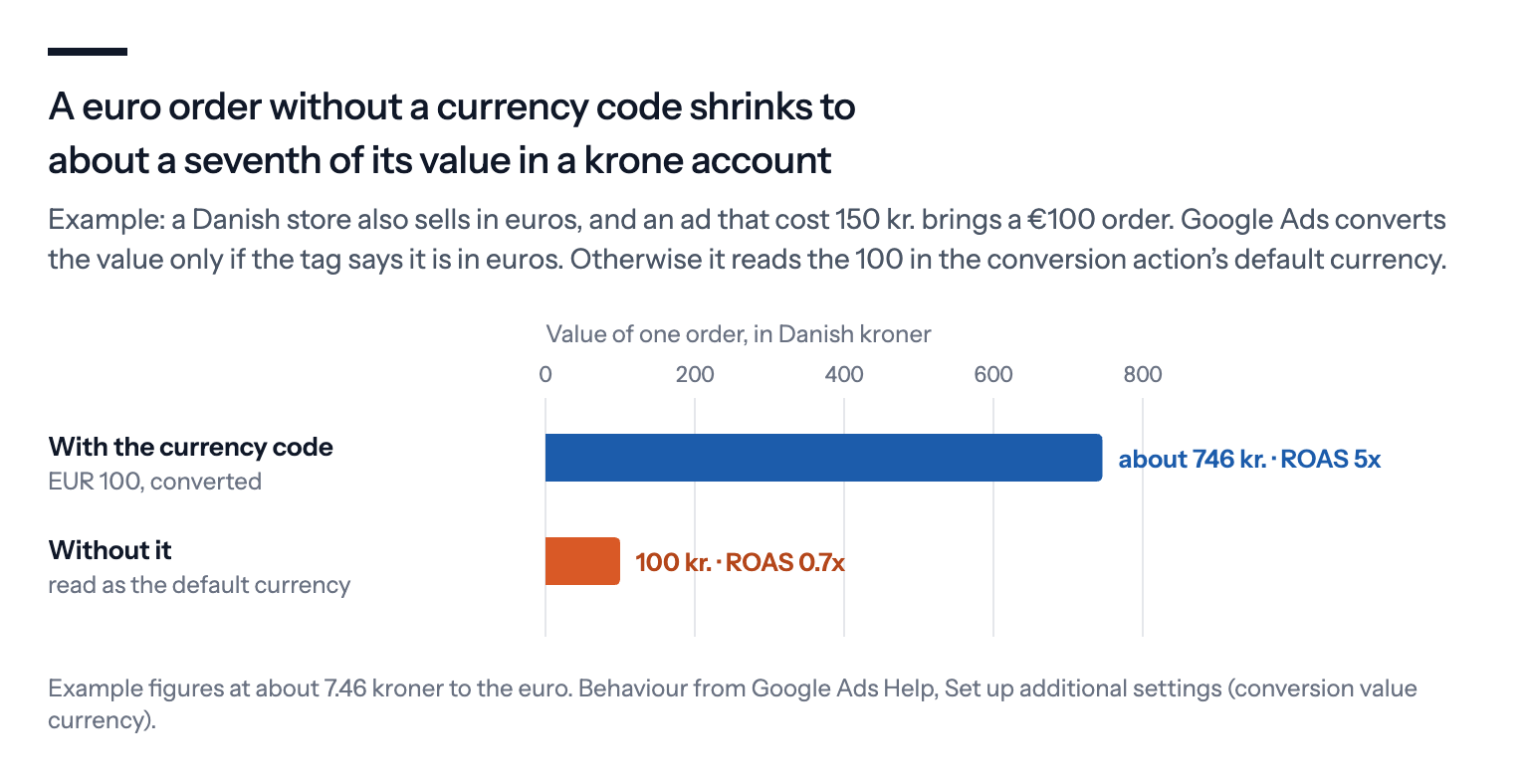
So a Danish store whose conversion action is set to kroner, and whose shop sends euro orders without a code, reports them at about a seventh of their value. The euro markets then look unprofitable, and value-based bidding holds them back for a reason that doesn't exist.
Merchant Center has a currency rule of its own: in most countries, shipping has to be set up for each country you add to a data source, in the currency of your products, either in Merchant Center's shipping settings or per product in the feed. When a market gets its own prices rather than converted ones, that's often the first sign it may need its own site.
A site per country
Each site is its own Merchant Center account. Only one Merchant Center account can claim a website. Google recommends a multi-client account for retailers selling on several domains, with a sub-account per site, so the products, shipping and policies for each country stay apart under one parent account.
A Google Ads account per site keeps things clean. Each market gets its own currency, budget, conversion tracking and reports. It's more to manage, but one country's results don't mix with another's.
Every market starts from scratch. A new country site has no history in Google Ads, so its first weeks are a test, whatever worked at home. Smart Bidding has no conversions from the new account to learn from.
How to choose
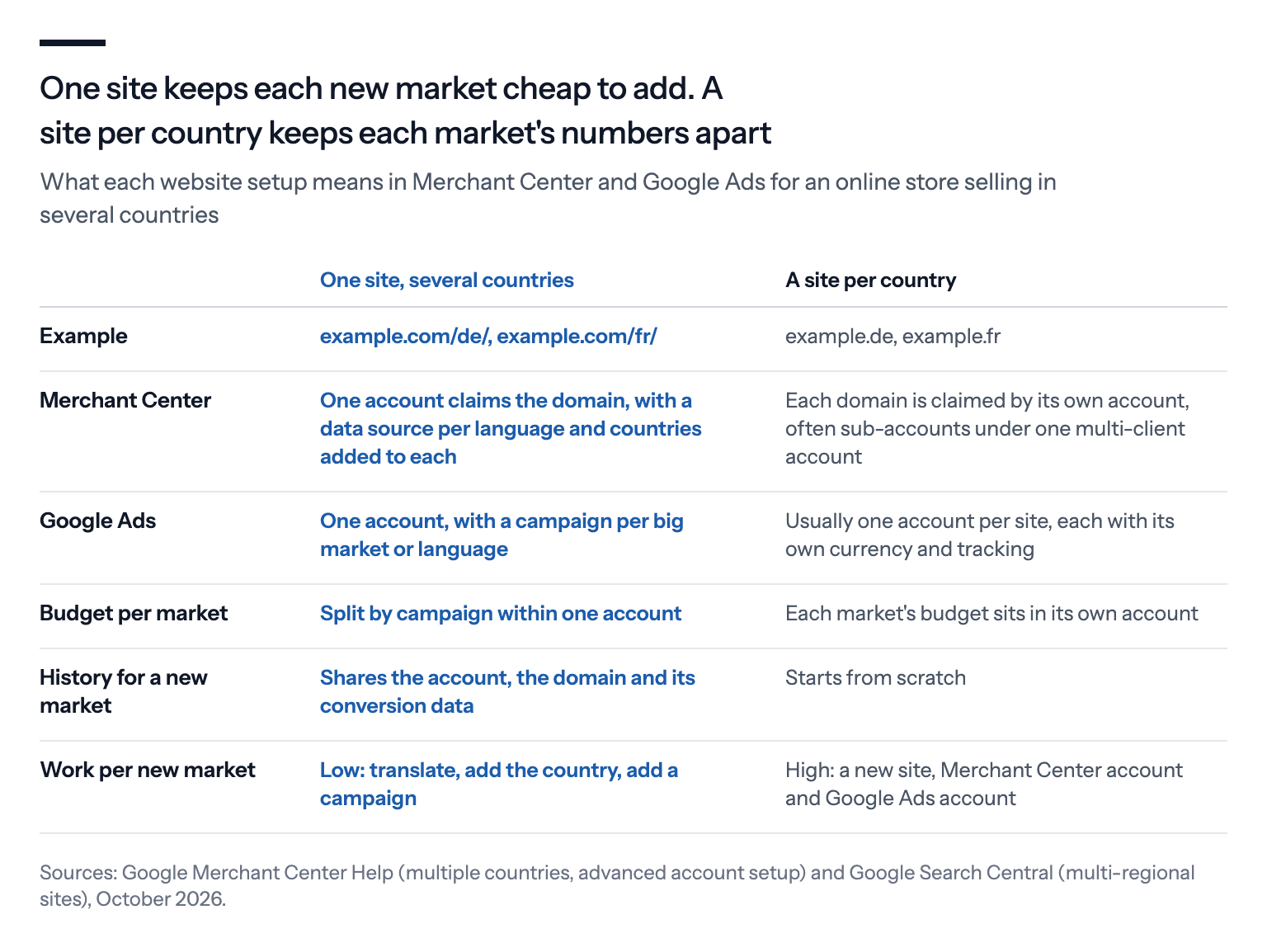
The choice is rarely about Google Ads alone. A separate domain is right when a market has its own prices, its own range, its own brand name or its own legal requirements, and the extra accounts are the price of that.
A translation isn't enough reason on its own. If the products, prices and checkout are the same, one site with a folder per language gives Google Ads more data to learn from and you fewer accounts to keep in step.
What we'd do
Start with one site and a campaign per big market. Group small markets that share a language into one campaign until each has enough sales to stand alone.
Switch every international campaign to Presence, unless you also sell to people who are planning to come to your country.
Write ads and landing pages in each language you sell in, one language per ad group, now that the language setting is gone.
Link between country versions instead of redirecting by location. Let visitors and Google's crawlers see each version.
Split into a site per country when a market needs its own prices, range or brand. Then give it its own Merchant Center account and Google Ads account, and treat its first weeks as a test.
If you use Bavian, a project is one website, with its own Google Ads account and, for an online store, its own Merchant Center account, and you can run several projects from one Bavian login. Within a project, you choose the countries on the Locations page in Bavian, for all campaigns or per campaign, and Bavian writes ads in the project's ad language. For a campaign in another language, ask Bavian in the chat on the Agent page.