
Bots and paid clickers are real, and Google says so itself. It also filters most of them out before you pay, and credits you for some it catches later. In the accounts we see, money that looks stolen has more often gone to settings that send ads to the wrong people. Here's how to tell the two apart, and what actually helps against each.
Recently, a business owner told me on a call that his competitors were using bots to click his ads. His click costs had gone up, his leads hadn't, and he was sure someone was draining his budget on purpose.
It's a worry that comes up more in some industries than in others, mostly where a single click is expensive. And it's a fair worry. Click fraud exists, and Google says so itself.
At Bavian, where we build an AI that runs Google Ads accounts on Autopilot, we see a lot of accounts. When we look behind the worry, the money that looks stolen has often gone somewhere more ordinary: to searches it never meant to buy, to places on the web where the ad should never have run, or to people outside the area it serves. Those leaks are easier to find than a bot, and easier to close.
The short answer
- Click fraud is real. Google names bots, paid clickers and competitors who click to waste budgets as sources of invalid traffic.
- Google filters a lot of it before you pay. Invalid clicks are removed from your bill, and some caught later come back as credits. You can see them in your account.
- Google doesn't catch everything, and how much it misses is disputed. The numbers in circulation come mostly from companies that sell fraud protection.
- Much of what looks like fraud is a setting. Searches you didn't mean to buy, ads on the Display Network and ads shown outside your area often cost more than bots do.
- Close the ordinary leaks first, then report what's left to Google. It investigates the last 60 days on request and credits what it finds, if you bring the right evidence.
What Google already does about click fraud
Google calls these invalid clicks: "clicks on your ads that don't represent a genuine interest in your business". Its examples are accidental clicks, automated traffic from bots and tools, and manual clicks meant to raise your costs.
Competitors are on the list. Google's Ad Traffic Quality page names advertisers who click on ads to waste "their competitors' budgets" as one of the sources it fights, with automatic filters, machine learning and people who review suspicious traffic.
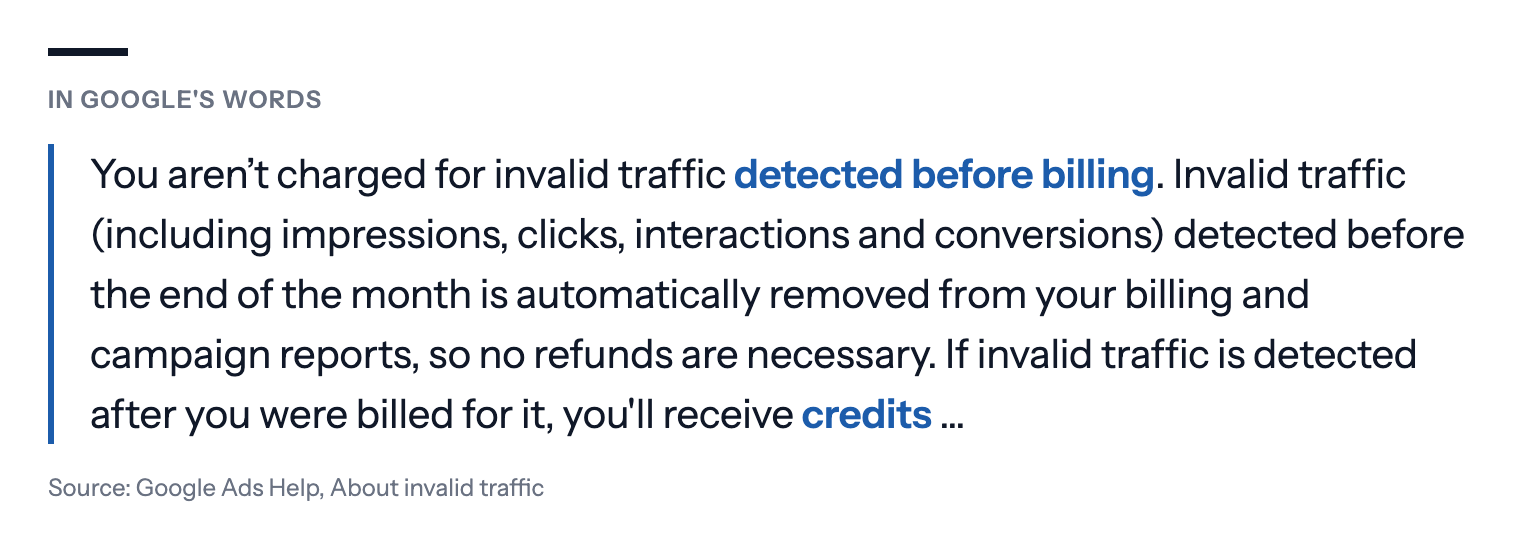
What happens to the clicks it catches is spelled out in its guide to invalid traffic:
- Caught before billing: removed from your bill and your reports. "You aren't charged for invalid traffic detected before billing."
- Caught after billing: credited back, shown as "Invalid activity" under adjustments on your billing summary.
- Visible in the account: you can add an Invalid clicks column to your campaigns and see how many were filtered.
If you suspect something Google missed, you can ask it to investigate traffic from the last 60 days with its click quality form, with your server logs as evidence. Google won't tell you whether a specific click was valid.
How common is click fraud?
Nobody outside Google knows exactly, and Google doesn't publish an overall rate.
The figure you'll see most comes from Fraud Blocker, a company that sells click fraud protection. Across 43,701 Google Ads accounts in the six months to February 2026, it put the average invalid click rate at 11.4%. By campaign type, it found 11.2% on Search and 7.9% on Shopping, but 35.5% on Display and Video.
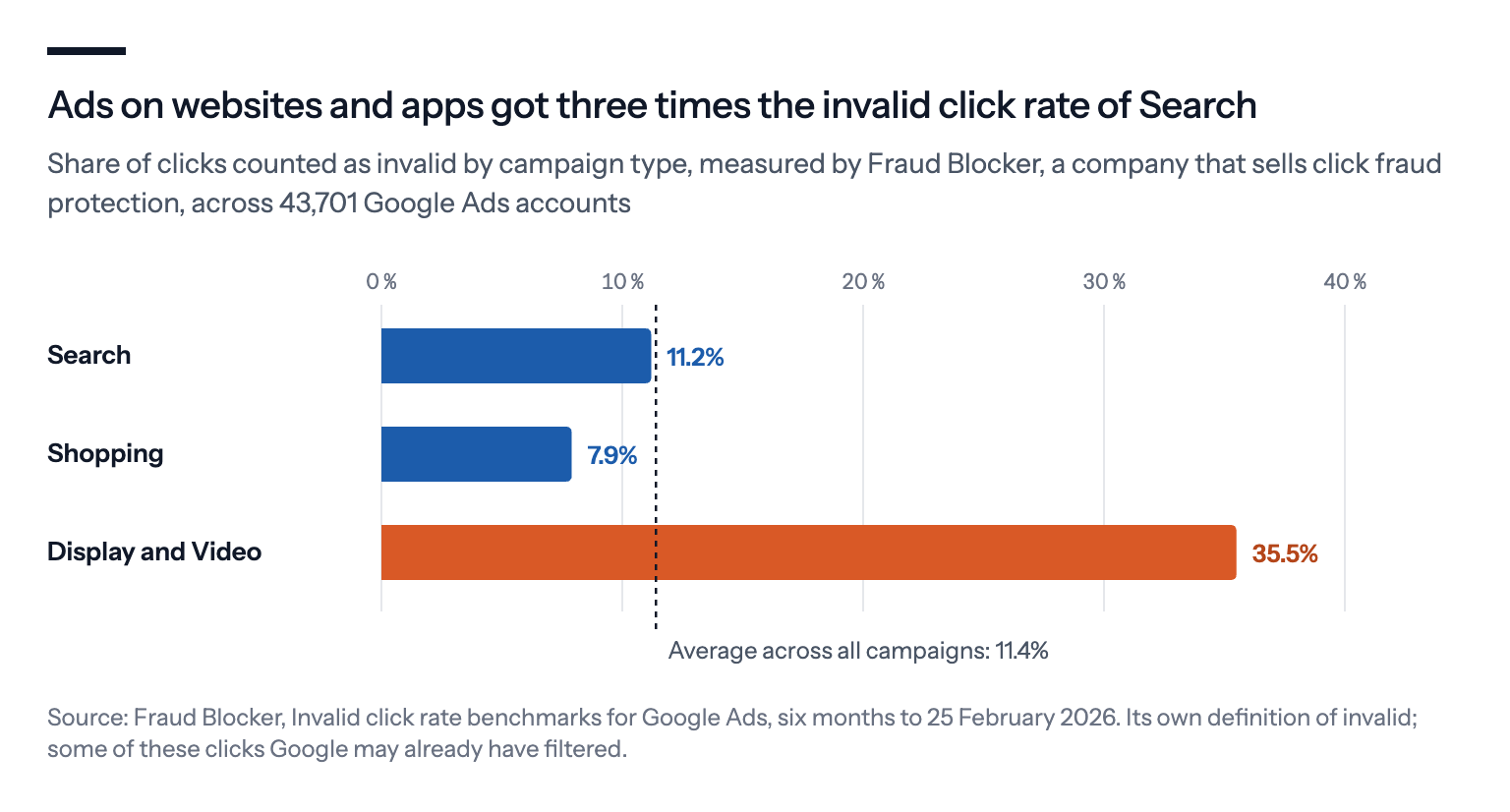
Two things are worth knowing about that number. It's measured by a vendor whose business is the problem, using its own definition of invalid. And it isn't necessarily money lost: some of those clicks may be ones Google had already filtered and not charged for.
The useful part is the pattern, not the level. Where your ads appear matters more than who your competitors are. Search and Shopping ads, shown to someone who typed a search, were far less affected in its data than ads on websites and apps.
What looks like fraud, but usually isn't
Before blaming a competitor, rule out the ordinary causes. Google's own guide suggests the same: check your change history first, because spikes often come from your own changes, the season, or a competitor stopping its ads, which sends more clicks your way.
Ads shown outside your area. Google's default location setting reaches people in your area and people interested in it. For a local business, that can mean clicks from the other end of the country, or another country, that never turn into customers. It looks like junk traffic. It's a setting.
Ads shown on websites and apps. Search campaigns can spill onto the Display Network, and Performance Max runs everywhere Google sells ads. That's where Fraud Blocker measured the highest invalid click rates, and where accidental taps in games and apps are common. Google has announced a setting that lets you cap what Search, Shopping and Performance Max campaigns spend on Search partners and Display, rolling out over the coming months, as we described in What changed in Google Ads, September to mid-October 2026.
Searches you didn't mean to buy. Broad match and AI Max show ads for searches far from your keywords. Clicks from people looking for jobs, free versions or something else entirely look like fake interest, because they are, but they're real people. See Broad, phrase or exact match in 2026.
A curious competitor. Yes, competitors click your ads sometimes, to see your offer or your prices. A handful of clicks a month is annoying, not a budget drain.
Bots that fill in your forms. This is real, and it's a different problem. Spam leads don't just cost a click; if they're counted as conversions, they teach Google's bidding to find more of them. Protect the form, and count only leads you'd actually call back.
How to tell click fraud from a settings problem
A few signals separate fraud from leaks:
- The Invalid clicks column jumps. A sudden rise means Google is seeing more bad traffic, and filtering it.
- Clicks without visits. Google Ads shows clicks, but Google Analytics or your server logs show no matching sessions.
- One source, over and over. Many clicks from the same IP address, device type or place, often at odd hours, on the same keyword.
- The searches don't fit, but the place does. Then it's probably your keywords or match types, not fraud.
- The place doesn't fit. Then it's probably your location setting.
How to stop paying for fake and useless clicks
Show ads only to people in your area. Switch the location setting to presence, so only people who are, or regularly are, in your target area see the ads. For a local business that gets clicks from outside its area, this one change can remove more useless clicks than any fraud tool.
Know where your ads run. Keep Search campaigns on Google Search unless you've tested the rest. Check where Performance Max spends, and be warier of Display and apps.
Block searches that don't fit. Read the search terms report and add negative keywords for what you don't sell.
Count real results only. Count one real conversion per sale or lead, and keep spam leads out of it. Smart Bidding moves money toward what converts, so clicks that never convert get less over time, but only if the count is honest.
Exclude known addresses. If you know the IP address of a competitor's office, or your own, you can exclude up to 500 IP addresses per campaign, or at account level, which also covers Performance Max. It works for a fixed office connection. It doesn't stop bots, which change addresses all the time.
Protect your forms. Google's own advice for fake leads is reCAPTCHA and server-side checks on the form, and a confirmation email for sign-ups, because Google's filters can't stop a bot from reaching your website after the click.
Ask Google to investigate. If the Invalid clicks column, your logs and your analytics all point the same way, report it to Google through the Click Quality Form.
Consider a fraud tool last. Third-party tools can block suspicious IPs and help you file claims. They pay off most for accounts spending heavily on Display, Video or Smart campaigns. Judge one on the money it actually saves or wins back, against its fee, not on the share of clicks it labels invalid. Google notes that such tools often flag clicks it had already filtered and not charged for.
How to report click fraud to Google, step by step
Contact Google if you still suspect fraud after ruling out the ordinary causes. It costs nothing, and it's the only way to get money back for clicks Google missed. Google lays out what it needs in its guide to invalid traffic. In practice:
- See what Google already caught. Add the Invalid clicks column: in Campaigns, click the Columns icon, search for "Invalid clicks" and select Apply. Then open Billing › Summary and look for "Invalid activity" under Adjustments. The two numbers aren't meant to match: the column shows clicks filtered before billing, the credits cover what was caught after.
- Rule out your own changes. Open Change history for the days the traffic jumped. A bigger budget, new keywords or a wider location setting all bring more clicks.
- Collect the evidence, within 60 days. Google asks for your 10-digit customer ID, the exact dates, the campaigns, ad groups and keywords involved, and your web server logs: the IP addresses behind repeated clicks, the browsers and devices, and the GCLID of each suspicious click. The GCLID is the click ID Google adds to your landing page address when auto-tagging is on, and it lets Google match a visit to a specific click. If the problem is fake leads, add a spreadsheet with the GCLID of each lead and what happened when you called or emailed them.
- Explain the pattern in a sentence or two. Google's own examples: a 300% jump in clicks with no more conversions, or clicks from outside the places you target.
- Send it through the Click Quality Form, signed in with the Google account you use for Google Ads.
- Wait for the email. Specialists review the traffic by hand, which typically takes several business days. If they find invalid clicks the filters missed, you're credited. They won't tell you whether a specific click was valid, because that would show fraudsters what Google looks for.
Two things don't count as evidence on their own. A visit of zero seconds can simply mean the visitor didn't click again on your page, because many analytics tools only record time on site from a second click. And many clicks from one IP address can be one office, a university or a mobile network, where hundreds of devices share an address.
While you wait, do what stops the problem from growing: exclude the IP addresses you're sure about, keep ads to the places you serve, and protect the form. That's also how you make clicking your ads less worthwhile for anyone trying.
Example: a plumber spending $3,000 a month
(An illustration with round numbers, not a real account.)
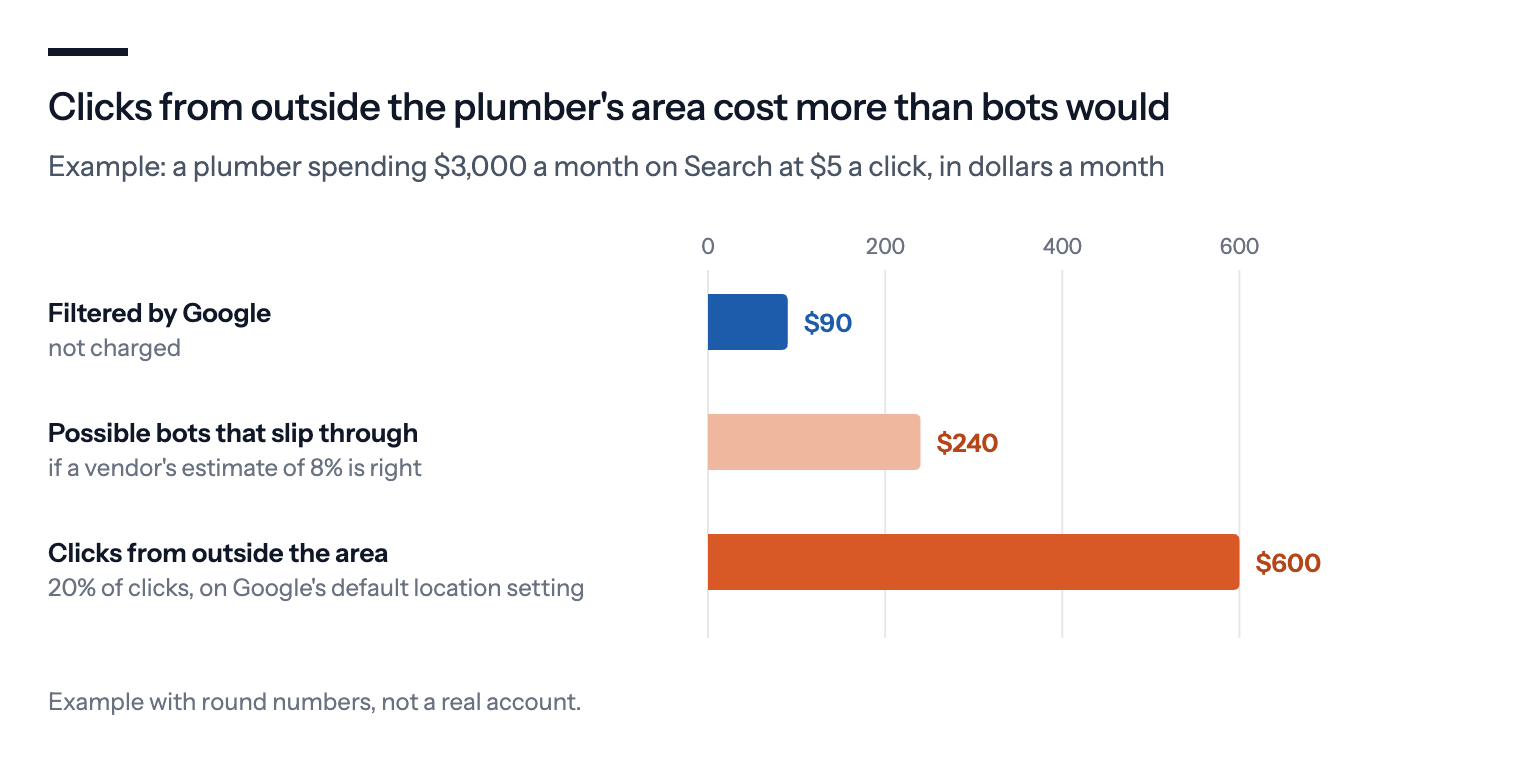
A plumber spends $100 a day on Search, about $3,000 a month, at $5 a click. The owner suspects a competitor.
The Invalid clicks column shows that Google filtered 3% of clicks, which he wasn't charged for. Say a fraud vendor's estimate is right and another 8% slip through. That's about $240 a month.
Then the location report: the campaign uses Google's default setting, and 20% of the clicks come from people outside the area he serves. That's $600 a month, and no fraud tool would have flagged it, because those are real people.
Switching to presence and blocking ten searches for jobs and DIY guides would likely save more than the fraud tool, at no cost. What's left can then be judged on its own.
Why you shouldn't rule out fraud entirely
Sophisticated fraud exists. Click farms and bots that mimic real users are built to look like ordinary traffic. Some of them get past Google, and an advertiser can't always tell from inside the account.
Google has an interest. Google earns from every click it doesn't filter, and it decides what counts as invalid. That doesn't mean it lets fraud through on purpose, but it's a reason to watch the numbers yourself rather than take them on trust.
So do the vendors. The companies that measure click fraud also sell protection against it. Their numbers may be right, but they aren't neutral either.
Some industries are targeted more. Expensive clicks, such as for lawyers, locksmiths or emergency services, are a bigger prize for fraudsters and bigger losses for advertisers. If you're in one, the case for monitoring is stronger.
Where to start if you suspect click fraud
Add the Invalid clicks column. It takes a minute and shows what Google already catches.
Fix the location setting. Presence, not interest, for anyone who serves a local area.
Check where the money goes. Search terms and placements first, before suspecting anyone.
Keep the count honest. Real conversions only, and spam leads out.
Escalate with evidence. If something still doesn't add up, collect logs and send them to Google within 60 days.
If you use Bavian
Spotting bots is Google's job, and Bavian doesn't try to do it for Google. What Bavian does is close the ordinary leaks that cost most accounts far more: it blocks searches that cost money without results every day, switches a campaign to reach only people in your area when clicks from elsewhere don't pay, and, with Autopilot on, checks every day that conversions are counted correctly, so the bidding learns from real customers. If something still looks like fraud after that, it's worth a closer look, and worth sending to Google.