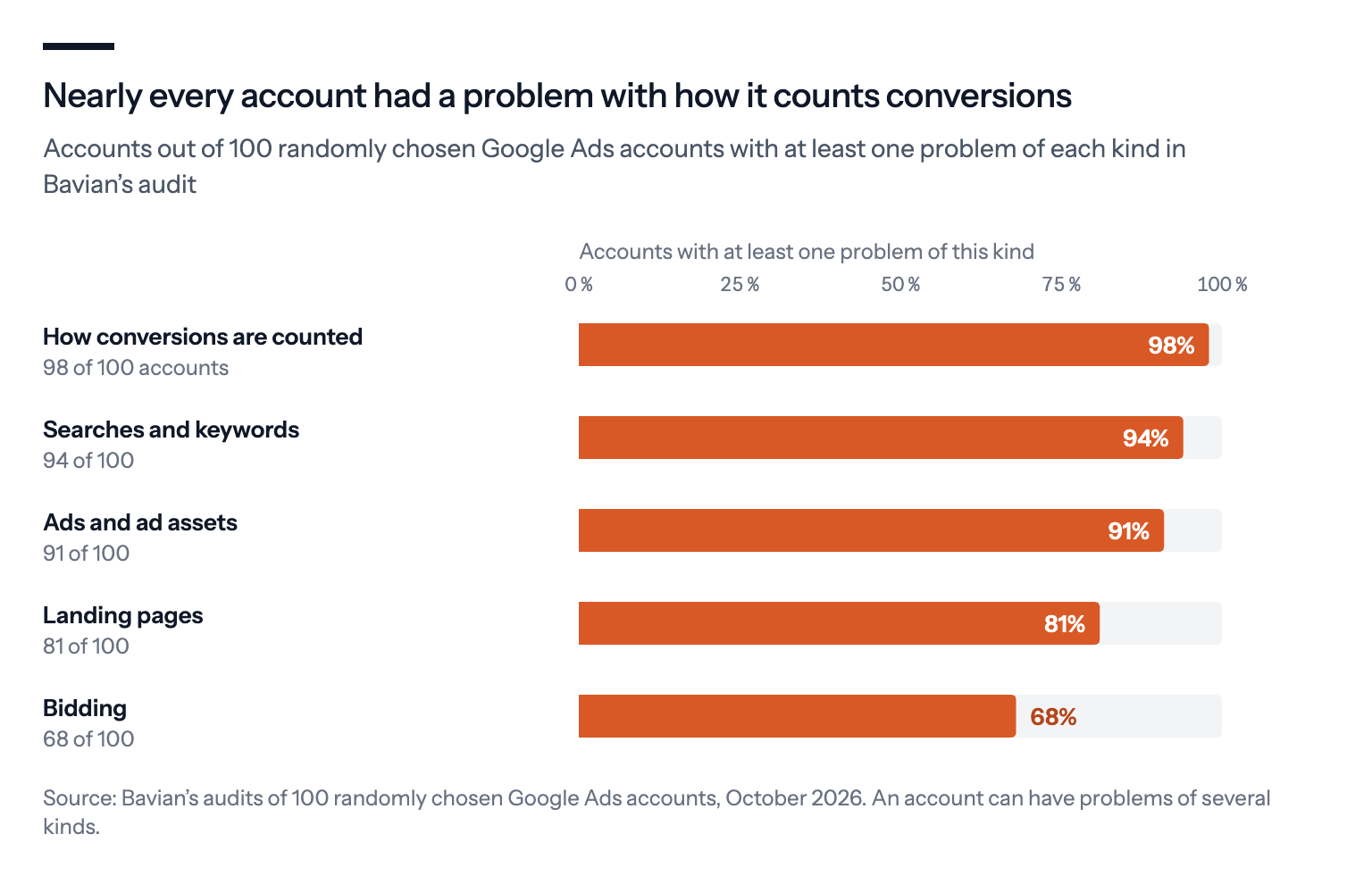
In 100 Google Ads accounts that Bavian audited, 98 had a problem with how conversions were counted, and most also paid for searches that didn't fit, ran weak ads, sent clicks to the wrong page or bid without the data to back it. Here's each mistake, and what Bavian fixes itself and what it leaves to you.
Before Bavian manages a Google Ads account, it audits the whole account: what's set up, what it costs, what it brings in and what's wrong. Every problem it finds is written down, with the numbers behind it.
We picked 100 accounts at random from the ones Bavian had audited by October 2026, and went through every problem it found. Some of the accounts spend a few dollars a day and some spend thousands. About half are online stores, and most of the rest are service businesses.
The same five kinds of problems came up again and again.
The short version
- 98 of 100 accounts counted conversions in a way that can mislead Google's bidding: steps counted as results, sales counted twice, dead actions still counting, or nothing counted at all.
- 94 paid for searches that didn't fit, 91 had weak or broken ads, 81 sent clicks to the wrong page, and 68 bid in a way their data couldn't support.
- Conversion tracking comes first, because every other number in an account depends on it.
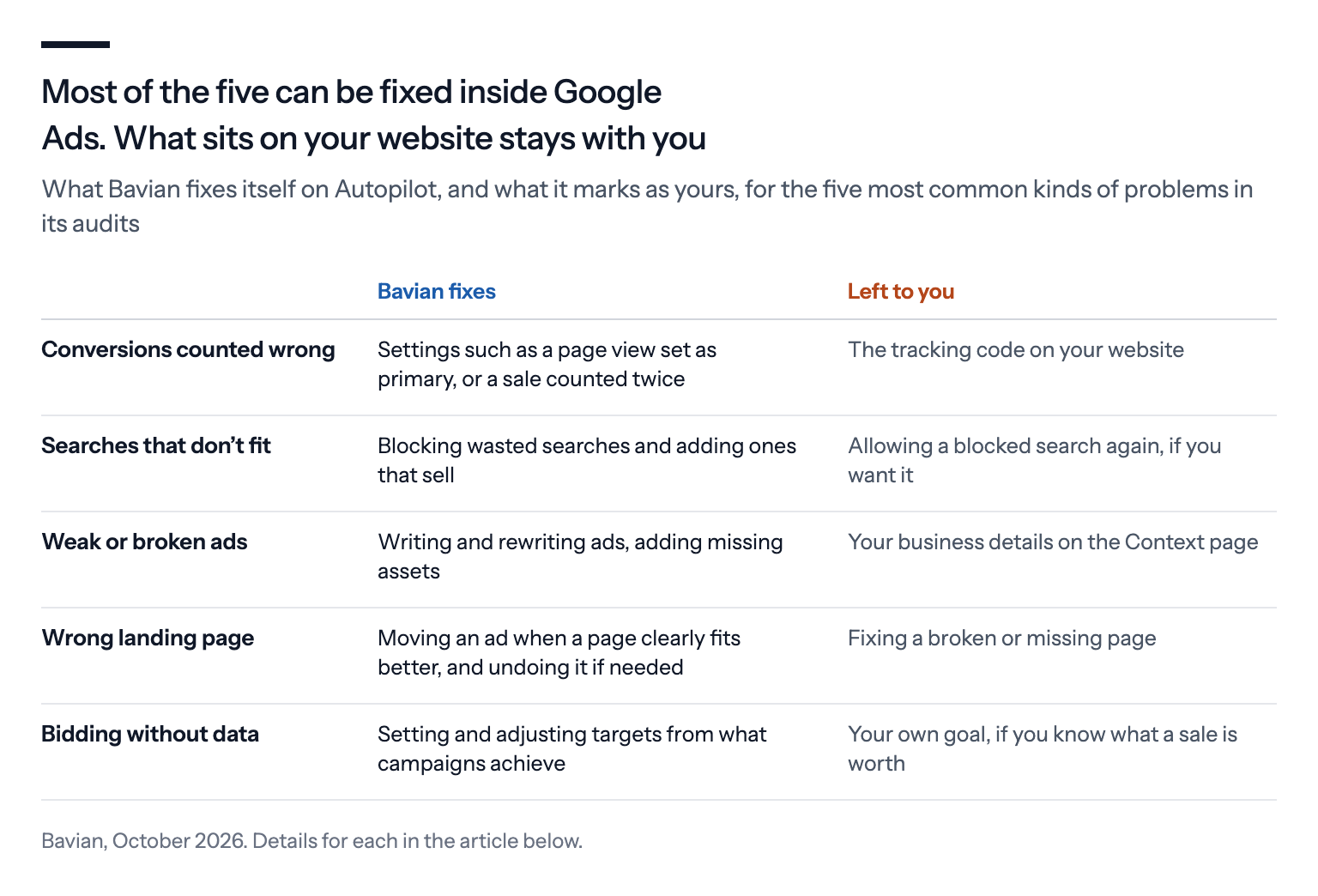
- Most of the five can be fixed inside Google Ads. The ones that live on your website, such as the tracking code or a broken page, stay with you.
How we counted
A number like this is only useful if you know what went into it.
Bavian's audit reads an account through the Google Ads API: its campaigns, keywords, searches, ads and where they lead, conversion actions and bidding, and the results of each over the last 30 days, looking further back where needed. Each problem it records belongs to one area, such as conversions or bidding, and is written down with the number that shows it and the campaign it's in, naming the conversion action, search term or page where there is one.
For each of the 100 accounts, we counted whether it had at least one problem in each area. So "98 of 100" means 98 accounts had at least one conversion problem, not that 98% of their conversions were wrong. A small problem counts the same as a large one. Accounts can appear in several areas, which is why the five numbers add up to far more than 100.
For each kind, here's what goes wrong, what Bavian does about it, and what's left for you to do.
1. Conversions are counted wrong
Found in 98 of 100 accounts.
This was the most common problem by far, and the one that does the most damage, because Google's bidding learns from whatever you count. In the accounts we looked at, it took a few forms:
- Steps counted as results. Add to cart, page views, app downloads or YouTube subscriptions set as primary conversions, next to the purchase or the lead.
- The same sale counted twice. Two purchase actions, such as the Google Ads tag and an import from Google Analytics, recording nearly the same orders day after day.
- Old actions that still count. Conversion actions that stopped recording months ago but are still primary, so nobody notices when the real one breaks.
- Nothing counted at all. Some accounts had no working conversion tracking, so neither Google nor anyone else could tell which ads paid off.
A dental clinic that counts every visit to its contact page as a lead can see 60 "leads" a month in Google Ads while the phone rings 12 times.
We're not the only ones to see it. "Many Google Ads accounts have a conversion tracking problem that is disguised as a strategy problem," writes the consultant Sarah Stemen in Search Engine Journal. Google's own guide to the learning period says Smart Bidding "optimizes exclusively toward your primary conversion goal", so whatever is set as primary is what the bidding buys.
When steps count as results, the Conversions column looks great and Smart Bidding gets very good at buying the cheapest "conversions" it can find. We explain the setting behind it in Primary vs. secondary conversions.
What Bavian does: Once Autopilot is on, Bavian checks your conversion tracking every day. Where the problem is a setting, such as a page view set as primary or a purchase counted twice, it can fix it: it moves the action to secondary or changes how it counts. On the Agent page, click the line next to Account, where it's marked "The agent can fix this".
While it can't trust your tracking, Bavian also holds back: it doesn't move campaigns to bidding for conversions.
What's left for you: Bavian can't change the tracking code on your website. When the tag itself is missing or broken, it's marked "Only you can fix this", with the steps under Show me how. Send them to whoever runs your website if that isn't you.
2. Money goes to searches that don't fit
Found in 94 of 100 accounts, counting problems with search terms and keywords together.
Your keywords decide roughly which searches your ads can show for. The searches people actually type are often something else. In the accounts we looked at, the money went to:
- competitors' names, often with no sales to show for it;
- searches for things the business doesn't sell or places it doesn't serve;
- free and do-it-yourself searches, such as "free" or "how to";
- campaigns with no negative keywords at all;
- keywords that had spent for months without a single conversion.
Picture a pet store selling dog food. It can end up paying for "how to make dog food at home", "dog food factory jobs" and "free puppies near me". None of those people want to buy a bag of dog food today.
Part of the problem is that advertisers see less than they used to. Since 2020, Google has shown fewer of the searches behind your clicks in the search terms report, a change a US court later looked at in its antitrust ruling, as we described in Google's AI vs. an independent AI ad manager. Broad match and AI Max widen the net further, so checking the searches you can see matters more, not less.
What Bavian does: Every day, Bavian reads the searches that triggered your ads over the last 30 days, with what each one cost and brought in. It blocks searches that cost money without results, measured against how often your account usually converts, and searches that clearly don't fit your business. It blocks a search on the campaign that showed it, and never one that brought a conversion on that campaign in the last three months.
It can also add searches that do sell as keywords. See How does Bavian decide which search terms are wasted spend?
Pro tip: If Bavian blocks a search you want, open Keywords, then Negative keywords, click Allow again, then Allow 1 keyword. Bavian won't block that search again.
3. Ads and ad assets are broken or weak
Found in 91 of 100 accounts.
This is the quiet one. The campaigns run, but the ads underneath them are in poor shape:
- sitelinks disapproved by Google because the page they point to no longer exists;
- promotions still attached after the offer ended;
- ads that Google rates Poor, some of them the only ad in their ad group;
- call assets disapproved because the phone number was never verified, so the ads showed no number to call.
A typical case: a bakery's "Order Christmas cakes" sitelink still showing in March, pointing to a page that was taken down in January.
One caveat: Google's Ad Strength rating, the Poor-to-Excellent score, is a diagnostic. Google's Ads Liaison, Ginny Marvin, has said it isn't used in Ad Rank, and plenty of ads rated Poor or Average sell well. A disapproved asset or an expired offer is a real fault. A Poor rating on its own is a reason to look, not proof of a problem.
What Bavian does: In Search campaigns, Bavian writes new ads and rewrites weak ones, and adds missing sitelinks, callouts and structured snippets. In Performance Max campaigns, it adds headlines, descriptions and search themes. In Approval mode, each new ad waits for your yes on the Agent page.
What's left for you: Ads you wrote or edited yourself stay as you left them, unless something comes up that costs you money or breaks a rule. Fill in your business details on Bavian's Context page, such as what you sell and who your customers are. They guide the ads it writes.
4. Ads send people to the wrong page
Found in 81 of 100 accounts.
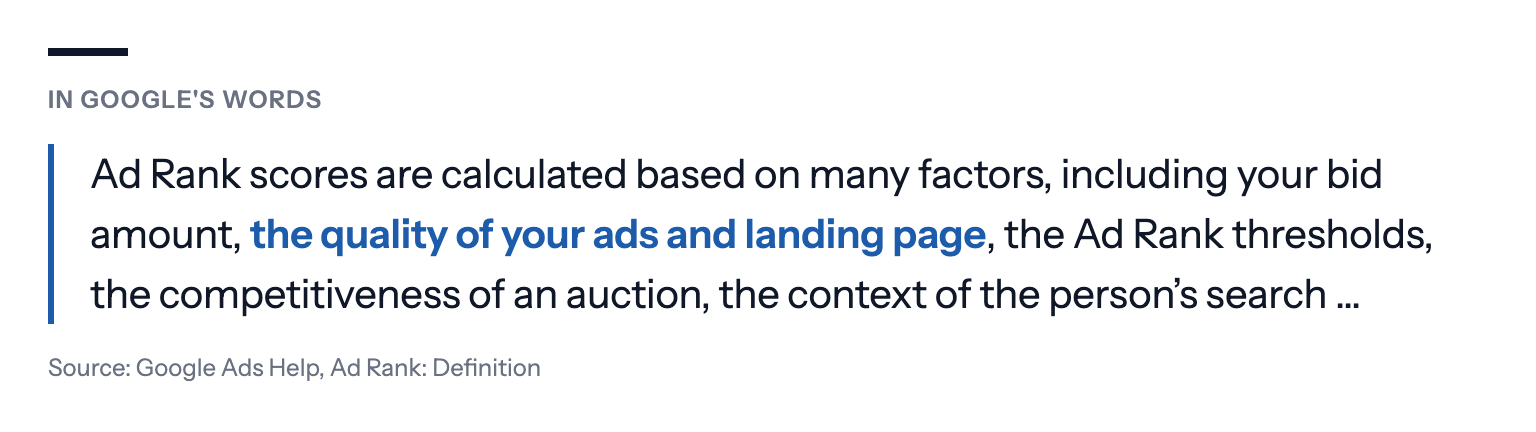
A click is paid for the moment it happens. What it's worth depends on where it lands, and the page also affects what you pay, because Google counts it when it ranks ads.
The pattern we saw most was the homepage: in one account, all of its nearly 50 ads pointed to the front page. In another, an ad promising a returns page sent every click to the homepage instead. Others had sitelinks promising a product range that pointed to the homepage too.
Someone searches "waterproof hiking boots size 11", clicks an outdoor store's ad and lands on its homepage, under a banner for swimwear.
That doesn't make the homepage wrong. For many small businesses it's the best page on the site, the one with the most care put into it, and it can convert better than a thin subpage. The problem is a specific search landing on a general page when a page that matches it already exists.
What Bavian does: Bavian doesn't move ads off the homepage on principle. It reads what each ad and its searches are about, compares that with the actual content of the pages on your site, and only moves an ad when a page clearly fits better. Contact, cart, checkout, privacy and terms pages are never candidates. When nothing fits better, the ad stays where it is. When Bavian does move an ad, it rewrites the ad to match the new page, follows the results in the days after, and can undo the move. It can do this for an ad, an ad group it built or a Performance Max asset group (an asset group keeps its texts).
What's left for you: If a page is broken or missing, Bavian can stop sending clicks to it, but it can't fix the page. That's a job for your website.
5. Bidding doesn't match the data
Found in 68 of 100 accounts.
Smart Bidding is only as good as what it's told and what it has to learn from. We saw campaigns on Maximize conversions without any target, spending freely on whatever the tracking counted; Maximize clicks with no limit on what a click may cost; targets set at ad group level that overrode the campaign's own, on campaigns with no conversions; and ROAS targets far from what the campaign was actually earning.
Say a shoe store runs Maximize clicks with no limit. It can pay $14 for a single click on "cheap shoes", from someone who wanted a $30 pair.
This one has become more expensive to get wrong this year. Since mid-August, Google bids budget-limited Target ROAS and Target CPA campaigns to their target instead of beating it, so a loosely set target now gets taken at its word. We explain the change in "Limited by budget": should you raise your budget when Google suggests it?
What Bavian does: Campaigns Bavian takes over usually keep their type of bidding strategy. Where a campaign bids for conversions or conversion value, Bavian sets and adjusts its target in steps, based on what the campaign has actually achieved. It only moves a campaign to bidding for conversions when the tracking can be trusted and the campaign has enough conversions to go on.
Pro tip: If you know what a sale or a lead is worth to you, set it as your goal on Bavian's Bidding page, as a cost per conversion or a return on spend. Your goal then holds until you hand it back with Bavian decides. See How do I give Bavian instructions or set performance goals?
Why these five, and not others
The order matters. A campaign with broken conversion tracking can't be judged on anything else, because every other number depends on it. That's why Bavian checks measurement first, and why it holds back on bidding until it can trust what's counted.
The other four cost money in a more ordinary way: clicks you didn't need, ads that underperform, and visitors who land on the wrong page.
Plenty of smaller things came up too: ads shown far outside the area a business serves, product feeds with errors, budgets spread across too many campaigns. They just weren't in most accounts.
Where an audit like this falls short
These numbers say how common a kind of problem is, not how much it costs. An account with one stray page view set as primary counts the same as one whose entire Conversions column is fiction.
The sample isn't every advertiser. These are accounts whose owners chose to connect them to Bavian, and people who look for help may have more problems than the average account. They're also mostly small and mid-sized businesses, not large brands with in-house teams.
And an automated audit only sees what's in the data. It reads the account through Google's API: it sees where the ads send people, but not what's on those pages. It can't see a phone call that never got logged, an offer that changed in the shop but not in the ads, or a business decision behind a setting that looks wrong from the outside.
So treat the five as the places to look first, not as a verdict on your account.
What we'd do
Check conversion tracking before anything else. One primary action per real result, no sale counted twice, and nothing primary that stopped recording.
Read the search terms every week. Block what doesn't fit, and keep an eye on campaigns with broad match or AI Max.
Fix what's broken in the ads before you write new ones. Disapproved sitelinks, expired promotions and unverified phone numbers first.
Send each search to the page that answers it, but don't abandon a homepage that sells.
Set targets from what a sale is worth to you, and recheck them on campaigns that run short of budget.
The audit itself is free. You connect your Google Ads account, Bavian audits it and shows you what it found and what it would do, and nothing changes in your account until you turn on Autopilot. See What does the free Google Ads analysis include?
If you run an online store, a service business or a small budget, we've gone deeper on each:
- The 5 Google Ads mistakes Bavian finds in almost every online store
- Calls but no jobs? 5 Google Ads mistakes Bavian fixes
- $20 a day on Google Ads? Bavian fixes these 5 mistakes first
About the numbers: we drew 100 accounts at random from those Bavian had audited by October 2026. Each number is how many of them had at least one problem of that kind in Bavian's audit. An account can have problems of several kinds, and some problems are small, so a number says how common a kind of problem is, not how much it cost. The examples are illustrations, with details changed so no account can be recognised.