In 100 online stores' Google Ads accounts, 95 had a problem with how sales were counted. Here are the five mistakes we found most, from sales counted twice to products the feed keeps out of Shopping, and what Bavian fixes itself and what it flags for you.
We picked 100 online stores at random from those whose Google Ads accounts Bavian had audited by October 2026. They sell everything from garden tools to pet food, in many countries, on budgets from a few dollars to thousands a day.
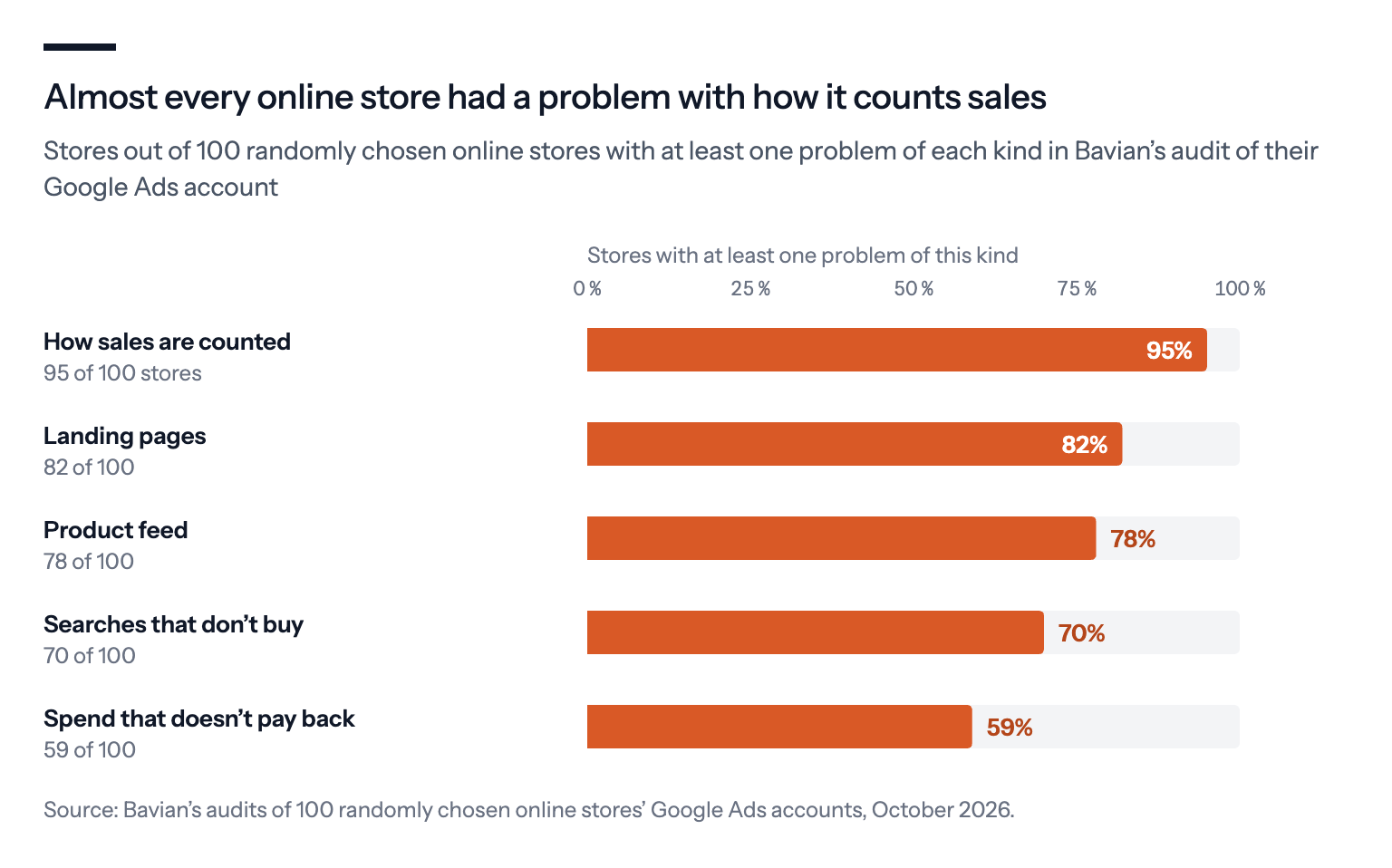
Almost every one had at least one of the same five problems.
The short version
- 95 of 100 stores had a problem with how Google Ads counted their sales, such as the same sale counted twice, which makes ROAS look better than it is and steers Smart Bidding by the inflated number.
- 82 sent shoppers to pages that didn't match the ad, and 78 had feed problems that kept products out of their ads.
- 70 paid for searches that couldn't lead to a sale, and 59 had products or campaigns that didn't earn back what they cost.
- Fix the counting first. Then judge products against their own margin, not the store's average ROAS.
Here's what each one looks like in a real store's account, what Bavian does about it, and what you'll still have to do yourself.
1. Sales are counted twice, or not only sales are counted
Found in 95 of 100 stores.
For an online store, the purchase is the result that matters, and Google Ads should count each one once. 95 of the 100 stores had at least one problem with how their conversions were counted. The common ones:
- Two purchase actions for the same orders. Typically the Google Ads tag plus a purchase event imported from Google Analytics or a server-side setup. In one store, the two recorded within 20% of each other on most days.
- Cart steps counted as conversions. Add to cart and begin checkout counted next to purchases, in one case alongside basket removals filed under checkout.
- App installs mixed in. One store's Conversions column mixed purchases with app downloads, so its cost per conversion said nothing about the cost of a sale.
Take a pet store that ships 100 orders in a month. Google Ads can show 190 purchases, because its Google Ads tag and its Google Analytics import both record most of them.
When the same sale is counted twice, every number built on it is off by the same factor: ROAS doubles, and cost per sale halves.
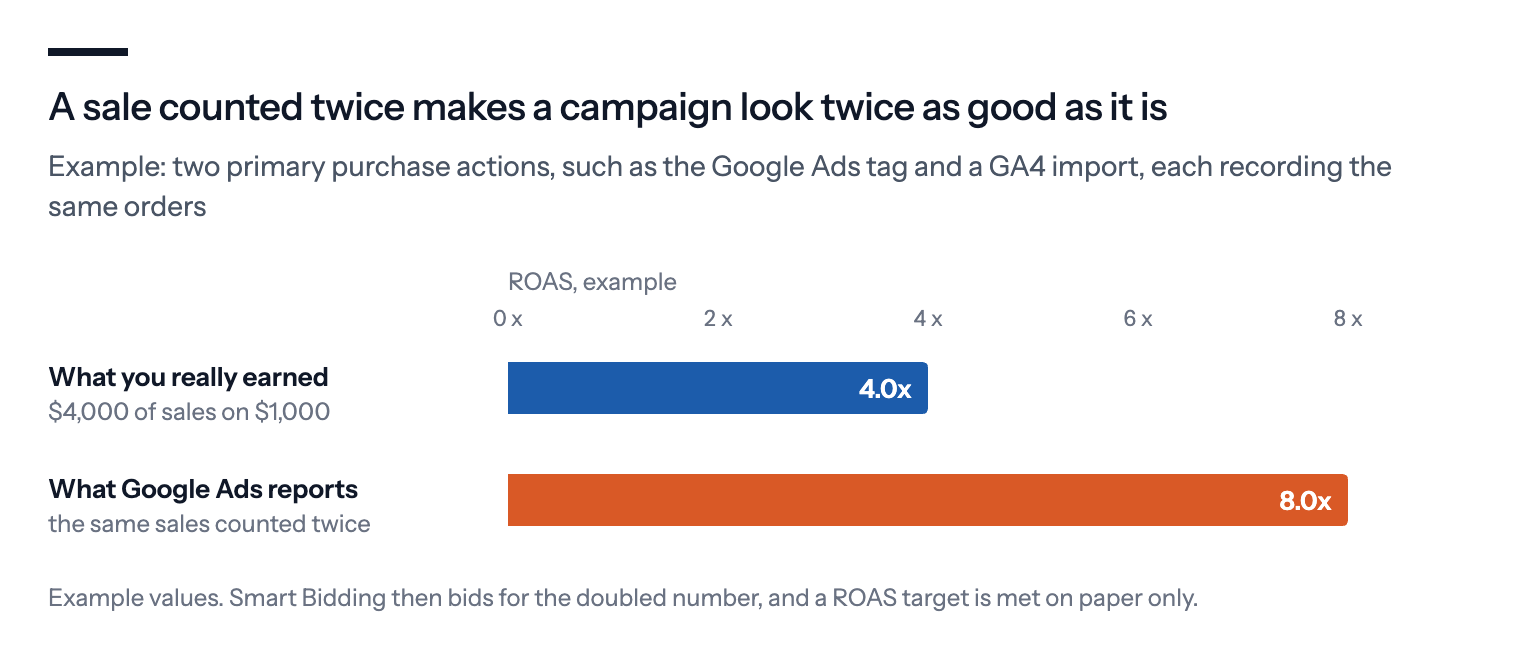
The worst part isn't the report. Smart Bidding steers by the same numbers, so a ROAS target can look met while the campaign loses money. Google removes duplicates only within one conversion action, using the transaction ID, so two actions that record the same order both count it. We explain how to spot it in Why does Google Ads count more conversions than GA4 and Shopify?
What Bavian does: Once Autopilot is on, Bavian checks your conversion tracking every day. When two primary purchase actions may count the same sale, or a cart step is set as primary, it can move the extra action to secondary. It's still recorded in All conversions, but no longer steers bidding. On the Agent page, click the line next to Account, where it's marked "The agent can fix this", with a Fix it for me button. In Autopilot mode, Bavian can fix it without waiting.
What's left for you: If the purchase tag itself is missing or fires wrongly, that's in your shop's code or app settings, which Bavian can't reach. It's marked "Only you can fix this", with the steps under Show me how.
2. Ads send shoppers to the wrong page
Found in 82 of 100 stores.
In a store, a click should land on the product or the category the ad was about. We saw search ads for specific product ranges sending everyone to the homepage, sitelinks promising a sale that pointed to the front page, and product pages Google couldn't open at all, which takes those products out of Shopping ads.
A classic: an ad for "cast iron skillet 12 inch" that opens the store's homepage instead of the skillet's own page.
The homepage isn't always the wrong answer. For a search on your shop's name, or a broad one like "gifts for gardeners", it can be the best page you have.
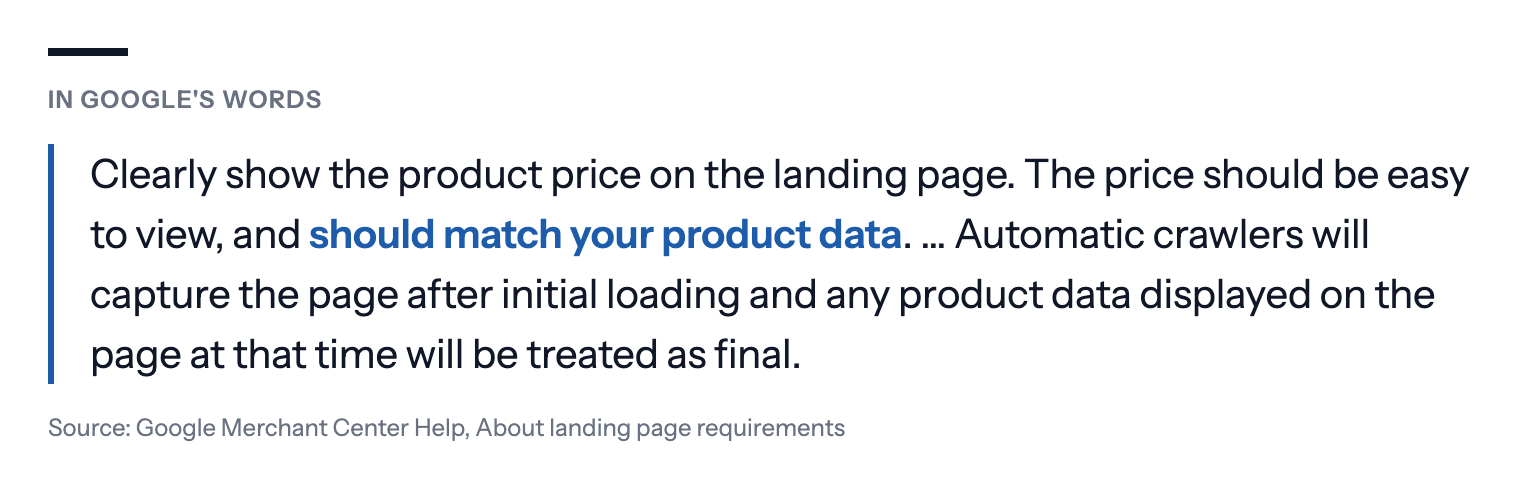
For Shopping ads, Google is stricter than for text ads. Its landing page requirements ask for the product's own page, showing the same product and price as your feed.
What Bavian does: Bavian doesn't move ads off the homepage on principle. It reads what each ad and its searches are about, compares that with the actual content of the pages on your site, and only moves an ad when a page clearly fits better. Contact, cart, checkout, privacy and terms pages are never candidates. When nothing fits better, the ad stays where it is. When Bavian does move an ad, it rewrites the ad to match the new page, follows the results in the days after, and can undo the move. It can do this for an ad, an ad group it built or a Performance Max asset group (an asset group keeps its texts).
What's left for you: A product page that's down, blocked for Google or showing a different price than your feed is fixed in your shop.
3. Products can't show because of the feed
Found in 78 of 100 stores.
Shopping and Performance Max ads are built from your product feed in Merchant Center. A product Google rejects simply doesn't show, and nothing in your Google Ads account says so loudly. Among the feed problems we saw:
- product pages Google reported as unavailable or couldn't crawl;
- prices in the feed that didn't match the price on the page;
- images too small or in a format Google doesn't accept;
- shipping set up in one currency for a country that uses another;
- missing attributes such as colour, size or age group on clothing;
- products blocked by Google's policies, for example health claims;
- products in the feed that no campaign advertised at all.
Say a kitchenware store puts its skillets on sale for $39, but the feed still says $49. If Google's automatic updates don't catch it, Google disapproves them, right in the middle of the sale.
Two rule changes make this more pressing. Since a help-page update in late September, Google says products whose price or availability changes often (for example more than once a day) may be disapproved instead of updated automatically when the feed and the page don't match, which hits stores that reprice automatically. And from 31 January 2027, Google disapproves product images smaller than 500 × 500 pixels. We list both, with this year's other Shopping changes, in Starting Google Shopping from scratch: Shopify, Merchant Center and Google Ads.
What Bavian does: Bavian reads the status of every product in your feed and shows it on its Shopping page, with Google's reason when a product is Not eligible. It can fill some gaps Google asks for, such as colour, size or age group read off the product's own text, but it can't fix most feed problems itself, so it tells you what's wrong.
What's left for you: Fix it where your products come from, such as your shop or your feed tool, and let it sync to Merchant Center. Don't delete products just because they're sold out for a while. Google already stops showing a product marked out of stock. See Does Bavian automatically exclude out-of-stock products?
4. Money goes to searches that won't buy
Found in 70 of 100 stores.
Shopping and Performance Max campaigns choose their own searches, and they choose generously. In the stores we looked at, the spend went to:
- other shops' names, including big chains the store doesn't stock;
- product types the store doesn't sell;
- brands that aren't in the feed.
Some whole campaigns ran without a single negative keyword.
A pet store selling cat food can pay for "cat memes", "cat food factory jobs" and a big pet chain's name. None of them sells a single bag.
Google's search terms report shows the searches behind your ads, apart from ones too few people made, and it's worth reading every week, for Shopping and Performance Max as much as for Search.
What Bavian does: Every day, Bavian reads the last 30 days of searches with their clicks, cost and sales, and compares them with what's in your product feed: the titles and brands you actually sell. It blocks searches that cost money without sales and searches for things you don't sell, on the campaign that showed them, including Shopping and Performance Max. It never blocks a search that brought a sale on that campaign in the last three months.
Pro tip: A search you sell well can be added as a keyword in a Search campaign too, so it can get its own ad and landing page. Bavian does this on the Search campaigns it manages. On its Search terms page, you can see the searches Google reports behind your ads, block one with Exclude, and download the list.
5. Products and campaigns that don't earn back what they cost
Found in 59 of 100 stores.
A store's ROAS is an average. Under it, some products and campaigns earn many times what they cost, and some don't cover their own clicks. We saw a Demand Gen campaign returning less than half its spend in sales, a single brand taking almost half of a store's product ad spend for little back, and a group of products earning a little over 2.5 times their cost in a campaign targeting 5.
For example, a garden tools store with a 4x ROAS overall can be losing money on lawnmowers, which return 1.5x on a 20% margin, while hand tools at 8x pay for them.
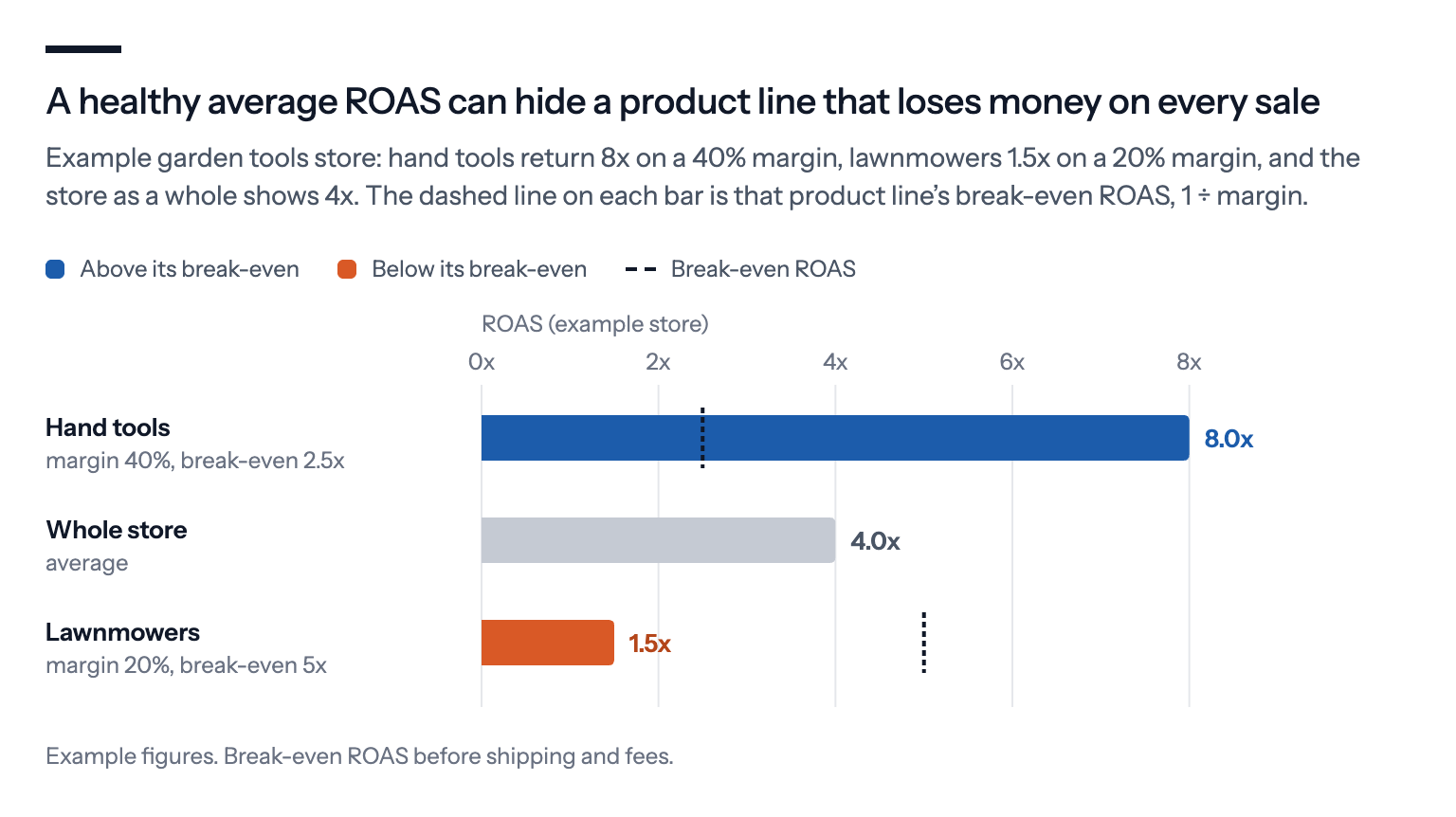
Agencies see the same thing. Otavio Dias of the Irish agency Wolfgang Digital describes a client whose electronics sell at margins of 5% and whose furniture sells at 25%. That puts break-even at a ROAS of 20x for the electronics and 4x for the furniture. Whether a ROAS is good depends on your margin. We explain how to find your break-even point in What is a good Google Ads ROAS for my business?
What Bavian does: Bavian divides your total daily budget across your campaigns, and moves it towards what sells. In the Shopping campaigns it builds from your feed, it can give products that sell well a campaign of their own, with their own share of the budget and their own target, and keep the rest together. It adjusts ROAS targets in steps, based on what each campaign has actually earned.
Pro tip: Give Bavian a goal your margin can carry. Set a return on spend at or above your break-even on the Bidding page, or have your tracking report each sale's profit instead of its order value, so Bavian and Google's bidding aim for profit. Bavian doesn't use your product margins itself. See Can Bavian optimise my Google Ads for profit instead of revenue? To go further, see POAS vs. ROAS: how to make Google Ads bid for profit, not revenue.
Where these numbers fall short
Each number says how many stores had at least one problem of that kind, not how much it cost them. One stray cart step set as primary counts the same as a Conversions column that doubles every sale.
The stores are ones whose owners chose to connect them to Bavian, mostly small and mid-sized, so they may not look like the average store, and certainly not like a large retailer with an in-house team. And an automated audit reads the account through Google's API. It can't see a margin nobody told it about, or a product that sells mainly in your physical shop.
What we'd do first
Check what counts as a conversion. One primary purchase action, and everything else secondary. It's the fix that makes every other number trustworthy.
Look at the products Google won't show. Merchant Center's diagnostics, or Bavian's Shopping page, list each one with the reason.
Check images and repricing before the new rules bite. Images of at least 500 × 500 pixels, and a feed that updates as often as your prices change.
Read the search terms. Anything with another shop's name or a product you don't sell is money you can stop spending today.
Judge products against your margin. Not against an average ROAS.
If you use Bavian, it does much of this every day, and the Agent page says what it changed and why. The free audit shows what it would do in your account before you pay, and nothing changes until you turn on Autopilot.
We found the same patterns across every kind of account, not just stores. See Bavian audited 100 Google Ads accounts. The same 5 mistakes kept showing up.
About the numbers: we drew 100 online stores at random from those Bavian had audited by October 2026. Each number is how many of them had at least one problem of that kind in Bavian's audit. A store can have problems of several kinds. The examples are illustrations, with details changed so no account can be recognised.