Most online stores' Google Ads say what the shop is, not what the shopper typed. Here are ten before-and-after examples from Search ads, Performance Max and Shopping, shown as the shopper sees them, with the mistake behind each and how Bavian writes and improves ad copy from your own site and product feed.
Open the Search ads in a typical online store's Google Ads account and you'll find the same ad everywhere. "Quality products. Fast delivery. Shop now." It was written once, for every product, and it says nothing a shopper didn't already assume.
The shopper typed "waterproof hiking boots women size 39". The ad says "Welcome to Outdoor Store".
Ad copy is the cheapest thing to fix in an account and one of the most ignored. Below are ten before-and-after examples, six from Search ads and four from Performance Max and Shopping, each shown the way the shopper sees it. Then, how Bavian does this on your account.
The short version
- The best ad copy says what the shopper searched for and what your page actually says. Generic shop lines do neither.
- A Search ad is a set of up to 15 headlines and 4 descriptions. Google shows three headlines and two descriptions at a time, picked from what you gave it. So give it facts, not slogans.
- Shopping ads have no written copy. Their "copy" is your product title, your attributes and, in Performance Max, the text assets. Missing attributes keep products out of the auction altogether.
- Bavian writes and rewrites ads from your website, your feed and the rules you give it, and tests and improves them as the data comes in.
How to read the examples
Each example starts with what someone typed into Google. BEFORE is the ad as it ran. AFTER is the ad rewritten. Under the AFTER ad, the lime chips are extra headlines given to Google, which it can swap in when they fit a search better.
The stores and products are made up. The mistakes are the ones we see most in the accounts Bavian manages.
Search ads
1. The ad describes the shop, not the product
A store selling kitchen knives. Someone searches for a Japanese chef knife.
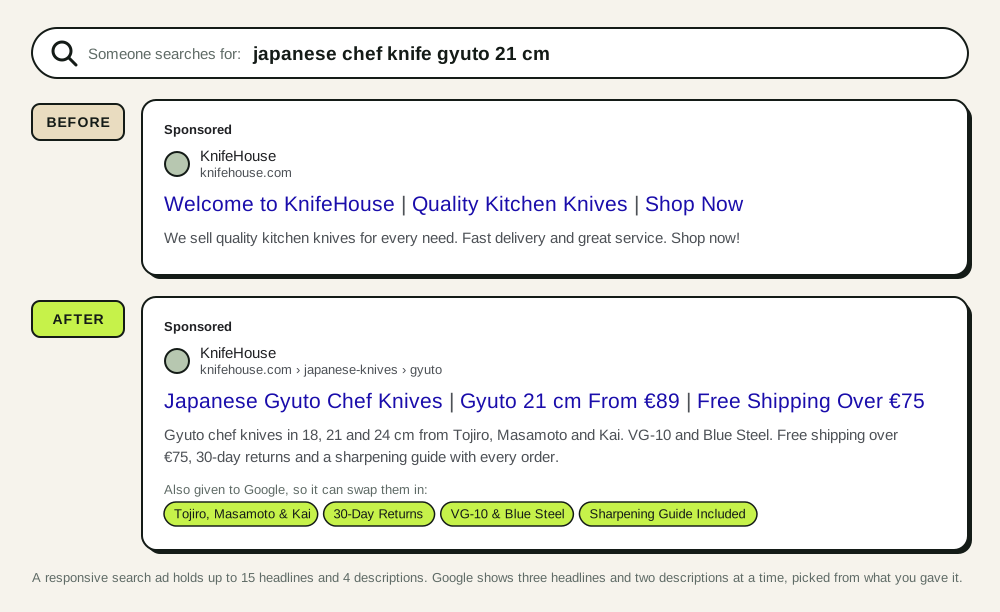
What changed: the ad now answers what the shopper could ask. Which knives, what size, what price, what shipping costs, what if it's wrong.
What Bavian did: it read the category page, which lists the brands and lengths, and the shipping and returns pages, and wrote the headlines from them. It didn't add a price or a brand that wasn't on the page.
2. The headline was cut off mid-word
A store selling strollers in Germany. Someone searches for a 3-in-1 stroller.
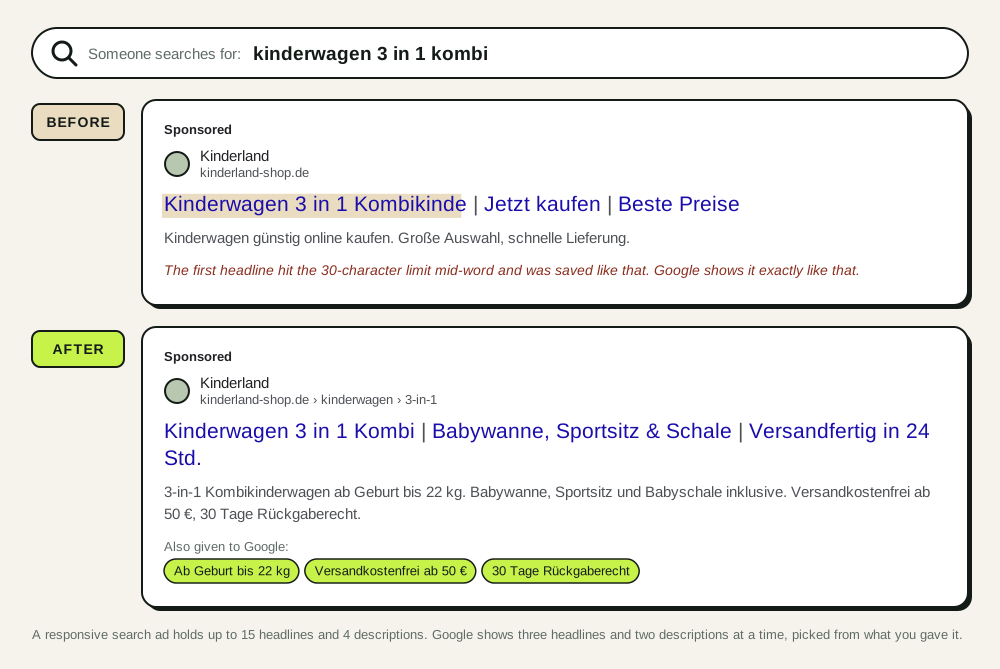
What changed: the broken headline is gone, and the freed slots say what the set includes and when it ships.
What Bavian did: truncated and misspelled headlines are among the first things its ad text scan finds in an account it takes over. It replaces them with complete ones from the product page.
3. The ad promises what the page can't back up
A store selling supplements. Someone searches for magnesium bisglycinate.
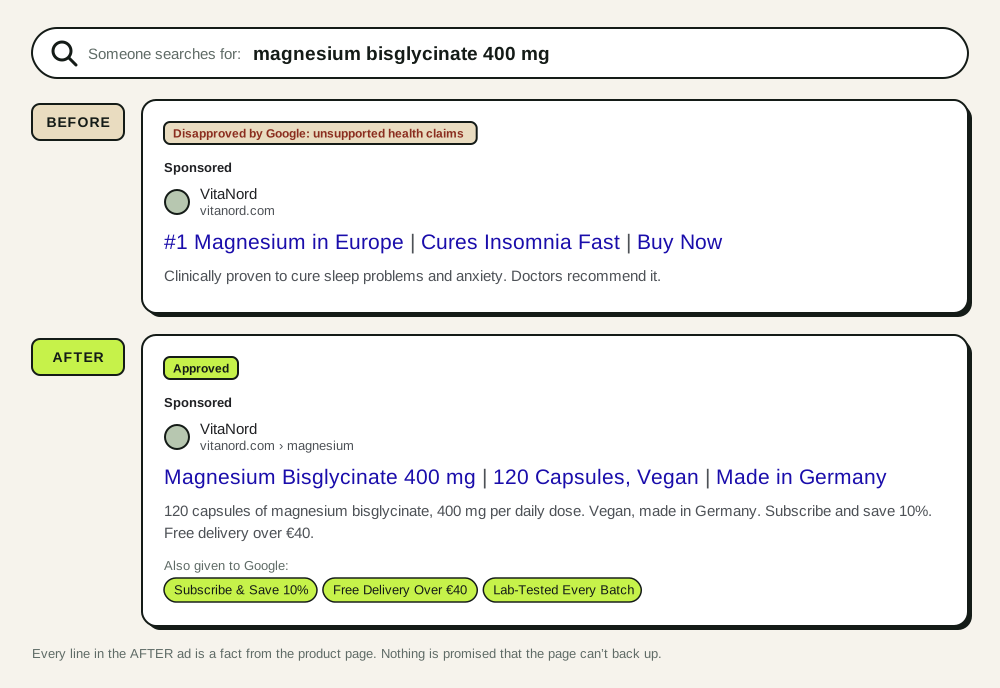
What changed: "#1", "clinically proven" and "cures" are gone. Besides misleading shoppers, they get the ad disapproved under Google's healthcare and misrepresentation rules, and a few disapprovals can put the whole account at risk. Every line in the AFTER ad is a fact from the product page.
What Bavian did: it only writes what your site and your business details say. For anything that must never appear, you add a rule in Memory, such as "never mention cures or medical effects", and Bavian follows it from then on. Will Bavian's ads make claims my website doesn't make? explains how.
4. The brand ad sells the wrong thing
A furniture store that has stopped selling office furniture to businesses and now focuses on home furniture. Someone searches for the store's name.
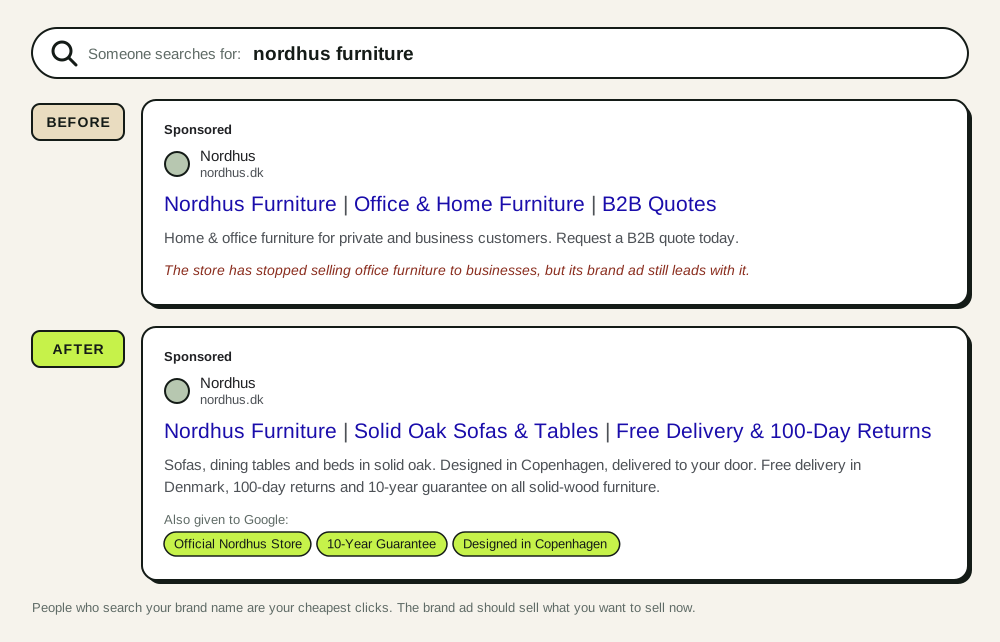
What changed: people who search your brand name are your cheapest clicks. The ad now sends them to what the store sells now, not what it used to sell.
What Bavian did: the owner told Bavian in the chat to focus on home furniture. Bavian rewrote the brand ad around that, kept the campaign and budget unchanged, and made no claims the site didn't make.
5. The ad has no sitelinks, callouts or snippets
A store selling bicycle parts. Someone searches for Shimano brake pads.
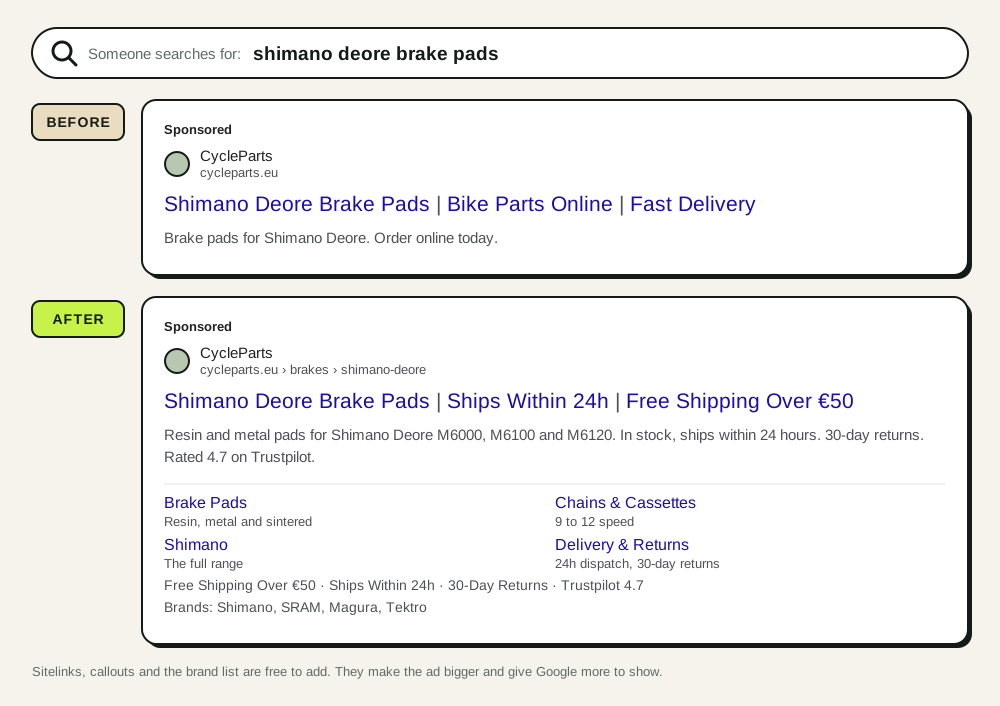
What changed: nothing in the BEFORE ad is wrong, but it's half the size of the ads around it. Sitelinks, callouts and the brand list are free to add, make the ad bigger and give Google more to show.
What Bavian did: it adds missing sitelinks, callouts and structured snippets to Search campaigns from the pages and facts on your site. The Trustpilot score only goes in because the site shows it.
6. The description just repeats the product name
A store selling running shoes. Someone searches for a specific model.
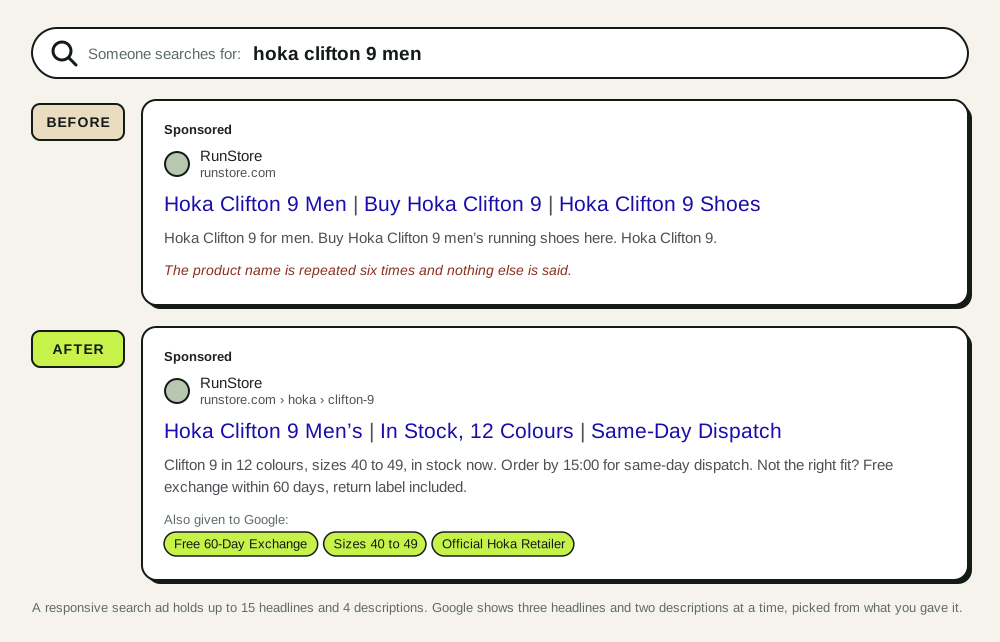
What changed: the product name stays in the headlines, where it matters. The description now says what the headlines can't fit: stock, colours, dispatch and exchange. Repeating the keyword six times buys nothing. Google already bolds the search term.
What Bavian did: it keeps the product name in the headlines and uses the descriptions for the delivery and returns facts from the site.
Performance Max and Shopping
Shopping ads don't have written copy. What the shopper sees is your product title, price, image and shop name from Merchant Center. In Performance Max, Google adds the text assets you give the campaign. So "copy" for Shopping means three things: the title, the attributes and the Performance Max assets.
7. Performance Max text that could belong to any shop
A garden store. The Performance Max asset group for outdoor lounge furniture.
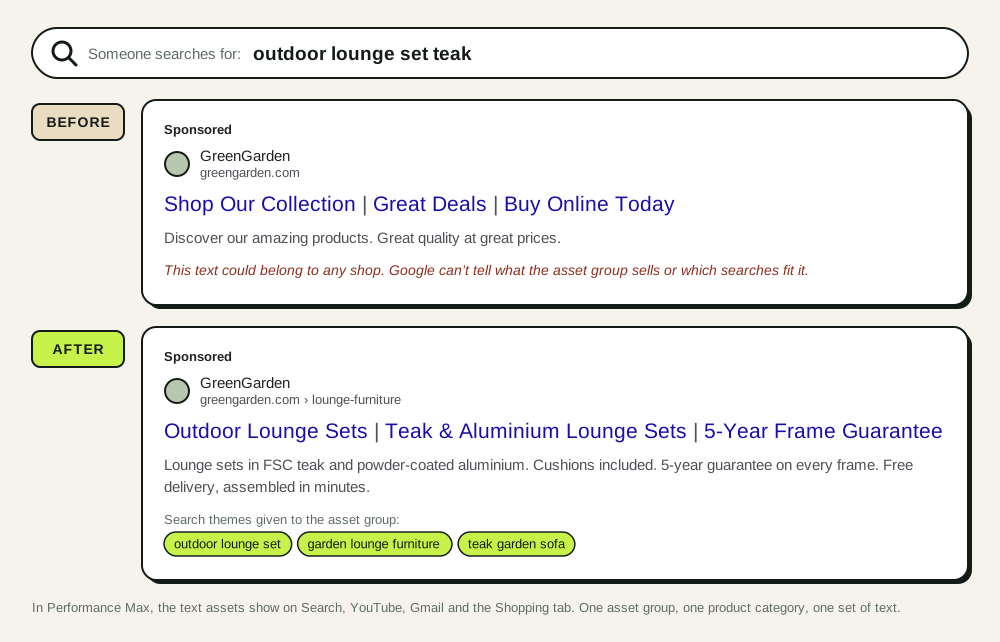
What changed: Performance Max shows these assets on Search, YouTube, Gmail and the Shopping tab. Text that fits any shop tells Google nothing about which searches and audiences this group is for. The AFTER assets name the products, the materials and the guarantee, and the search themes match.
What Bavian did: it wrote the assets for this asset group from the lounge furniture category page, and keeps each group's text to that group's products, so a sale on garden tools doesn't leak into the lounge furniture ads.
8. The product never entered the auction
A clothing store. A women's merino base layer, as the feed came from the shop.
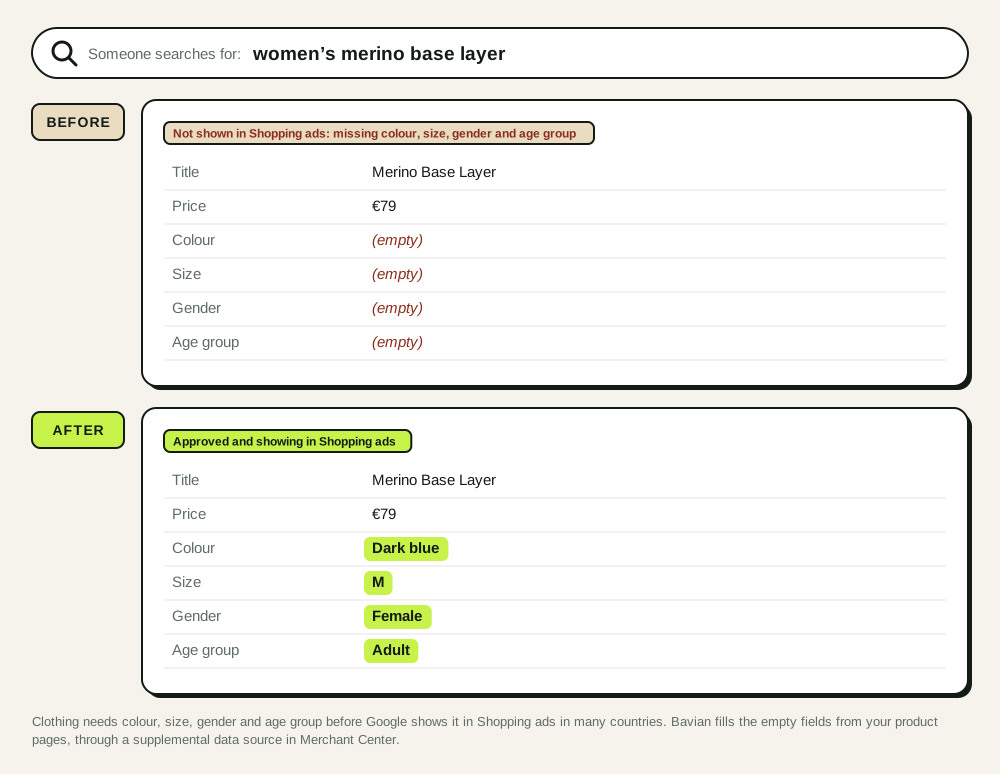
What changed: no copy was wrong, because the product never showed. In many countries, clothing needs colour, size, gender and age group before Google shows it in Shopping ads. The shop had those details on the product page, but not in the fields Google reads.
What Bavian did: it fills in the attributes Google asks for that your feed leaves empty, through a supplemental data source in Merchant Center, matched by product ID. Across the stores Bavian manages, colour, age group, gender and size are the four gaps it fills most. It doesn't change your titles or prices. Supplemental data sources in Merchant Center explains the mechanism.
9. The product title was written for your own site
Same clothing store. Someone searches for a women's long-sleeve merino base layer, and three shops' products show side by side.
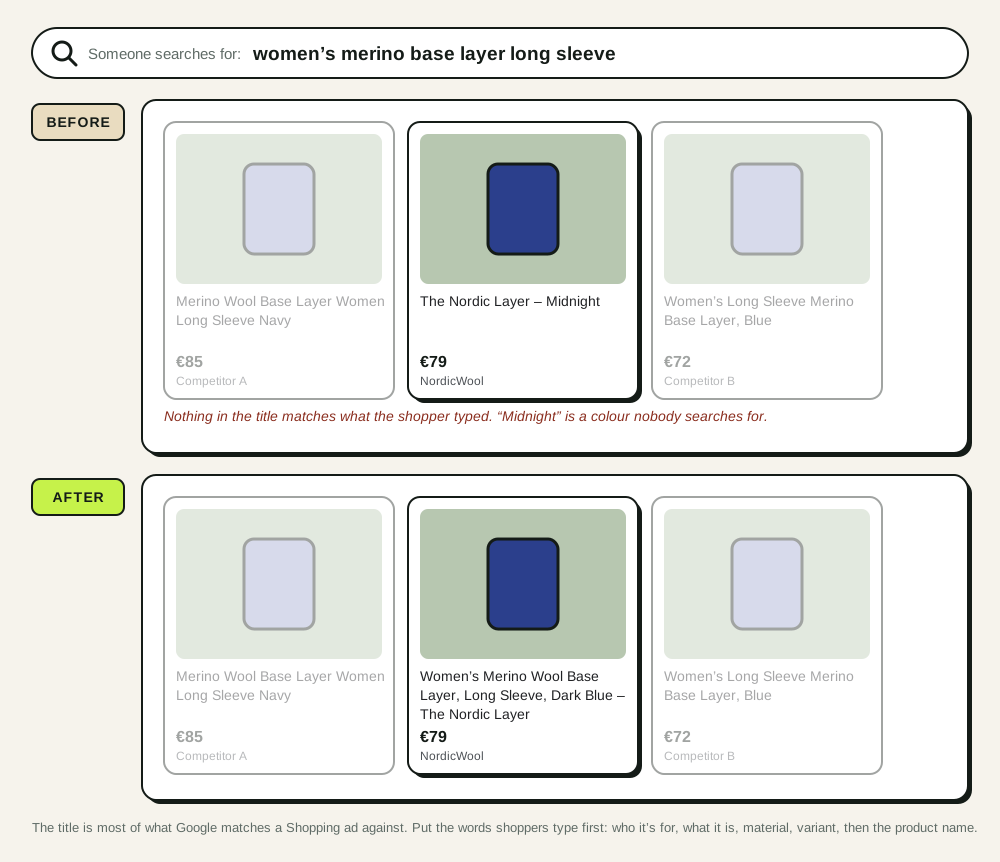
What changed: on your site, "The Nordic Layer – Midnight" sits under a photo and a category heading, so it makes sense. In Shopping, the title is most of what Google matches searches against, and it shows next to twenty competitors. "Midnight" isn't a colour anyone types. The AFTER title puts the words shoppers type first: who it's for, what it is, material, variant, then the product name.
What this takes: the title comes from your feed, and Bavian doesn't rewrite titles. This one is yours to fix, in the shop or in a feed rule. Start with your ten best-selling products.
10. The product description gives Google nothing to match
A home store. A cast-iron casserole. Someone searches for a 24 cm enamelled casserole for induction.
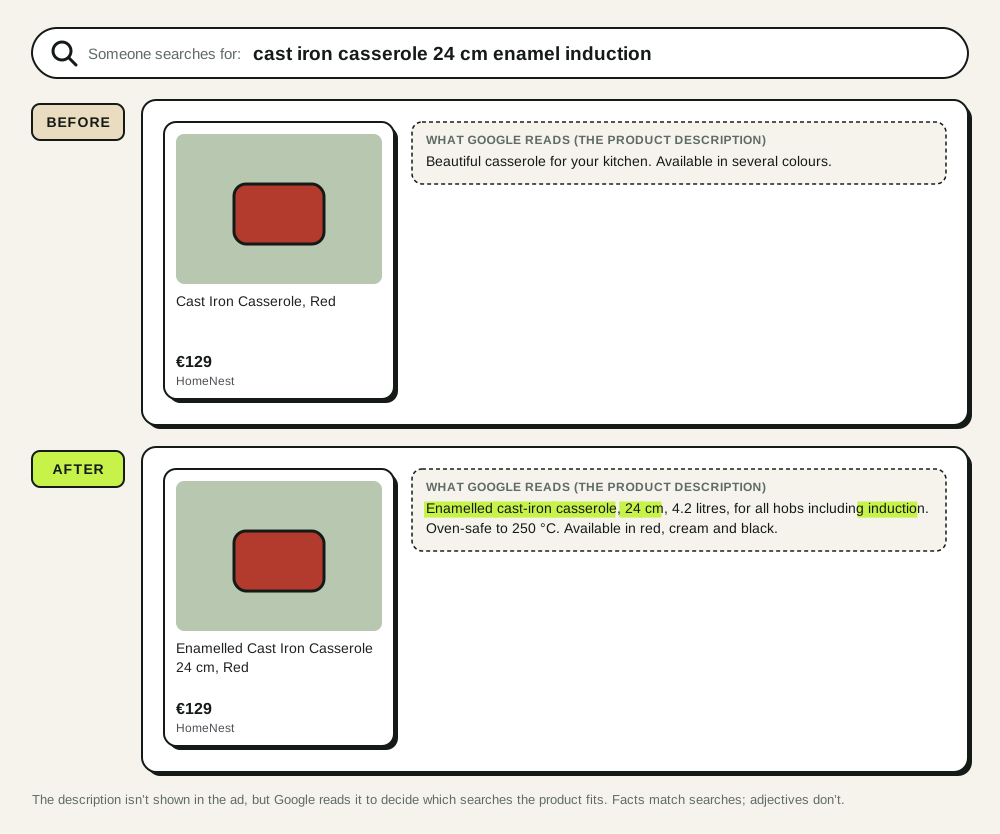
What changed: the description isn't shown in the ad, but Google reads it to decide which searches the product fits. "Beautiful" and "several colours" match nothing. Size, capacity, material and hob compatibility match exactly what the shopper typed.
What this takes: like the title, the description comes from your feed, and the fix is in the shop. Write what the product is in the words a shopper uses, and the facts that decide the purchase.
How Bavian writes ad copy
The ten examples share one principle: the ad should say what the shopper searched for and what your page actually says. Here's how Bavian applies it on an account.
It reads before it writes. Bavian's copy comes from your website, your product feed and the business details and rules you've given it in Memory. A headline only goes in if the page or the catalogue backs it up. That's why its ads don't promise "#1" or "clinically proven", and why a price or a brand in a Bavian ad is one that's on your site.
It starts with what's broken. When Bavian takes over an account, its ad text scan finds the truncated, misspelled, disapproved and generic ads first, and rewrites them. New Search campaigns get full responsive search ads with sitelinks, callouts and structured snippets from the start.
It fits the copy to the ad group. One ad per product group, written for that group's searches, not one ad for the whole shop. In Performance Max, one set of text and search themes per asset group.
In Shopping, it fills the gaps in your feed that keep products out of the auction, and groups products with custom labels so the ones that sell get the budget. Titles and prices stay yours.
It tests and improves. Every ad is measured against the others in its ad group as clicks and sales come in. Weak ones are rewritten. Ads you wrote or edited yourself are left as they are, unless they break a rule or cost you money.
You stay in control. You can read every Search ad under Ad variants, ask for a change in the chat on the Agent page, add rules about what the ads must or must never say, and, in Approval mode, approve every new ad before it goes live.
What we'd do with your own ads today
- Look for headlines that end mid-word, and fix them.
- Read each ad as the shopper who searched for it. If the first headline doesn't name the product, rewrite it.
- Replace every claim you can't point to on your site with a fact you can.
- Add sitelinks, callouts and a structured snippet to every Search campaign.
- In Merchant Center, open the products with limited visibility and fill in the missing attributes.
- Rewrite your ten best-selling products' titles in the order shoppers search: who, what, material, variant, name.
Or connect Bavian, and let it do the first five.