
How do I track enquiries from my contact form as conversions?
Updated 6 November 2026
Once Autopilot is on, you create it on the Conversions page in Bavian, and Bavian gives you the code for your website. Bavian then counts each enquiry as a conversion.
Create the conversion
- In Bavian, open Conversions in the menu.
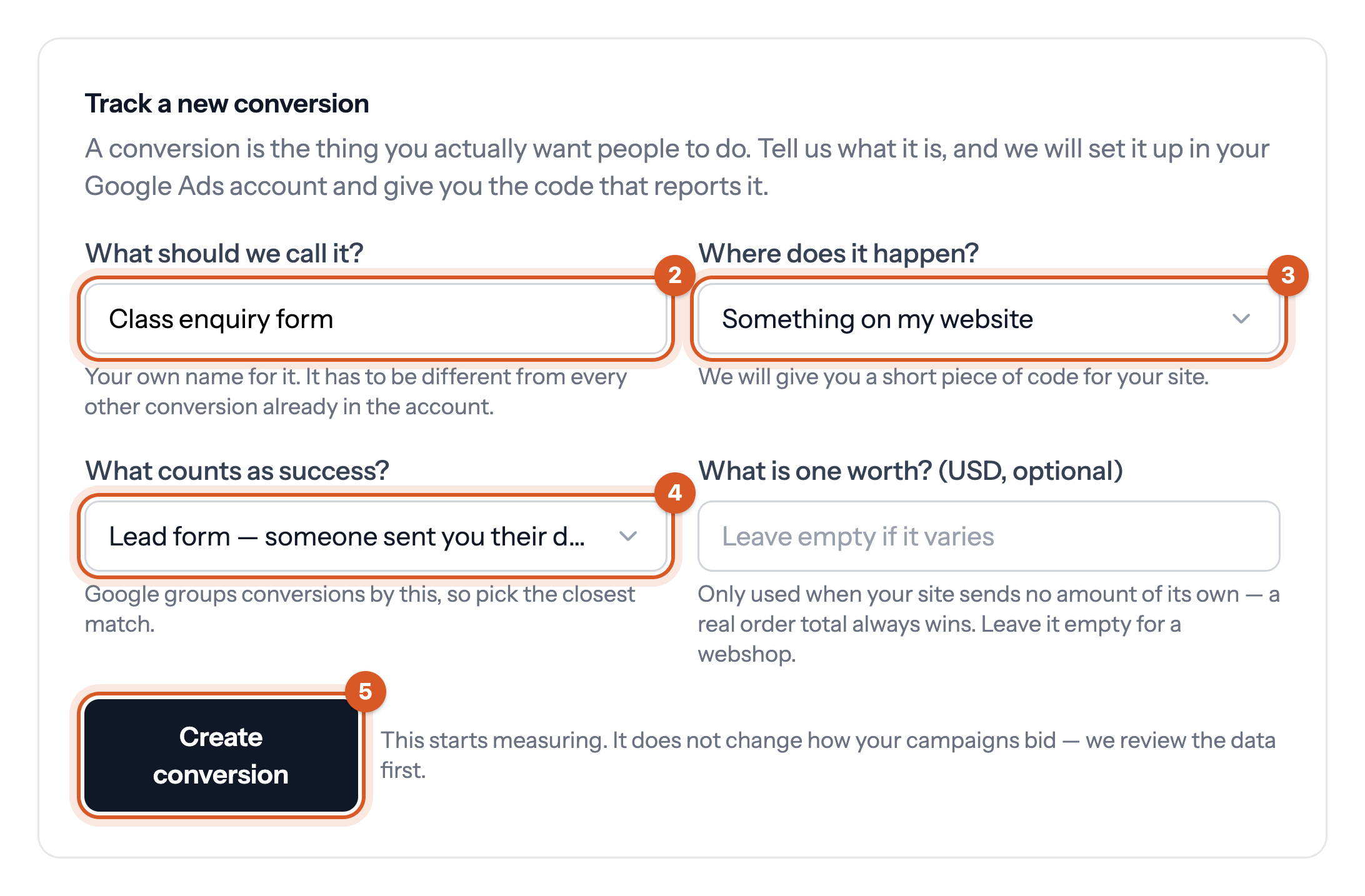
- Under Track a new conversion, give it a name under What should we call it?
- Under Where does it happen?, choose Something on my website.
- Under What counts as success?, choose Lead form — someone sent you their details.
- Click Create conversion.
Bavian then shows two pieces of code: the Google tag, which goes on every page, and the conversion code, which goes on the thank-you page a visitor only sees after sending the form. Share them with whoever maintains your website, or add them yourself as below.
Where to put the code
First, find your thank-you page: send your own form once and copy the address of the page you land on, for example yoursite.com/thank-you. That page is where an enquiry counts.
With Google Tag Manager
- In Tag Manager, open your container and click Tags, then New.
- Choose Custom HTML, paste the Google tag from Bavian, and choose the trigger All Pages. Save it. Skip this tag if your site already has a Google tag with the same ID.
- Click New again, choose Custom HTML, and paste the conversion code from Bavian.
- Under Triggering, create a Page View trigger that fires when Page URL contains the end of your thank-you page's address, for example /thank-you. Save it.
- Click Submit, then Publish.
Without Tag Manager
- Paste the Google tag in your website's header code, the field most website builders call something like header scripts or custom code, so it's on every page.
- Paste the conversion code on the thank-you page only.
If your form has no thank-you page, and only shows a message on the same page, the code can't tell when an enquiry was sent. Ask whoever builds your website to add a thank-you page, or to fire the conversion code when the form is sent.
Check that it works
Send your own form once. Google's Tag Assistant shows whether the conversion code fired. In Google Ads, the conversion can take a few hours to show as recording.
Good to know
- Unsure about a step? Ask Bavian in the chat on the Agent page, for example "How do I track my contact form as a conversion?"
- Creating the conversion starts measuring. It doesn't change how your campaigns bid.
- If you use Tag Manager, Bavian can repair the tags that track conversions. See Can I connect Google Analytics and Tag Manager to Bavian?
- Bookings or enquiries that end in a booking system or CRM can count too. See Can Bavian use conversions from my CRM or booking system?