
Which conversions does Bavian optimise for?
Updated 20 October 2026
Bavian mainly works with the conversion actions that are set as primary in your Google Ads account. Those are the ones Google's bidding steers by. A secondary action is still recorded, but it usually doesn't steer bidding.
When Bavian judges a campaign, it also looks at what the conversions are. Sales, leads, bookings and sign-ups count as real results. Page views and basket or checkout steps don't, even when Google counts them as conversions.
Choose which conversion counts
- In Google Ads, set the action you trust, such as your purchase, as primary, and set the others to secondary. See Google's About primary and secondary conversion actions.
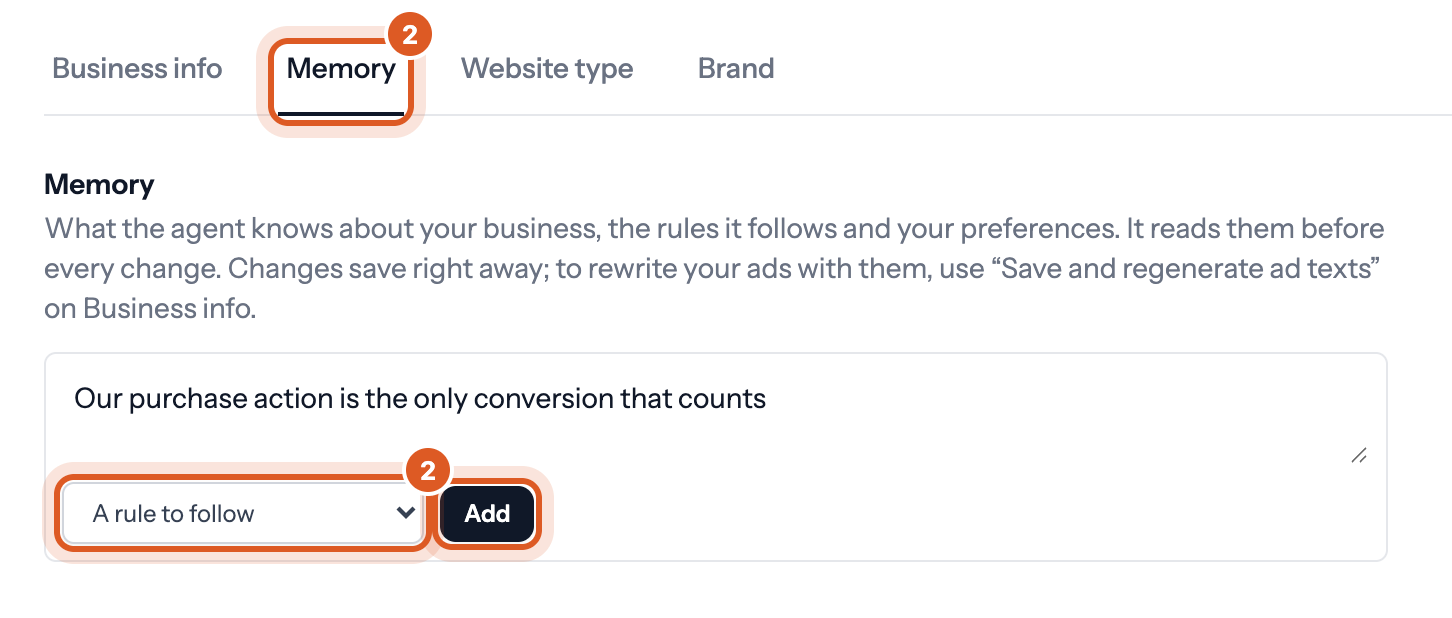
- In Bavian, open Context in the menu, then the Memory tab, and add it as A rule to follow, for example "Our purchase action is the only conversion that counts".
Good to know
- Bavian can change which actions are primary or secondary itself, for example when one sale is counted twice. See How do I fix conversion tracking issues detected by Bavian?
- If Bavian can't trust your tracking, it holds back bidding changes that depend on it. See Does Bavian check my conversion tracking before it changes bids?
Other articles
- What happens to my campaigns if I disconnect Bavian?
- What happens if my payment fails?
- Does Bavian use conversion value or only the number of conversions?
- Does Bavian add new keywords, and which match types does it use?
- I raised my total daily budget. Why aren't my campaigns spending it?