
Ask Advisor is Google's new AI agent inside Google Ads: you ask, it answers, suggests and makes changes with your approval. An AI ad manager such as Bavian works the other way round: it runs the account every day inside limits you set, without waiting to be asked. Which one fits depends on how much of the work you want to keep.
In October, many advertisers found an email from Google in their inbox: "Meet Ask Advisor, your new AI agent in Google Ads." Click a button, start chatting, and an agent built on Gemini helps you create campaigns and track how they do.
If you already use an AI to run your Google Ads, or are thinking about it, the obvious question follows. Google now has its own agent, inside the account, for free. Why use anything else?
We build one of those alternatives at Bavian: an AI that runs Google Ads accounts on Autopilot. So we're not neutral, and I won't pretend to be. But the honest answer is that they do different jobs. Ask Advisor is an assistant you ask. An AI ad manager is something you hand the account to. Here's what Ask Advisor does, where it's genuinely strong, and how to tell which kind of help you need.
The short version
- Ask Advisor is a chat inside Google Ads. It answers questions about your account, explains changes in results, suggests keywords, ads and campaigns, and can make changes such as pausing a campaign or changing a budget, each one with your approval.
- It waits for you. The work starts when you ask, and every change needs a yes. That's a good fit if you run the account yourself and want a faster way to do it.
- An AI ad manager such as Bavian works without being asked. It checks the account every day and acts inside limits you set, such as a total daily budget, and tells you what it changed and why.
- Both depend on the same data. If your conversion tracking counts the wrong thing, neither of them can fix that by being clever.
- Ask Advisor is still in beta, launched for English-language accounts, and not available in manager accounts.
What Ask Advisor is
Google introduced Ask Advisor at Google Marketing Live on 20 May 2026. It brings the assistants Google had been building for each product, Ads Advisor and Analytics Advisor, together in one, with a Merchant Center agent to follow, as PPC Land reported. In Google's words, it "orchestrates a team of expert agents across Google products".
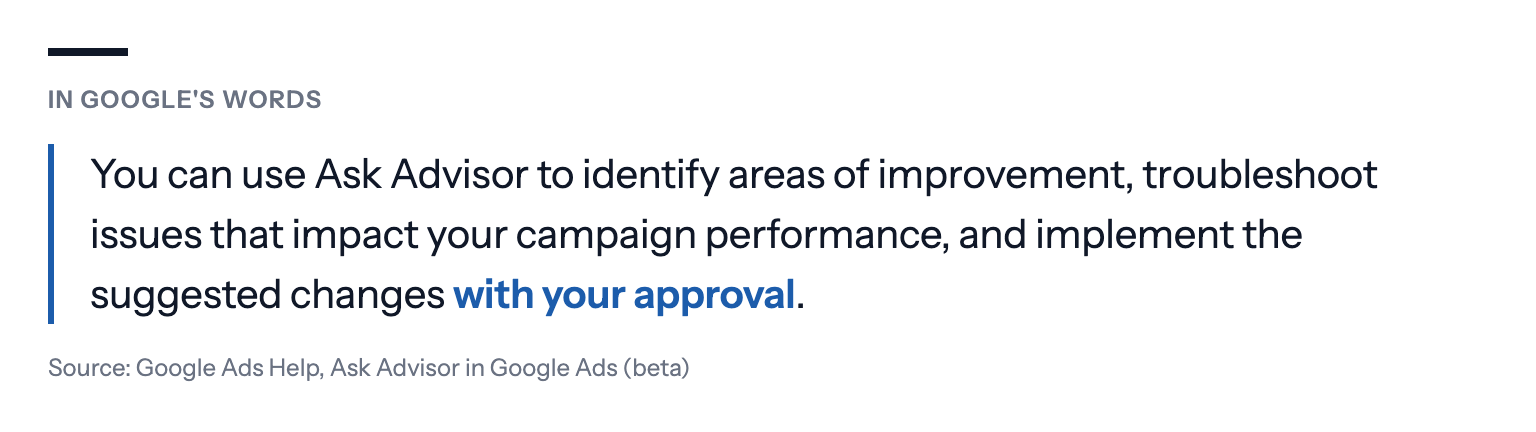
Google's help page calls it "an agentic conversational experience built within Gemini capabilities". In practice, it's a panel that opens on the right of your Google Ads account. You type a question, and it can:
- report on performance and explain why results changed;
- troubleshoot policy problems, billing and identity verification;
- suggest optimisations, new text and image assets, keywords and campaign ideas;
- change individual campaign settings, such as pausing a campaign, changing a budget or changing the locations it targets;
- build reports and charts.
Google's own example is a request like "find new customers for my hair care products": Ask Advisor pulls the product details from Merchant Center and sets up a new campaign in Google Ads.
Two details matter for how you'd use it. First, it makes changes "with your approval". Second, it has a memory of sorts: you can save business context, such as a preference for judging campaigns on ROAS, under "saved info", and go back to earlier conversations in the chat history.
What Ask Advisor does well
It's worth starting with the strengths, because they're real.
It sees what Google sees. Ask Advisor reads your Google Ads, Google Analytics and Merchant Center data in one place. Answering "why did sales from Shopping drop last week?" used to mean three tabs and an afternoon. Matthias Reynders of CSW, a German digital agency that offers Google Ads work among other services, calls this cross-platform memory what separates Ask Advisor from a smart search box.
It removes clicks. Pausing a campaign, raising a budget or finding a disapproved ad's policy problem are small jobs buried in menus. Asking for them in plain language is faster, especially for people who open Google Ads once a week.
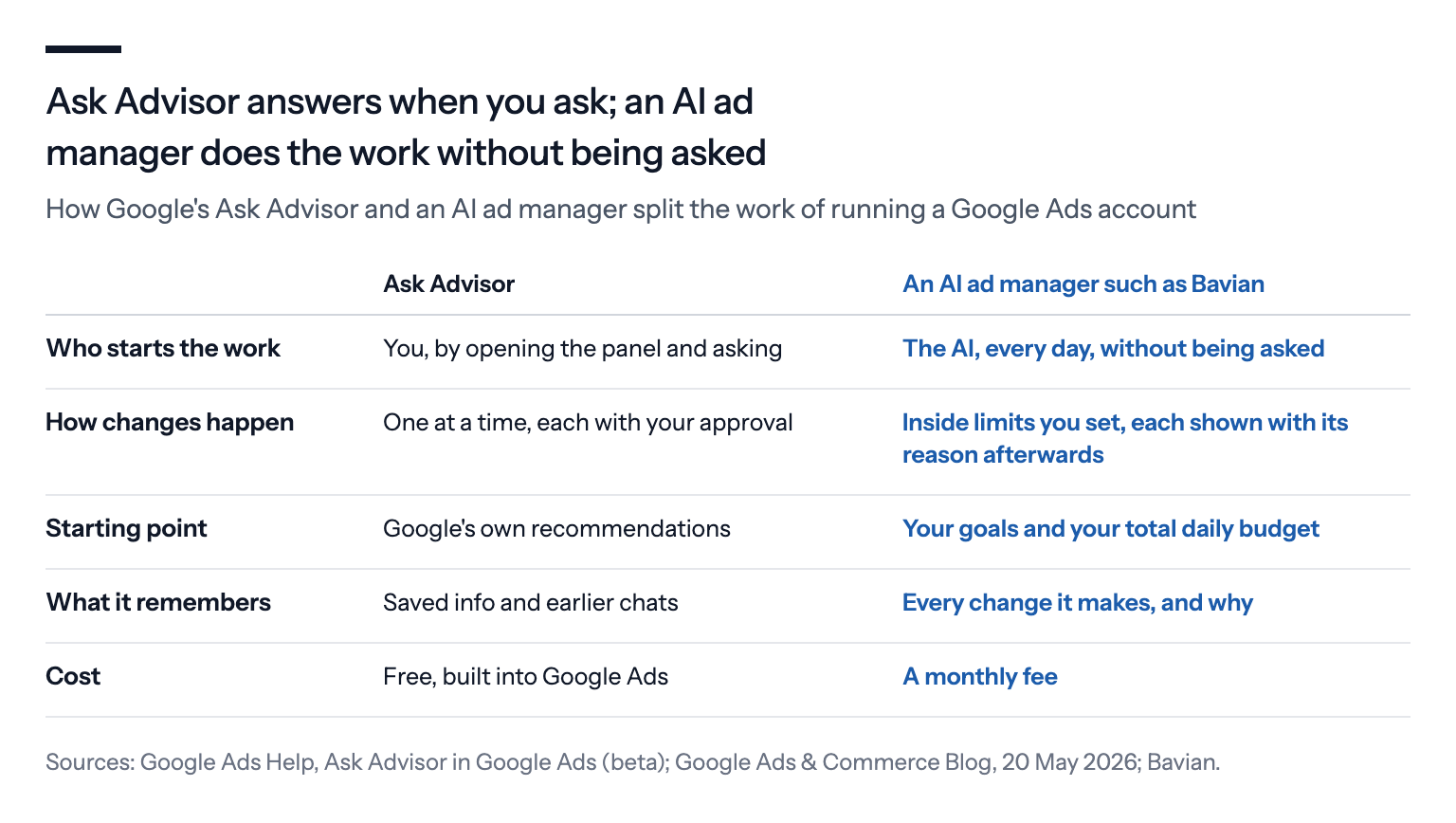
It's free and built in. There's nothing to connect, no access to grant and nothing to pay.
It asks before it acts. Nothing changes until you say yes, which is the right default for a tool that's still in beta.
Ask Advisor waits for you to ask; an AI ad manager doesn't
Ask Advisor starts when you do. You open the panel, you ask, it answers or suggests, you approve. That's the design, and it's in the name.
An AI ad manager, like the one we build at Bavian, turns that around. You give it the account and the limits once, and it does the routine work every day without being asked: reading which searches your money went to, checking that conversions are still being counted, moving budget between campaigns, writing and replacing ads. You read what it did, and step in when you disagree.
The difference shows up on the days nobody asks.
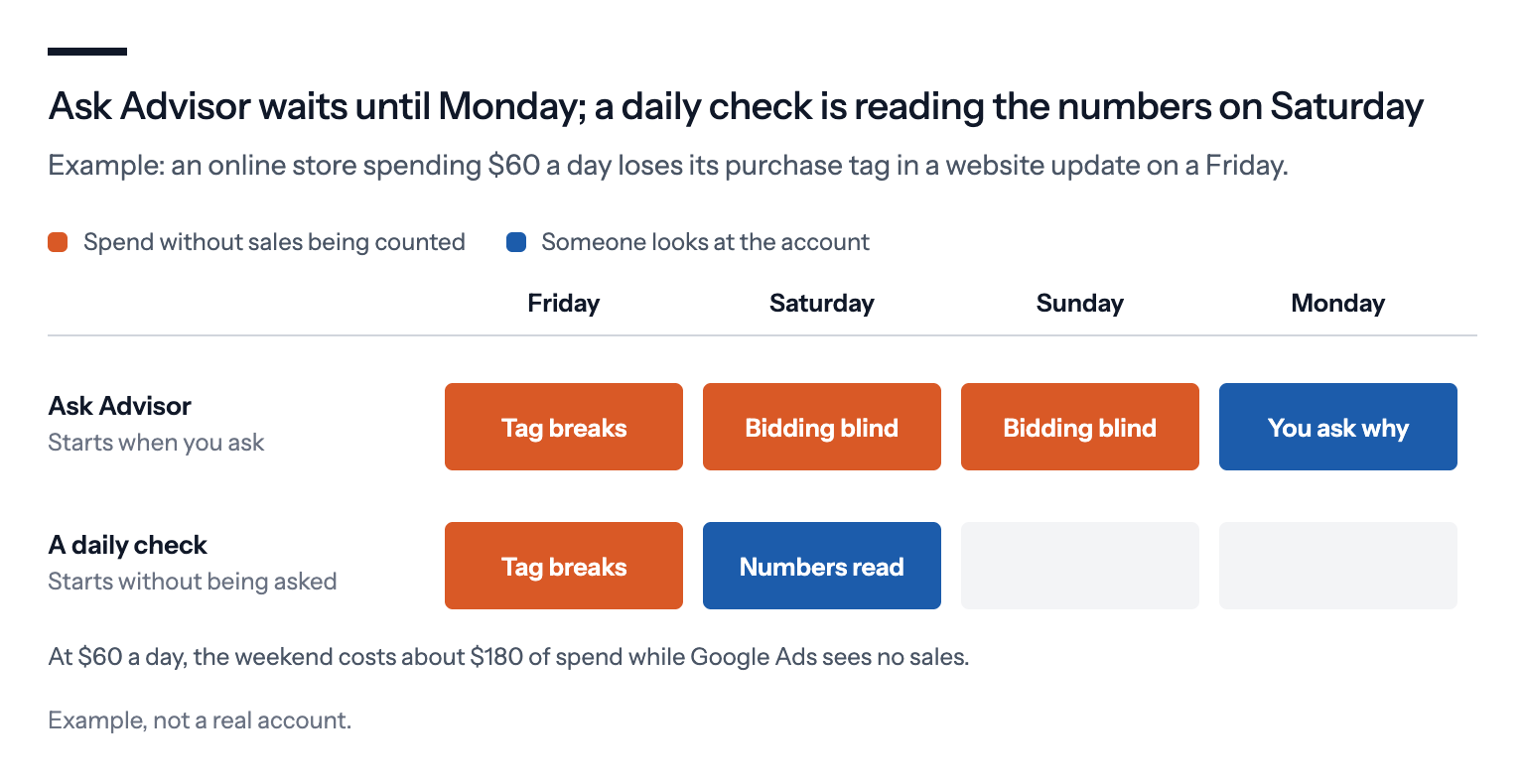
An example. An online store spends $60 a day. On a Friday, a website update removes the purchase tag from the checkout page. Over the weekend, Google Ads records no sales, and the campaigns that bid for conversions start bidding as if nothing sells. On Monday, the owner opens Google Ads, sees a drop and asks Ask Advisor why. It's a good question, and Ask Advisor may well find the answer. But the three days have already been spent. An AI that reads the account every day, as Bavian does with Autopilot on, is already looking at the weekend's numbers before anyone asks. Even so, a few quiet days can look like a slow weekend, so test the purchase tag with Google's Tag Assistant after every website update.
(The example is an illustration, not a real account.)
Ask Advisor starts from Google's recommendations
Ask Advisor is Google's agent, inside Google's product. That doesn't make its advice bad. It means its starting point is Google's own recommendations, and Google's recommendations tend to make your ads show in more places.
We've written about this in detail in Google's AI vs. an independent AI ad manager: of the 15 recommendation types Google's developer documentation lets software apply automatically, six widen where your ads show or loosen your target. None of them raises your budget, as Google points out, but more reach usually means more spend. Google also switches features on by default. This autumn alone, it moved Search campaigns that used two older settings into AI Max and started adding promotions from advertisers' websites to their ads, as we covered in What changed in Google Ads, September to mid-October 2026.
When an assistant from the same company suggests "new keywords and campaign ideas", it's fair to read each suggestion with that in mind. An AI ad manager you pay yourself starts from your goals and your total budget, and decides which of Google's defaults to accept. Bavian, for example, switches off Google's automatically applied recommendations wherever Google lets it, and checks every night that they're still off.
Ask Advisor remembers chats, not account decisions
Ask Advisor's memory is what you save and what you said in earlier chats. That's useful for preferences, such as which metric you care about.
Running an account needs a different kind of memory: what was changed, when, why, and whether it worked. If you paused a campaign in March because its leads were poor quality, the next person, or the next AI, needs to know that before it switches the campaign back on because the click price looks good. At Bavian, keeping that record is part of the job. A chat history only has it if someone typed it in.
Ask Advisor is a beta for English-language accounts
Ask Advisor is in beta. Google launched it for English-language accounts, with "new features rolling out in the coming months", and its help page says it isn't available in manager (MCC) accounts, the accounts agencies use to run their clients. Google's own help page adds a caution worth taking literally: "always verify critical billing status" in your account settings.
For a German or Danish advertiser whose account isn't set to English, it may not be there yet. According to CSW, Google plans the German rollout for the end of 2026, without a firm date.
Where Ask Advisor has the edge, and what no AI can fix
This isn't a contest one side wins on every count.
Ask Advisor has data nobody else has. It's Google's agent, built into Google's own products and connected across Ads, Analytics and Merchant Center. An outside AI, Bavian included, reads the account through the same API every other tool uses.
Some people should keep the work. If you know Google Ads, enjoy running it and have the time, an assistant that answers questions and makes the clicks for you may be all you need. Handing the account to anyone, human or AI, means accepting changes you didn't make yourself.
Neither can fix every data problem. Reynders puts it bluntly: Ask Advisor assumes your account data is cleanly structured, and the AI amplifies what's already there. The same is true of any AI ad manager, Bavian included: it can catch a setting such as a page view counted as a conversion, but it can't see a sale your website never reports. If page views count as conversions and nobody fixes it, any AI will chase page views. We found a conversion counting problem in 98 of 100 accounts we audited, in Bavian audited 100 Google Ads accounts.
It's early. Ask Advisor is a beta, and Google is adding to it every few months. Some of the differences between Ask Advisor and an AI ad manager, such as which accounts can use it, may narrow.
How to get the most out of Ask Advisor
Try Ask Advisor for questions. "Why did conversions drop last week?" or "Which search terms cost most without a sale?" are good uses, and it costs nothing.
Read every suggestion as Google's suggestion. Before you approve new keywords, a broader match type or a higher budget, ask what it does to your spend, not just your reach.
Decide who does the daily work. If it's you, Ask Advisor can make you faster. If you'd rather not find a broken purchase tag three days late, you need something that checks without being asked.
Fix the tracking first. Whichever AI you use, it learns from what you count. One primary conversion per real result, and nothing counted twice. See Primary vs. secondary conversions.
Keep a record of decisions. Whatever runs the account, write down why you paused, changed or kept something, so the next decision starts from it.
If you use Bavian
Bavian is an AI ad manager that runs the account for you: you give it a total daily budget once, and with Autopilot on it does the daily work in your own Google Ads account, from blocking wasted searches to checking conversion tracking every day. You can skip asking: every change shows up on the Agent page with the reason for it, and it never sets your budgets above the daily total you agreed to. You can still use Ask Advisor alongside it for questions, and most changes you make by hand in Google Ads, such as budgets, keywords you add and ads you write, count as your decisions, which Bavian doesn't reverse just because it disagrees.